








NerdQaxe++ review: 4.8 TH/s from four BM1370, and who should upgrade from a Bitaxe
7 September 2026 · 20 min read · Updated on 26 September 2026

At some point the first Bitaxe is set up, the pool is running, “Best Difficulty” keeps climbing, and the question changes: no longer whether home mining works, but how much hashrate fits on a desk without electricity, noise and effort getting out of hand. That is exactly where the NerdQaxe++ sits: four BM1370 on one board, 4.9 TH/s expected out of the box, about 76 W, NerdOS in the browser. In our support it often shows up as the second miner after a Bitaxe.
This article is not a spec sheet. It answers the questions buyers actually ask: how much faster is the NerdQaxe++ than a Bitaxe Gamma, and what does that cost in electricity? How does it compare with the Bitaxe GT and Bitaxe 702? How loud is it? When is the water-cooled Hydro worth it, when the Copper Pro, and from what point are a NerdQX or NerdOctaxe the better choice? All factory values come from the NerdOS 1.1.0.1 source code, and every measurement is given with its source.
What the NerdQaxe++ is and how it differs from a Bitaxe
A Bitaxe Gamma has a single BM1370, the chip from Bitmain’s Antminer S21 Pro. The NerdQaxe++ puts four of them on one board and feeds them through a considerably beefier voltage regulator. It was designed by shufps, who publishes schematic and layout in the qaxe repository. It is controlled by an ESP32-S3 on a plug-in LILYGO T-Display S3, which is also the 1.9-inch display.
The ESP32 does not run AxeOS but NerdOS, the firmware of the Nerd range, also by shufps, currently version 1.1.0.1 from 24 September 2026. It shares its roots with AxeOS and is operated in the browser the same way, but it has its own menu: Dashboard, Swarm, Settings, InfluxDB, Alerts, Security and System. Wi-Fi, pool, clock and fans are all set under Settings, in one of nine interface languages. No PC or Raspberry Pi is needed for operation or setup. How AxeOS and NerdOS differ in detail is shown in Bitaxe or Nerdaxe.
Its predecessor, the NerdQaxe+, used four BM1368 and reached about 2.5 TH/s at 55 W according to shufps, so about 22 J/TH. The move to the BM1370 almost doubled the hashrate and clearly lowered the power per terahash without changing the concept: an open board on a stand, a large fan above the heatsink, a second fan for the voltage regulator and a display with the operating values.
| Feature | NerdQaxe++ |
|---|---|
| Chips | 4 × Bitmain BM1370 |
| Factory setting (NerdOS) | 600 MHz, 1150 mV (revision 7: 1200 mV) |
| Expected hashrate | 4.90 TH/s (600 MHz × 2,040 cores × 4 chips) |
| Power | about 76 W according to the developer |
| Efficiency | about 15.8 J/TH |
| Cooling | heatsink with 92 mm PWM fan, second fan for the voltage regulator |
| Controller and display | ESP32-S3 on LILYGO T-Display S3 with 1.9 inches, 2.4 GHz Wi-Fi |
| Firmware | NerdOS 1.1.0.1, in the flasher also as OSM-OS v1.1.0-osm |
| Power supply | 12 V / 10 A (120 W), included |
| In the box | miner, DC power supply, 3D-printed stand, quick-start guide |
Two things stand out in everyday use. First, the miner sits there in the open. That is intentional on all Nerd devices, because the heat is supposed to escape freely, but it also means dust, pets and curious children can reach the board. Second, the power supply is included. If you replace it, the new one must deliver 12 V and at least 10 A; supplies that are too weak show up as restarts under load.
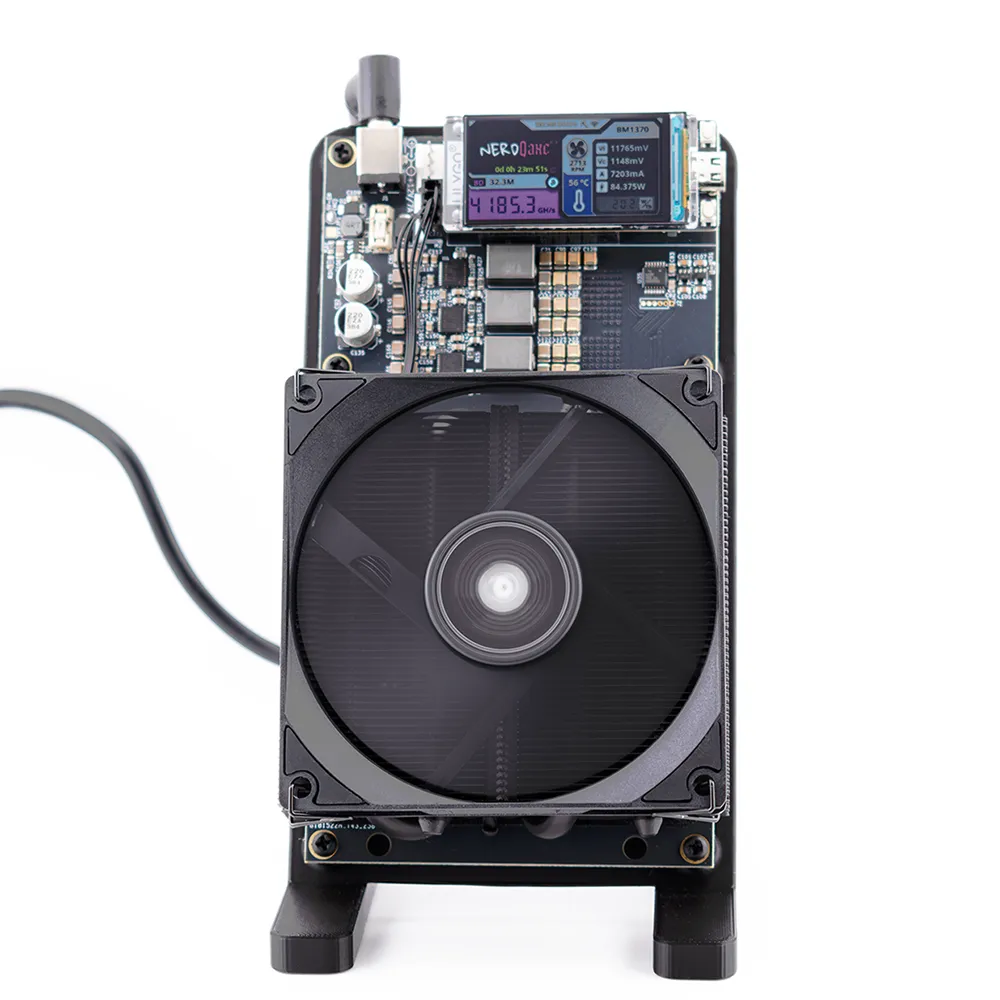
Hardware revisions
There are several board revisions of the NerdQaxe++. The public hardware repository by shufps lists revisions 5.1 to 5.1.2; he calls rev. 5.1 the version most NerdQaxe++ are based on. Later revisions are not published there but run the same firmware: our Hydro carries revision 6.1, and since version 1.1.0 NerdOS automatically recognises a revision 7 by its different voltage regulator (TPS546). On it the firmware sets 1200 instead of 1150 mV out of the box, allows up to 1000 instead of 800 MHz and runs the fans on automatic control at 65 °C from the start. Which revision you have is printed on the board; in NerdOS you can spot rev. 7 by the core voltage marked “(default)” in the Mining Settings.
Hashrate and efficiency: what to expect out of the box
Like AxeOS, NerdOS calculates the expected hashrate from clock, cores and number of chips: 600 MHz × 2,040 × 4 gives 4,896 GH/s, or 4.9 TH/s. The measured hashrate on the dashboard fluctuates around this value. The developer specifies about 4.8 TH/s at about 76 W for the device, which is about 15.8 J/TH.
One detail helps when you read the watts: on NerdQaxe++ boards up to revision 6, NerdOS shows the input power the voltage regulator measures itself, not an estimate like AxeOS on the Gamma. At the wall, however, the losses of the power supply come on top. Two users compared both: 88.4 W in NerdOS against 94 W at the wall (issue 297) and 113.2 against 132.2 W (issue 345), both devices overclocked. So expect a few to a good 15 percent more at the socket.
| Miner | Chips | Expected out of the box | Power | Efficiency | Cooling |
|---|---|---|---|---|---|
| Bitaxe Gamma | 1 × BM1370 | 1.07 TH/s | about 17 W (our measurement) | 14 to 16 J/TH | 40 mm fan |
| Nerdaxe Gaia | 1 × BM1373 | 2.40 TH/s | 26 to 30 W (manufacturer) | 11 to 12.5 J/TH | 40 mm fan |
| Bitaxe GT | 2 × BM1370 | 2.14 TH/s | about 43 W (retailer figure) | about 20 J/TH | air cooling |
| Bitaxe 702 | 6 × BM1368 | 3.75 TH/s | 75 to 90 W | 20 to 24 J/TH | air cooling |
| NerdQaxe++ | 4 × BM1370 | 4.90 TH/s | about 76 W (developer) | about 15.8 J/TH | 92 mm fan plus regulator fan |
| NerdQaxe Copper Pro | 4 × BM1370 | 4.90 TH/s | as NerdQaxe++ | as NerdQaxe++ | solid copper heatsink, 60 and 92 mm fans |
| NerdQaxe++ Hydro | 4 × BM1370 | 4.90 TH/s | as NerdQaxe++; about 100 W at 6 TH/s | about 16 to 17 J/TH at 6 TH/s | water loop |
| NerdQX | 4 × BM1370 | 6.34 TH/s | up to 160 W at 8 TH/s (manufacturer) | about 19 to 20 J/TH at 8 TH/s | air cooling |
| NerdOctaxe | 8 × BM1370 | 11.42 TH/s | 160 to 200 W (manufacturer) | 14 to 17.5 J/TH | air cooling |
The table shows the pattern: per terahash the NerdQaxe++ needs almost the same power as a Gamma, since both use the same chip. Only the BM1373 in the Nerdaxe Gaia is clearly more efficient; the GT and the 702 are clearly weaker. With the NerdQaxe++ you are therefore not buying better efficiency, but a good four times the hashrate in one device, with one power supply and one line in the pool dashboard. The mining calculator works it out with your tariff.
NerdQaxe++ versus Bitaxe 702 and Bitaxe GT
If you are coming from a Bitaxe and want to stay with AxeOS, there are two alternatives: the Bitaxe GT with two BM1370 and the Bitaxe 702 with six BM1368. Both run on 12 V, like the NerdQaxe++.
| Bitaxe GT | Bitaxe 702 | NerdQaxe++ | |
|---|---|---|---|
| Chips | 2 × BM1370 | 6 × BM1368 | 4 × BM1370 |
| Factory setting | 525 MHz / 1150 mV | 490 MHz / 1166 mV | 600 MHz / 1150 mV |
| Expected | 2.14 TH/s | 3.75 TH/s | 4.90 TH/s |
| Power | about 43 W | 75 to 90 W | about 76 W |
| Efficiency | about 20 J/TH | 20 to 24 J/TH | about 15.8 J/TH |
| Firmware | AxeOS 2.15.3 | AxeOS 2.15.3 | NerdOS 1.1.0.1 |
| Display | 0.91-inch OLED | 0.91-inch OLED | 1.9-inch colour display |
| Power supply | 12 V / 5 A (60 W) | 12 V / 10 A (120 W) | 12 V / 10 A (120 W) |
| Block odds per year | 1 in 8,400 | 1 in 4,800 | 1 in 3,700 |
Against the 702 the NerdQaxe++ wins clearly: about 30 % more hashrate at the same or lower power, because the BM1370 is one chip generation newer than the BM1368. The only argument for the 702 is AxeOS, if you want to manage all devices with the same interface. The GT is the middle ground: just under half the hashrate at a little over half the power, plus a smaller 60 W power supply. If you want 2 TH/s with AxeOS, take the GT; if you want more than 4 TH/s, the NerdQaxe++.
The real question: how much more chance of a block?
Hardly anyone buys a NerdQaxe++ to collect cents in a shared pool. It is a solo miner, and hashrate is the number of lottery tickets. At the difficulty of 26 September 2026 (132.76 T) a Bitaxe Gamma at 1.07 TH/s has odds of about 1 in 16,900 per year. The NerdQaxe++ at 4.9 TH/s comes to about 1 in 3,700 per year, an overclocked Hydro at 6 TH/s to about 1 in 3,000, a NerdQX out of the box to about 1 in 2,850 and a NerdOctaxe to about 1 in 1,600. The maths behind it is in finding a block with a Bitaxe.
That it can work is documented: according to community reports, a single NerdQaxe++ with about 4.8 TH/s found block 944,078 through a solo pool on 7 April 2026 and received the full reward. Be careful with one often-quoted case: block 913,272 from September 2025 was also found by a NerdQaxe++, but in the shared pool OCEAN; the reward went to many participants, not to the finder alone.
Honestly calculated, this is not an income model. On average 4.9 TH/s correspond to about 233 satoshis a day, a little over 60 euros a year, against about 200 euros of electricity a year (0.30 euros per kWh). If the miner finds a block, about 3.14 BTC currently go to your address, with no fee and no account on our solo pool pool.bitaxe.de.
Noise and heat
A NerdQaxe++ is audible. About 76 W of waste heat has to go somewhere, handled by a 92 mm fan above the heatsink and a second fan at the voltage regulator. We have no noise measurement of our own. In an office or utility room the sound hardly bothers anyone; on a bedside table it does. The fan settings make the biggest difference.
With the original firmware both fans run at a fixed 100 % out of the box. That cools safely but is louder than necessary. Under Settings, in the “Fan Controller” card, select “Auto Fan Control (PID)” with a 60 °C target temperature; the voltage regulator fan stays on “Linked” and follows the chip fan. OSM-OS already regulates to 60 °C from the factory; on revision 7 both firmwares run automatic control at 65 °C from the start. The other levers are placement, free-standing and not in a closed cabinet where the heat builds up, and the variant: on the Hydro the noise comes from the radiator, and the open Performance Case guides the air along the heatsink of the standard model more deliberately. More in making a Bitaxe quieter; the principles apply just the same.
If it still gets too hot, the “Shutdown Temperature” steps in, 70 °C by default for the chips and likewise for the voltage regulator. NerdOS then cuts the core voltage, sets the fans to 100 % and shows “MINER OVERHEATED” or “VREG OVERHEATED”. The miner does not start again by itself; it needs a restart. In continuous operation the chips should stay well below that, and 65 °C is a good guide value. About 76 W is roughly a bright incandescent bulb: in winter a small contribution to room heating, in summer a reason to leave the miner some space all around.
NerdQaxe++, Copper Pro or Hydro?
All three have the same four BM1370, the same board and the same firmware; that is why the flasher lists Copper Pro and Hydro as “same board as NerdQaxe++”. Out of the box they compute the same, at 600 MHz and 4.9 TH/s. The difference is the cooling, and headroom for overclocking and noise depend on it.
| NerdQaxe++ | Copper Pro | Hydro | |
|---|---|---|---|
| Cooling | heatsink with 92 mm fan | solid copper heatsink with 60 and 92 mm fans | water block with radiator |
| Out of the box | 600 MHz, 4.9 TH/s | 600 MHz, 4.9 TH/s | 600 MHz, 4.9 TH/s |
| Overclocked | moderate; measured 5.2 to 5.5 TH/s at 82 to 88 W | more headroom for continuous operation at the top end | about 6 TH/s at roughly 100 W |
| Noise | audible right at the board | two fans on the copper heatsink | at the radiator, away from the board |
| Suits | first step into the four-chip class, office, homelab | continuous operation at a higher clock | living spaces and the most hashrate from four chips |
The Hydro removes heat through a closed water loop. Our model uses the board in revision 6.1, for which NerdOS allows at most 800 MHz and 1400 mV. About 6 TH/s corresponds to roughly 735 MHz. Community measurements show 5.74 TH/s at about 94 W with 700 MHz and 1190 mV and, with water cooling, 6.4 TH/s at about 110 W with 800 MHz. Buyers describe the Hydro as slightly more demanding to tune than the air-cooled model; check hoses and fittings for leaks regularly.
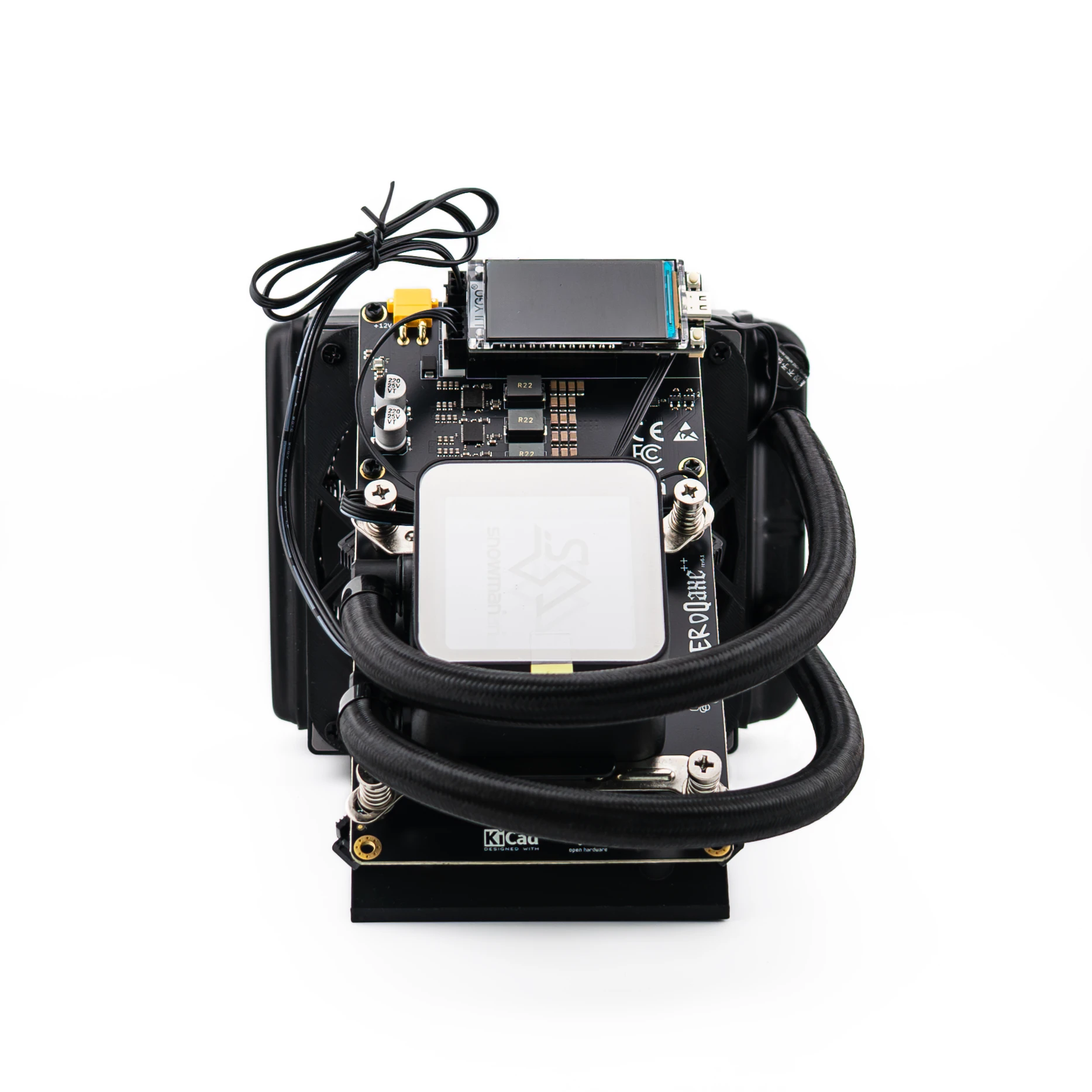
The Copper Pro cools through a solid copper heatsink with two PWM fans (60 and 92 mm). Its argument is not peak performance out of the box but headroom: if you raise clock and voltage and want to run the miner at the upper end permanently, the copper mass pays off. At factory settings the everyday difference to the standard model is small.
NerdQaxe++ versus NerdQX and NerdOctaxe
Above the NerdQaxe++ things get bigger quickly. The NerdQX by Ix Tech also has four BM1370, but runs them at 777 MHz out of the box and so reaches 6.34 TH/s; an eco profile at 495 MHz gives 4.04 TH/s. The manufacturer quotes up to 8 TH/s at 150 to 160 W, which would need about 980 MHz. The NerdOctaxe doubles to eight BM1370: from revision 3.0 with a six-phase voltage regulator and 700 MHz out of the box, that is 11.4 TH/s at 160 to 200 W according to the manufacturer. The water-cooled NerdOctaxe Hydro reached 11.3 TH/s at 155 W in one test and 13.9 TH/s at 230 W overclocked.
The rule of thumb from our consultations: up to about 100 W a miner is a desk device that runs on any socket and whose heat disappears into the room. From 150 W you should think about location, ventilation and the circuit, less for safety than for comfort. The NerdQaxe++ is the largest device that clearly belongs to the first category. If you want to maximise the number of tickets and have room in the basement, go for the NerdOctaxe. All models side by side are in the miner comparison, and the differences between the Bitaxe and Nerd families are explained in Bitaxe or Nerdaxe.
Power consumption and running costs
About 76 W around the clock is 1.8 kWh a day, 55.5 kWh a month and about 670 kWh a year. At 0.30 euros per kWh that costs about 16.70 euros a month and about 200 euros a year. A Bitaxe Gamma at about 17 W needs 12.4 kWh a month, about 3.70 euros. How to work it out with your tariff is shown by the mining calculator and the article on Bitaxe power consumption.
Two practical notes: if you want to switch the miner off at night or when power is expensive, use a switchable socket or a timer; NerdOS starts again by itself afterwards with your settings. And by the usual 80 percent rule, the included 120 W power supply is well sized for up to about 96 W of continuous load. That is ample for the factory setting and gets tight when overclocking.
Setup in NerdOS: on the pool in five minutes
Unbox, set up the stand, connect the power supply. On first start the NerdQaxe++ opens an open Wi-Fi network called Nerdaxe_XXXX; the name starts like this on every Nerd device, and the four characters after it are shown on the display. Connect to it and the NerdOS dashboard opens by itself; otherwise go to http://192.168.4.1. Under Settings, in “WiFi Settings”, enter a hostname, your 2.4 GHz Wi-Fi and its password; the ESP32-S3 cannot do 5 GHz.
The same form contains the “Stratum Settings” card. Leave the pool mode on “Failover (Primary/Fallback)” and enter in the primary pool tab:
| Field in NerdOS | Value |
|---|---|
| Stratum Protocol | Stratum V1 |
| Stratum Host | stratum.bitaxe.de, without stratum+tcp:// and without port |
| Stratum Port | 3333 |
| Username | your Bitcoin address, optionally with a device name: your-address.nqpp |
| Password | x |
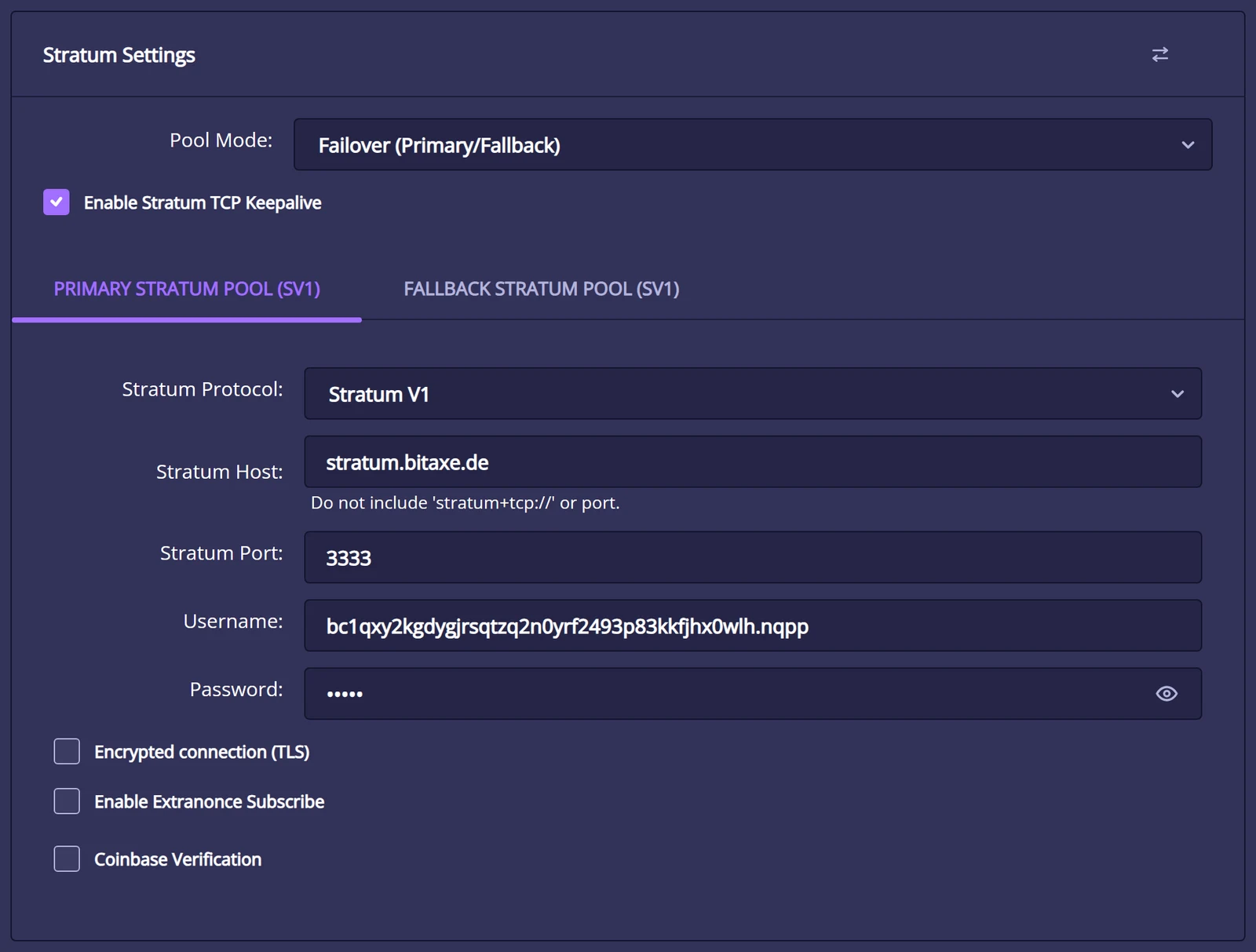
Save, then “Restart”. After one or two minutes the accepted shares rise in the dashboard. On pool.bitaxe.de you can see hashrate and workers of your address without logging in. The detailed guide with screenshots is at NerdQaxe++ setup, the pool configurator creates the values ready to copy, and choosing a mining pool compares the alternatives to our pool.
NerdOS has supported Stratum V2 since version 1.0.37. Set “Stratum Protocol” to “Stratum V2”, use port 3336 and enter our pool’s key in “SV2 Authority Public Key”: 9awpfZGWfrRBH8fkf82mWvnXMSTC7i9M3mshB8M56cw9UXTGdYi. With “Require Authentication” the miner only connects if the pool identifies itself with this key. Changing the protocol needs a restart. Step by step: setting up Stratum V2.
Everyday use: display, dashboard and updates
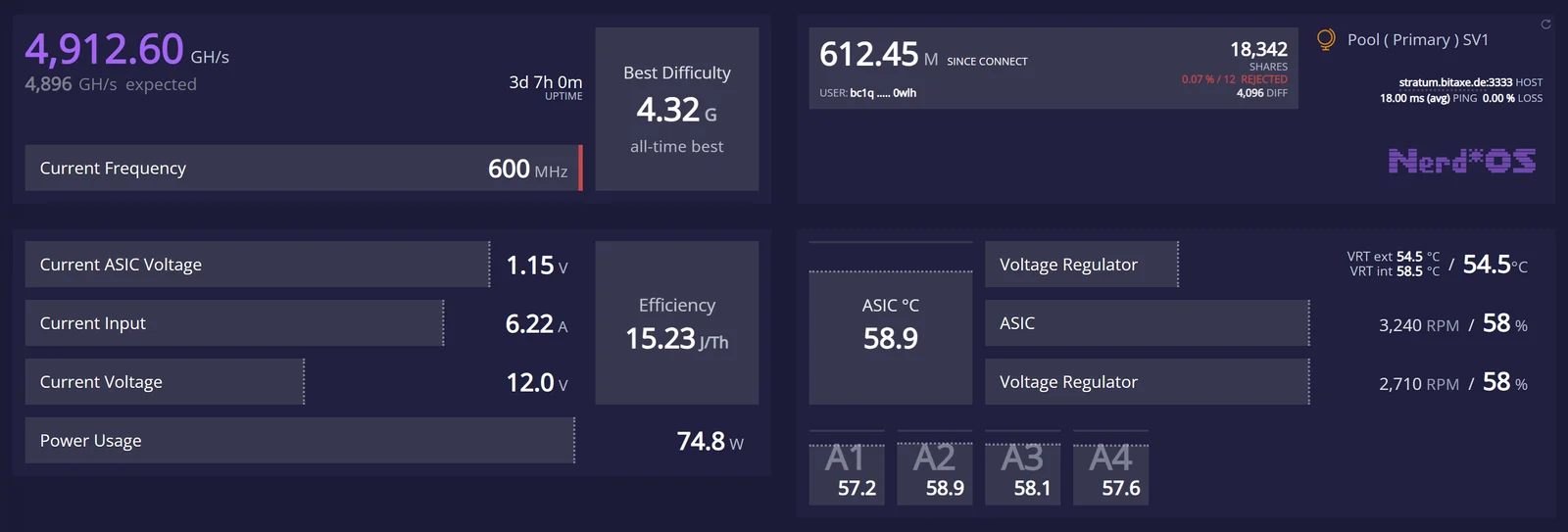
After setup the NerdQaxe++ runs without attention. The display shows hashrate, best difficulty, input and core voltage, current, power, chip temperature and fan speed. In the NerdOS dashboard four values are worth a look:
- Hash Rate against “expected”: on average the measured hashrate should be close to 4,896 GH/s. If it stays below 95 % of that, the voltage is not enough for the clock or one chip is weak. NerdOS does not show an error rate like “Error” in AxeOS; what that value means on a Bitaxe is explained in hashrate error.
- Temperatures: NerdOS shows each of the four chips separately (A1 to A4) and the voltage regulator. Staying below 65 °C on the chips is a good value.
- Pool card: accepted shares keep rising and the “Rejected” share stays under one percent. Otherwise something is wrong with pool, Wi-Fi or overclocking; the miner troubleshooter helps narrow it down.
- Power and input voltage: input voltage is close to 12 V, power at factory settings about 70 to 80 W.
Firmware updates are easiest through flasher.bitaxe.de: choose your model’s tile (NerdQaxe++, Copper Pro or Hydro) or let “Connect miner” detect it, OSM-OS is preselected, install type “Update”. Alternatively NerdOS updates itself: in Settings, choose the version in the “Release & Update” card and click “Install from GitHub”; with “Keep Settings” ticked, Wi-Fi and pool are retained. The route via two files, esp-miner-NerdQAxe++.bin and www.bin, has been hidden in the “Danger Zone” since version 1.1.0 because it was often only half completed. All routes are in the firmware update guide.
You run several NerdQaxe++ independently of each other, each with its own name after the dot. In the pool dashboard they appear as separate workers under the same address, and each worker plays for the block with its own hashrate. If you also have a Bitaxe, the Swarm page of AxeOS 2.15 is prepared for NerdOS devices according to its source code.
Overclocking: yes, but with judgement
Out of the box NerdOS only offers drop-down lists for clock and voltage, up to 600 MHz and 1200 mV on revisions up to 6. You unlock free values with the small, almost invisible warning triangle “Danger Zone” in the “Mining Settings” card. If a value is above the list, NerdOS warns with “Saving Unsafe Settings” when you save and lists the risks itself, including “Voids your warranty” and “May cause permanent hardware damage”. No restart is needed. The firmware sets hard limits at 800 MHz and 1400 mV, 1000 MHz on revision 7; the developer calls 800 MHz and 1.4 V the absolute maximum for the NerdQaxe++.
What is realistic is shown by measurements with open-source tools: 650 MHz at 1170 mV gave 5.16 TH/s at 81.7 W, 700 MHz at 1190 mV 5.74 TH/s at about 94 W. Too little voltage costs performance, though: at 740 MHz with only 1150 mV one device reached 66 % of its expected hashrate. Go in steps of 25 MHz, raise the voltage only when the hashrate drops below 95 % of “expected”, and watch each step for at least 15 to 20 minutes and the final setting for at least 24 hours.
The included power supply sets the second limit: by the 80 percent rule about 96 W of continuous load makes sense. Older revisions also have an 8 A fuse on the board that trips above about 100 W. If you want to run at the top end permanently, the Copper Pro or Hydro with a stronger power supply serve you better. The systematic approach is in the overclocking guide, the power supply question in the power supply guide.
Common pitfalls and how to fix them
- Very loud fans after the first start: the original firmware runs both fans at 100 %. Set “Auto Fan Control (PID)” with 60 °C.
- Someone else’s address in the pool: out of the box the Username field does not hold your address. Replace it before saving for the first time.
- Wi-Fi not found: the miner only works on the 2.4 GHz band. If 2.4 and 5 GHz share one name, a separate name for the 2.4 GHz network often helps.
- “MINER OVERHEATED” or “VREG OVERHEATED” on the display: the shutdown temperature was reached. Check airflow and fans, undo overclocked values, then restart.
- “Version mismatch!” in Settings: firmware and web interface have different versions, usually after a half-finished manual update. Reinstall through “Release & Update” or the flasher.
- Restarts under load: the power supply is sagging. Check the plug and use only the included or an equivalent 12 V supply with at least 10 A.
If you cannot find the cause, the miner troubleshooter takes you further; solutions to the most common problems are also at the end of the setup guide.
Who the NerdQaxe++ is for, and who it is not for
- Moving up from a Bitaxe: if you have understood your first miner and want more tickets without managing four power supplies, four Wi-Fi entries and four devices. The NerdQaxe++ puts the hashrate of a good four Bitaxe Gamma on one board.
- Homelab and utility room: where an audible fan bothers nobody, the standard model is the simplest four-chip option.
- Living space: better the Hydro. Same handling, more headroom for the clock, and the noise comes from the radiator.
- Efficiency before hashrate: if you want as many hashes as possible per kilowatt-hour, the Nerdaxe Gaia serves you better. Two Gaia deliver 4.8 TH/s together out of the box at 52 to 60 W, almost as much as one NerdQaxe++ at about 76 W.
- Everything in AxeOS: if you want to manage all devices with the same interface, take the Bitaxe GT or 702 and accept the weaker efficiency.
- Maximum tickets per device: the NerdOctaxe, with 11.4 TH/s out of the box more than twice as much, but also a device that needs a place of its own.
What the NerdQaxe++ is not: an investment product. Like every solo miner it is a lottery ticket with a power plug, with odds of about 1 in 3,700 per year. If you know that and still want to play, it gives you the largest amount of hashrate that can still run on a desk without rebuilding anything.
Conclusion
The NerdQaxe++ is the miner for everyone who wants more after the Bitaxe without things getting complicated: same chip, same pool, same address, just four chips instead of one. Out of the box NerdOS expects 4.9 TH/s at about 76 W, the same efficiency class as the Gamma. The differences from the Bitaxe are in the firmware: NerdOS instead of AxeOS, with nine interface languages, its own menu and fans you should switch to automatic after the first start. The limits are clear: it is audible, it is not the most efficient device in the range, and it does not find blocks on schedule. If you can live with that, the NerdQaxe++ is the right size for you, and if you want to put it in the living room, the Hydro.
Frequently asked questions about the NerdQaxe++
How much hashrate does the NerdQaxe++ have?
How much power does the NerdQaxe++ use?
How loud is the NerdQaxe++?
How much faster is the NerdQaxe++ than a Bitaxe Gamma?
NerdQaxe++ or Bitaxe 702: which is better?
What is the difference between NerdQaxe++, Copper Pro and Hydro?
Does the NerdQaxe++ run AxeOS?
Which pool settings do I enter in NerdOS?
stratum.bitaxe.de, Stratum Port 3333, your Bitcoin address as Username and x as Password. For Stratum V2 use port 3336 and the authority key from our V2 guide. Which hardware revision is my NerdQaxe++?
What are the odds of finding a block with the NerdQaxe++?
Which power supply does the NerdQaxe++ need?
Can I overclock the NerdQaxe++?
Matching products


Read more
Monitoring a Bitaxe: catch outages, heat and wrong payouts without false alarms
Which values the AxeOS API really delivers, when “no share for …” is a real outage, why a Bitaxe runs slower for good after overheating, and how a small script on your home network watches heat, power, fallback pool and coinbase.
Guides & knowledgeNerdaxe Gaia: what the BM1373 miner can do, which firmware to run and who it is for
A single BM1373 in the familiar Nerdaxe format: factory settings from the source code, hashrate and power draw with every documented figure, the 12-volt power supply, OSM-OS from the flasher, setup, overclocking up to the current limit, block odds and electricity cost, plus a comparison with the Nerdaxe Gamma, Bitaxe GT and NerdQaxe++.
Guides & knowledgeSetting up Stratum V2 on a Bitaxe: encrypted solo mining in five fields
Since AxeOS 2.14 every Bitaxe speaks Stratum V2, and since September 2026 so does the Bitaxe Pool. This guide walks through the AxeOS fields one by one, shows how to set up the fallback and verify the connection, and lists what goes wrong when no shares arrive. For Bitaxe, NerdQaxe and large ASICs.