









Bitaxe Gamma | 1.3 TH/s
1.3 TH/s at 15 W and quieter than 15 dB(A) – the open-source miner home mining starts with
Item no.: 25856 · Manufacturer: Bitaxe.de · Series: Bitaxe
- Open-source Bitcoin miner with BM1370 ASIC
- ~1.3 TH/s hash rate (typical)
- Under 15 dB(A) – quiet enough for the living room
- For beginners, home miners and solo miners
- Hashrate
- ~1.3 TH/s
- Efficiency
- ~14 J/TH
- Power draw
- ~15 W
plus shipping · −5% with Bitcoin: €132.05
Available on backorder · ca. 12 days
Notify me when it is back
One email as soon as this miner is in stock again. No newsletter.
Product information
Bitaxe Gamma 601: open-source Bitcoin miner with 1.3 TH/s
The Bitaxe Gamma (model 601) is an open-source Bitcoin miner for your home – for everyone who wants to start mining without a data centre, without a cloud contract and without a sealed black box. The BM1370 ASIC delivers around 1.3 TH/s at roughly 15 W, and the built-in ESP32-S3 runs the miner on its own: no additional PC or Raspberry Pi required.
At under 15 dB(A) it stays quiet enough to sit in a living room or office without bothering anyone. And it draws just around 15 W doing it.
Buying a Bitaxe Gamma means getting real hardware for your own setup: miner, power supply, stand, Wi-Fi setup and full control over pool, worker and your own Bitcoin address. When solo mining, your Bitaxe works around the clock on exactly the same task as the large mining farms: finding a valid Bitcoin block. Every single hash is another lottery ticket. If your miner lands the winning one, the entire block reward of currently 3.125 BTC plus transaction fees goes straight to your own Bitcoin address. Until then, your miner helps secure the Bitcoin network.
Why the Bitaxe Gamma is a strong choice
- Ready in minutes: plug it in, join your Wi-Fi, enter pool and Bitcoin address – done. No command line, no server configuration.
- Quiet and frugal: under 15 dB(A) and around 15 W. The 40 mm fan follows a curve you define yourself in AxeOS.
- Control instead of cloud mining: the hardware sits in your home. You see hash rate, shares, temperature and frequency in real time – instead of a statement nobody can verify.
- Openly documented: hardware design and firmware are open source. Spare parts, upgrades and community knowledge will still be around in a few years.
Your miner. Your pool. Your Bitcoin address.
You enter your own Bitcoin address into the Bitaxe Gamma. Whatever the miner finds goes through the pool of your choice – or, when solo mining, straight to your address. There is no provider in between.
That is exactly the difference to cloud mining: you can check at any time what your device really does, how warm the ASIC runs and which shares are being submitted. The basics are covered in the Bitaxe miner guide.
Up and running in minutes
All you need is a power socket, your 2.4 GHz Wi-Fi and a browser. Every step is documented with screenshots in the setup guide.
- 1
Switch the Bitaxe on
Connect the power supply and start the miner. On first boot the Bitaxe opens its own Wi-Fi access point.
- 2
Join your Wi-Fi
Connect to the Bitaxe access point, pick your 2.4 GHz home network and enter your Wi-Fi password.
- 3
Enter pool and Bitcoin address
Open AxeOS in your browser, set the mining pool and your own Bitcoin address, save, restart – your Bitaxe is mining.
AxeOS – your mining dashboard
AxeOS runs directly on the Bitaxe. Open the interface in a browser and you see hash rate, efficiency, accepted shares, best difficulty, ASIC temperature and fan speed at a glance.
Pool, frequency, voltage and fan curve are changed in the same place – from frugal 24/7 operation to careful overclocking. Take it slowly: more clock means more power draw, more heat and more fan noise.
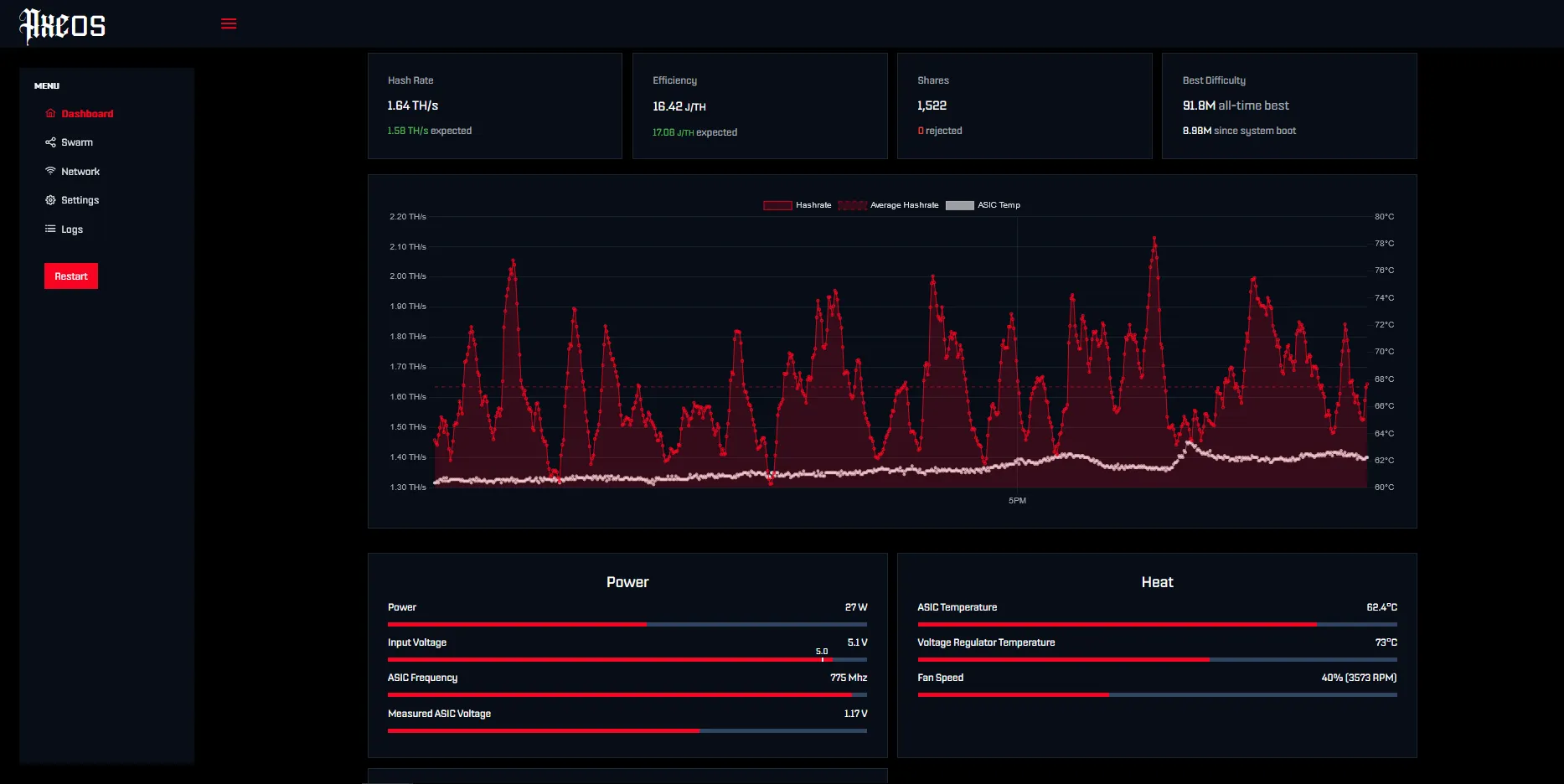
Who the Bitaxe Gamma is for
For beginners who want to understand Bitcoin mining instead of just booking it. For home miners running a quiet device next to the desk. And for solo miners going after a block find with their own address and realistic expectations.
It is a poor fit if you are looking purely for returns: a single Bitaxe does not replace industrial hardware. If you want considerably more hash rate in a similar format, look at the NerdQaxe++.
What you need to run it
The box contains the miner, a 5 V / 6 A power supply (30 W), a 3D-printed stand and a quick start guide – beyond that you only need Wi-Fi and a socket.
For continuous operation we recommend an open spot with some airflow, a solid power supply and an eye on temperature. Matching parts are in cooling and accessories.
Accessories and sensible upgrades
The Bitaxe Gamma is a setup you can extend later. Depending on where it stands and how you run it, better cooling, a quieter fan, a mount or your own Bitcoin node is the natural next step.
- Mining accessories for fans, power supplies, mounts and setup extensions.
- Cooling for lower temperatures and less fan noise.
- Bitcoin nodes if you want to combine mining with your own infrastructure.
Ready for your Bitaxe Gamma setup?
The Bitaxe Gamma is the right choice if you want a compact entry into Bitcoin mining at home and full control over your hardware – open firmware, your own Bitcoin address and support from people who run the same devices.
Bitaxe Gamma compared to similar miners
| Model | Hashrate | Power | Efficiency | Price |
|---|---|---|---|---|
| Bitaxe Gamma (this page) | ~1,3 TH/s | ~15 W | ~14 J/TH | €139.00 |
| Bitaxe Copperzilla | ~1,5 TH/s | ~22 W | ~15 J/TH | €179.00 |
| Bitaxe GT | 2,15 TH/s | 43 W | ~20 J/TH | €229.00 |
All values are guide figures. Compare all miners, calculate power cost.
Frequently asked questions about the Bitaxe Gamma
How loud is the Bitaxe Gamma?
How much electricity does the Bitaxe Gamma use?
How much hash rate does the Bitaxe Gamma have?
Is a Bitaxe Gamma worth it?
Can I solo mine with the Bitaxe Gamma?
How warm does the Bitaxe Gamma get?
What else do I need to get started?
Does the Bitaxe Gamma work on 5 GHz Wi-Fi?
What is the difference between the Bitaxe Gamma and the Bitaxe Gamma 601?
What is the difference to the Bitaxe Copperzilla?
Can I overclock the Bitaxe Gamma?
How fast do you ship?
Why buy from Bitaxe.de?
Free shipping from 300 €
Free shipping to almost every EU country from 300 €, worldwide shipping with UPS and a tracking link. Items in stock leave within 24 hours, with no customs surprises inside the EU.
Truly open source
Bitaxe, Nerdaxe, NerdQaxe & co. are open hardware running open AxeOS firmware: you set pool, clock and voltage yourself. No cloud account, no vendor lock-in, no black box.
Warranty & returns
Statutory warranty and a 14-day right of withdrawal for a safe order. If something is not right, we find a solution with you, person to person.
Direct support
Questions about setup, pool, firmware or your order? By email or Telegram you get help from someone who runs these devices themselves, in English or German, beginners welcome.
Customer reviews
4.8 / 5 · 82 reviews from customers who bought this product from us.
Nach Wechsel der WLP und besserer Befestigung des Kühlers läuft mein gamma 601 rund und kühl (unter 50°C bei 25% Lüfterdrehzahl).
Läuft super! Wichtig: Ich hatte anfangs wirklich schlechte Temperatur Werte , selbst bei kleinster Frequenz und Core Voltage. Ich habe also den Lüfter vorsichtig abgebaut und es war etwas arg viel Thermal Paste drauf. Habe diese entfernt, mit Isopropanyl alles gereinigt und eine neue dünne schicht auf die CPU aufgetragen. Vorher hatte ich bei 525/1150 Default > 60 Grad Celsisus und die Fehlerrate war ziemlich hoch mit knapp 1TH Nun läuft es bei 625/1250 mit 1.23-1.30TH stabil mit einer Fehlerrate von 0 bis max. 2% bei nur 59 grad celsius (ginge auch 57 grad)
Related guides
Setup, pool, cooling, power supply and sensible upgrades for your setup.
You might also like

Bitaxe Copperzilla | 1.5 TH/s

NerdQaxe++ | 4,8 TH/s

NerdOctaxe | 12 TH/s
