








Monitoring a Bitaxe: catch outages, heat and wrong payouts without false alarms
12 October 2026 · 21 min read

A Bitaxe runs for weeks without anyone watching. Most of the time that goes well. When it does not, you notice late: from the loud fan, from a hashrate that has been too low for days, or not at all, because the miner quietly switched to the fallback pool. This article shows what you can monitor, which thresholds work without false alarms and which tool suits how many devices. It is based on the source code of AxeOS 2.15.3 and NerdOS 1.1.0.1, the vardiff logic of ckpool and our own calculations.
/api/system/info every minute and sees what the pool cannot see: temperature, fan, power supply, fallback pool and whether the coinbase pays your address at all. Monitoring hardly saves your block chance, though: two days of downtime a month cost a Bitaxe Gamma about one euro a year in expected value. What an outage costs and what monitoring is really good for
The first question is a sober one: how much does it cost when a miner does nothing for a day? In solo mining the chance of a block depends only on the time spent hashing. At the difficulty of 12 October 2026 (about 132.7 trillion, block 971,119), a Bitaxe Gamma with 1.2 TH/s has a chance of 1 in 5.5 million per day and about 1 in 15,000 per year. With a block subsidy of 3.125 BTC, not counting transaction fees, the expected value is 20,747 sats a year, or a little over €15 at a price of €73,860.
Two days of downtime a month, 24 a year, cost 6.6 % of that: 1,364 sats or about one euro. A miner that hangs while still drawing 17 W uses 0.41 kWh a day, which is 12 cents at €0.30 per kWh. If you monitor to rescue your returns, you are monitoring the wrong thing. The full block-chance maths is in finding a block with a Bitaxe.
Other things get expensive. All of them show up in values AxeOS reports anyway:
| Event | Consequence | How to spot it | Urgency |
|---|---|---|---|
| Fan fails, heatsink clogged with dust | Chip and voltage regulator heat up; AxeOS stops and then runs throttled for good | fanrpm, vrTemp, overheat_mode | immediately |
| Miner on the fallback pool or with a foreign address | A block pays the address entered there, and out of the box that is not yours | isUsingFallbackStratum, stratumUser, coinbaseValueUserSatoshis | immediately |
| Power supply or cable too weak | Restarts, crashes, warm plugs in the long run | resetReason, voltage | same day |
| Creeping loss of performance | Hashrate stays below “Expected” | hashRate_10m, expectedHashrate, frequency | no rush |
| Complete outage | no shares, no block chance | pool alert, no answer from the API | no rush |
Three viewpoints: device, pool and network
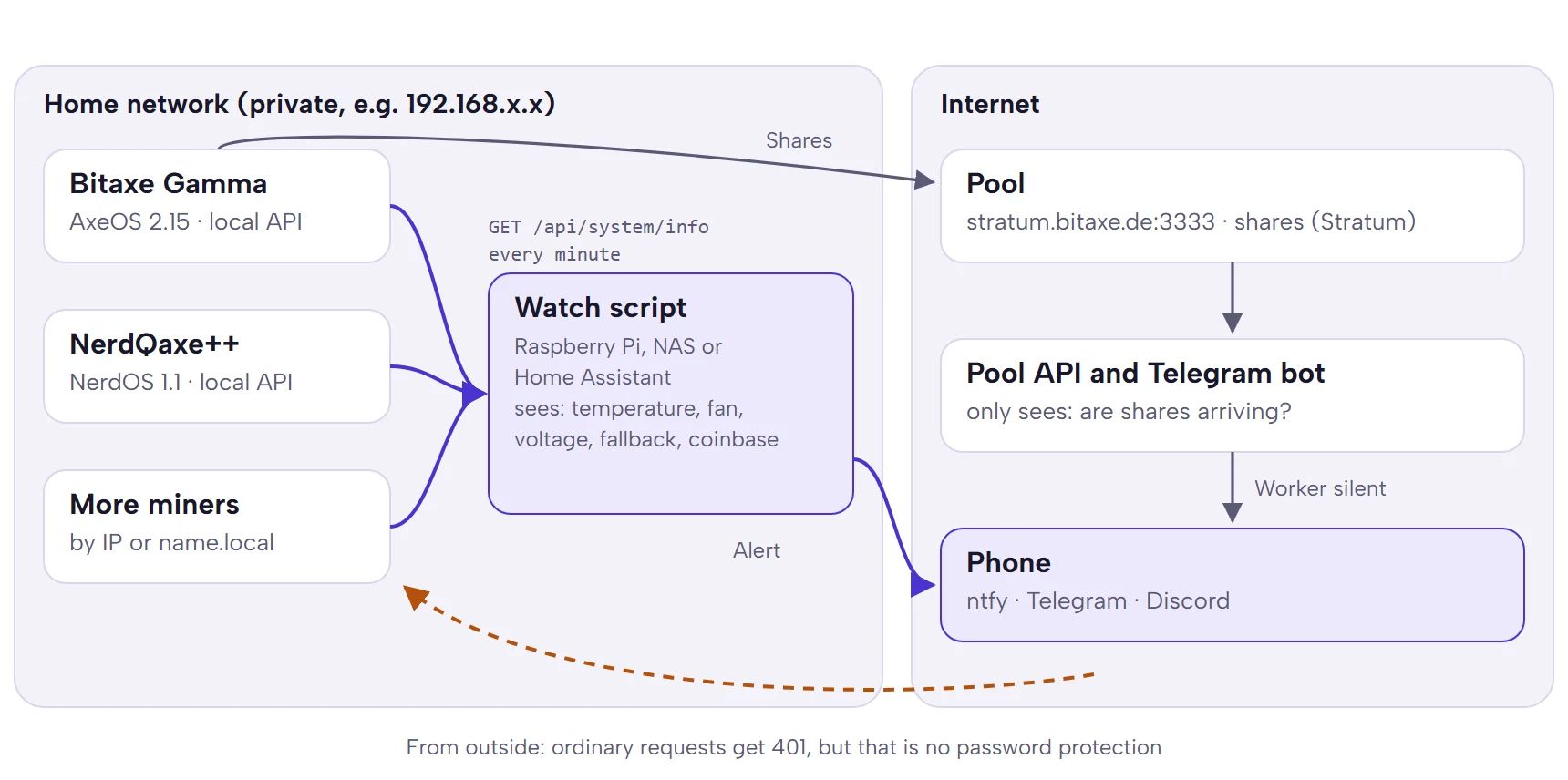
Every kind of monitoring looks at the miner from one of three directions, and each sees something different. The device knows every measurement but can no longer report anything once it hangs. The pool only sees whether shares arrive. A ping shows whether the device is on the network, not whether it is hashing.
| Source | Sees | Does not see | Needs access to the home network |
|---|---|---|---|
| AxeOS or NerdOS API | Temperatures, fan, voltage, hashrate, shares, pool settings, coinbase | anything, once the device stops answering | yes |
| Pool (API, Telegram bot) | whether shares arrive, hashrate from shares, best share | temperature, causes; a switch to the fallback looks like an outage | no |
| Ping, router | whether the device is on the network | whether it is hashing | yes |
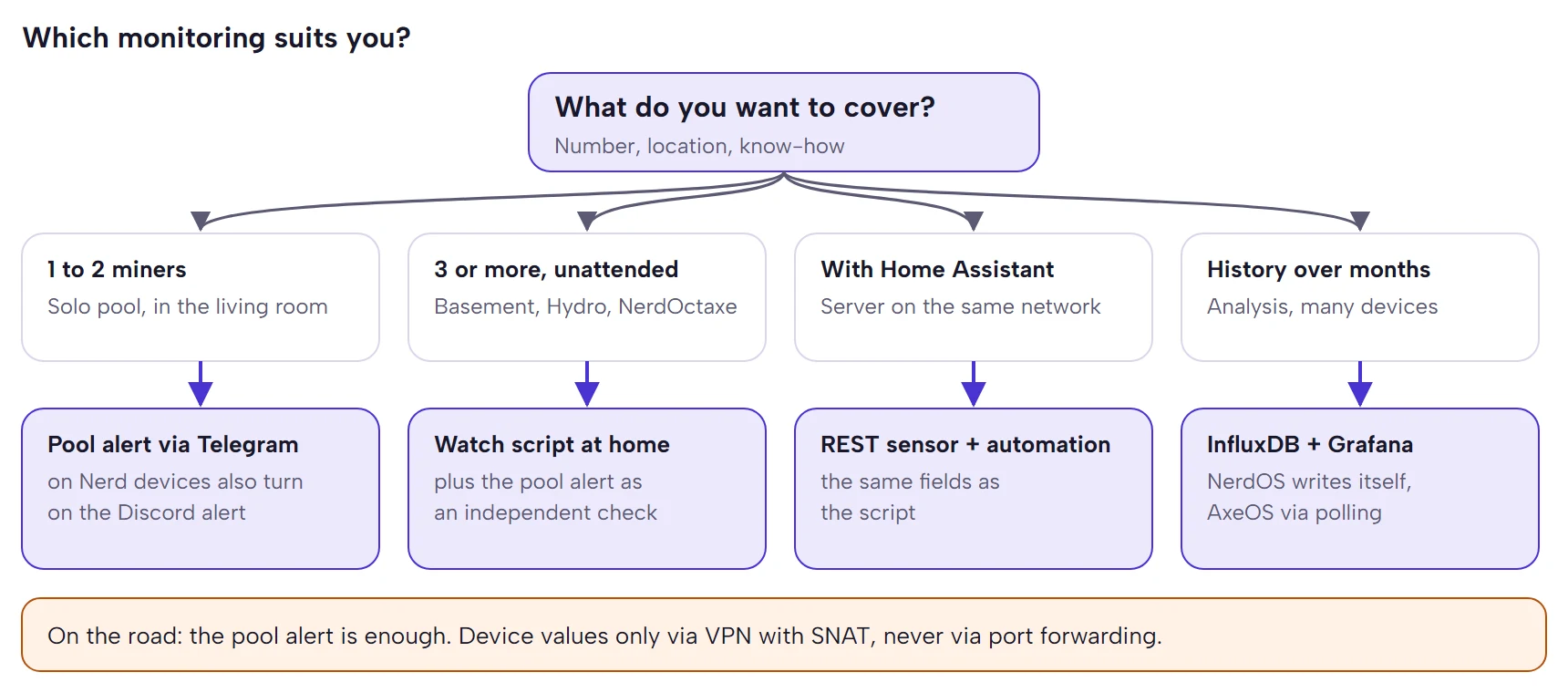
The most robust setup combines two directions: the pool view as an independent check that still reports when everything at home goes down, and the device view for the causes.
The AxeOS API: access, endpoints, fields
No password, but only from private networks
AxeOS has no login. Instead, the firmware checks where every API request comes from. Without an Origin header, as with curl, scripts or Home Assistant, the sender must come from the private address ranges 10.0.0.0/8, 172.16.0.0/12 or 192.168.0.0/16. If a browser sends an Origin header, it must point to a private address, a name ending in .local or a name without a dot. AxeOS answers everything else with “401 Unauthorized”. The API is only open while the miner runs its own setup Wi-Fi. That is what is_network_allowed() in http_server.c says.
Three things follow from this. First, every computer on the same private network may do everything: read, but also change pool and address (PATCH /api/system) or write firmware (POST /api/system/OTA). Second, ordinary requests from the internet fail, for example from a rented server or a cloud uptime service, even with port forwarding. That is still no protection against attackers: the check is mainly meant to keep foreign websites in the browser out, and a deliberately crafted request gets through as soon as the miner can be reached from the internet. Third, with VPN access it matters which address the request arrives with at the miner. A Tailscale subnet router rewrites the sender address to its own LAN address by default (SNAT), and then it works. If you switch SNAT off with --snat-subnet-routes=false, requests arrive from an address in 100.64.0.0/10 and AxeOS refuses them. The same rule applies to other VPNs: what counts is the address the request arrives with. A WireGuard tunnel with addresses from 10.x therefore works without rewriting.
The Nerd firmware also checks for private address ranges. Reading works there without further protection, changing settings requires a one-time code if two-factor protection (OTP) is switched on. AxeOS has no comparable lock.
The endpoints that matter for monitoring
| Endpoint | Method | What for |
|---|---|---|
/api/system/info | GET | the whole state in one JSON, the basis of any monitoring |
/api/ws/live | WebSocket | the same data live: complete once on connect, then only changes |
/api/system/statistics?columns=… | GET | the history the device stores itself (chart in the dashboard) |
/api/system/asic | GET | chip data and the allowed clock and voltage steps |
/api/ws | WebSocket | log output as on the Logs page |
/api/system/restart, /pause, /resume | POST | restart, pause and resume mining |
/api/system | PATCH | change settings |
To start, a single call with curl and jq is enough:
curl -s http://192.168.1.50/api/system/info | jq '{hashRate_10m, expectedHashrate, temp, vrTemp, fanrpm, sharesAccepted, isUsingFallbackStratum, coinbaseValueUserSatoshis, resetReason}'The fields that really tell you something
In AxeOS 2.15.3 the answer from /api/system/info has more than a hundred fields. For monitoring, these count:
| Field | Meaning | Unit | Worth an alert |
|---|---|---|---|
hashRate_10m | rolling average over 10 minutes (also hashRate_1m, hashRate_1h) | GH/s | stays below 85 to 90 % of expected |
expectedHashrate | clock times cores times chips | GH/s | drops when the clock drops |
errorPercentage | share of faulty hashes reported by the chip | % | keeps rising; below 0.1 % is very good |
sharesAccepted, sharesRejected, sharesRejectedReasons | counters since the start, rejection reasons as a list | count | counter stands still, rejections above 1 % |
poolDifficulty | difficulty the pool currently assigns | number | decides how long “no share” is normal |
temp, temp2, vrTemp | chip, second sensor, voltage regulator | °C | chip above 70, regulator above 95 |
fanrpm, fanspeed, autofanspeed | speed, set value, automatic on or off | rpm, %, 0/1 | speed 0 with a set value above 0; automatic suddenly off |
voltage, nominalVoltage | input voltage, nominal voltage | mV, V | below 94.9 % of nominal |
power_fault, hardware_fault | only appear on a fault, for example “Fan Control Failed” | text | any message |
overheat_mode | overheat protection is running | 0/1 | 1 |
uptimeSeconds, resetReason | uptime since the start, reason for the last restart | s, text | uptime jumps back |
isUsingFallbackStratum, stratumUser | fallback active, configured user | 0/1, text | fallback active; user differs |
coinbaseValueTotalSatoshis, coinbaseValueUserSatoshis, coinbaseOutputs | value of the current job's coinbase and the part that goes to your address | sats | own share 0 on a solo pool |
wifiRSSI | Wi-Fi signal strength | dBm | stays below −75 |
miningPaused | mining paused | true/false | for exceptions in your own logic |
The Nerd firmware delivers largely the same names under the same path, with differences: hostip instead of ipv4, lastResetReason instead of resetReason, asicTemps as a list per chip, no expectedHashrate (calculated as clock times smallCoreCount times asicCount divided by 1000) and no coinbase fields. It reports the fallback in stratum.usingFallback, the temperature at which it shuts down in overheat_temp and per fan channel in fans[].overheatTemp. On top of that it has its own coinbase check with an alert, more on that below.
Six checks that find real problems
1. Reachability and restarts
If the API does not answer three times in a row, the miner is gone. A restart shows up as uptimeSeconds being lower than at the last poll. resetReason delivers the reason along with it, and that is often the diagnosis already:
Text in resetReason | Typical cause | What to do |
|---|---|---|
| Reset due to power-on event | power was gone: socket, power cut, loose contact | once is no problem; if it repeats, check plug and power strip |
| Software reset via esp_restart | restart from AxeOS or the API, after a firmware update or changed settings | normal if it was you |
| Brownout reset (software or hardware) | input voltage briefly collapsed | check power supply and cable, see power supply for the Bitaxe |
| Reset due to task watchdog; Reset (software or hardware) due to interrupt watchdog | firmware hung | undo the overclock, update the firmware |
| Software reset due to exception/panic; Reset due to CPU lock up (double exception) | crash | update the firmware, save the log if it repeats |
| Reset due to power glitch detected | voltage spike or dip | check the power supply |
2. Shares: the most sensitive outage indicator
If sharesAccepted stops rising, the miner is not hashing or its work is not arriving. That is the most reliable outage indicator, because on ckpool-based solo pools like pool.bitaxe.de shares arrive every few seconds. How fast exactly is in the next section. Judge the share of rejected shares over an hour. If it is above one percent, the reasons in sharesRejectedReasons reveal the cause; what they mean is in the section on rejected shares in Bitaxe connected but not mining.
From the outside you check the same through the pool API: https://pool.bitaxe.de/api/v1/address/ plus your address delivers lastshare for each worker and hashrate averages from 1 minute to 7 days. Only lastshare is useful for outages: ckpool's hashrate fields do not drop to zero after an outage, they stay where they were until shares come in again.
3. Hashrate against expected
expectedHashrate is clock times cores times chips: for the BM1370 with 2,040 cores at 525 MHz that is 1,071 GH/s. A healthy miner reaches at least 95 % of that in the hourly average; why is explained in the hashrate error explained. For an alert, use the 10-minute average hashRate_10m with a more generous threshold of 85 % that has to be undercut for a quarter of an hour, and skip the first 15 minutes after a start, while the averages fill up.
The hashrate the pool shows is less suited for this. The pool estimates it from the shares, and that is noisy: with the AxeOS default a Gamma delivers about 1,000 shares an hour, so the pool's hourly average fluctuates by about ±3 %. At difficulty 32,768 it is only about 30 shares an hour and ±18 %.
4. Temperature, fan, power supply
AxeOS warns in the dashboard from 70 °C at the chip. Above 75 °C at the chip or above 105 °C at the voltage regulator the overheat protection kicks in. Up to 65 °C at the chip and up to 85 °C at the regulator are good for continuous operation. An alert at 70 °C chip and 95 °C regulator therefore fires before the protection does. The Nerd firmware, by contrast, already switches off the core voltage at its “Shutdown Temperature”, 70 °C at the chip by default; devices with two fan channels also shut down at 80 °C at the voltage regulator. The NerdOS 1.1.0.1 API has no message of its own for this; you only notice it because no more shares arrive. The alert limit therefore belongs 5 °C below the shutdown temperature. If the fan does not spin (fanrpm 0, fanspeed above 0), it is broken or the cable is loose. That alert cannot wait. hardware_fault reports for example “Fan Control Failed”, power_fault a fault of the voltage regulator. The input voltage is suspicious as soon as it drops below 94.9 % of nominal: below 4.75 V on the Gamma, below 11.4 V on 12 V devices. From there AxeOS also shows “Danger: Low Voltage”.
5. Payout: fallback, user, coinbase
If isUsingFallbackStratum is 1, the miner works for the fallback pool. That is harmless as long as your address is entered there. Out of the box the fallback, like the main pool, holds a preset address. If you only enter your own address for the main pool, a block found on the fallback pays that preset address. Also check whether stratumUser still matches the value you entered.
The strongest single check is the coinbase. AxeOS 2.15.3 decodes the coinbase of every job (option “Decode Coinbase Tx” in the advanced pool settings, on by default) and reports in coinbaseValueUserSatoshis how many satoshis go to outputs whose address stands at the start of stratumUser. On a solo pool without fees that is the whole coinbase. If it says 0, the pool builds blocks that do not pay you: a typo, the wrong pool, a tampered setting. The dashboard shows the same value as a share and warns with “You don't have a share in the mining reward” at 0 % and “Your share of the mining reward is only …” below 95 %. But only someone who opens the dashboard sees the warning. On most shared pools the coinbase pays the pool; 0 is normal there and the check should be switched off. With SOLO Groups on pool.bitaxe.de the coinbase splits a block among the members, so a share below 100 % is intended there. What is behind the warning is also answered in the FAQ of Bitaxe connected but not mining.
6. Settings that change by themselves
This check is missing from almost every guide. When the overheat protection kicks in, AxeOS 2.15.3 stops mining, sets the fan to manual 100 % and waits at least 30 seconds until the regulator is below 95 °C and the chip, where measurable, below 45 °C. Then it restarts with the clock 100 MHz lower and the voltage 100 mV lower and saves both. Automatic fan control stays off. None of this is reset by itself.
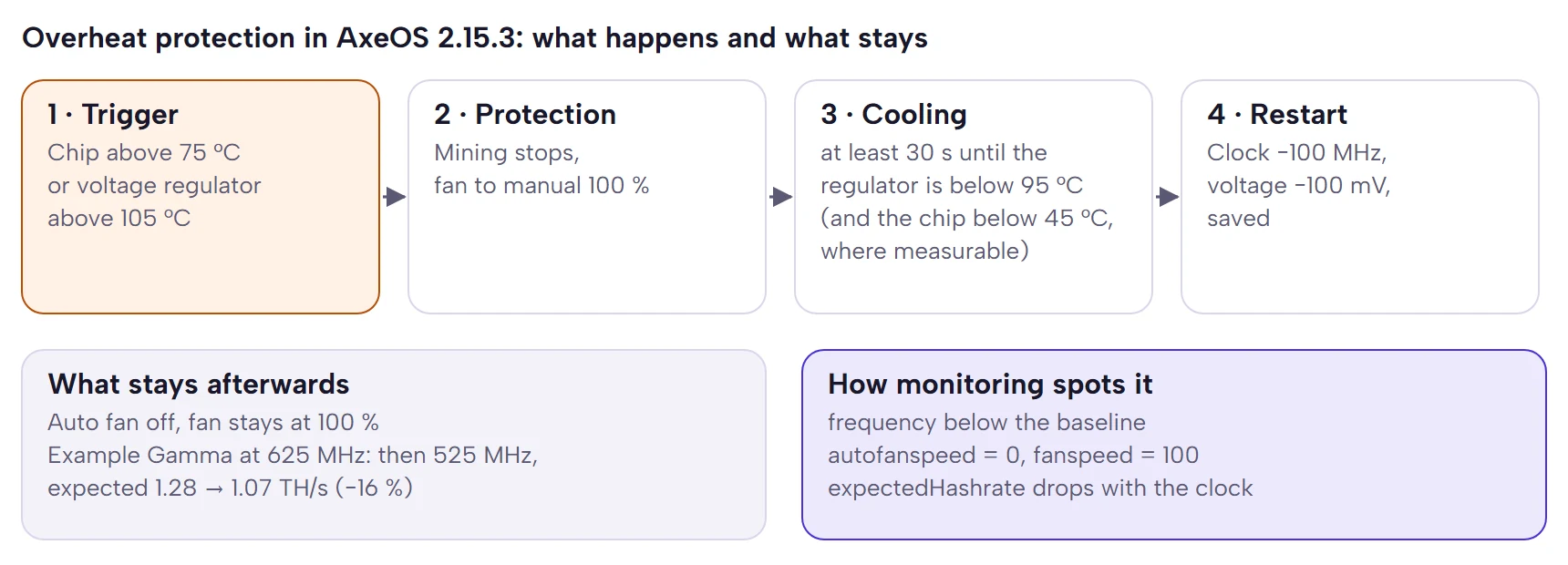
A Gamma at 625 MHz, the way we ship it, then runs at 525 MHz and expects 1.07 instead of 1.28 TH/s, 16 % less. With the original AxeOS values of 525 MHz it drops to 425 MHz and 0.87 TH/s, 19 % less. Monitoring that remembers the baseline of frequency and autofanspeed sees this at once. First fix the cause, meaning dust, fan or location, then reset clock, voltage and automatic fan control in the settings. How to make the fan quiet again afterwards is in making a Bitaxe quieter.
When is “no share” an outage?
Most false alarms come from a wrong threshold for “no share for …”. The right threshold depends on the share rate, and you can calculate that for your miner. A share of difficulty D takes D × 232 hashes on average. The average gap between two shares is therefore D × 4,294,967,296 divided by the hashrate in H/s. The dashboard shows D in the card with the pool data under “Difficulty”, the API in the field poolDifficulty.
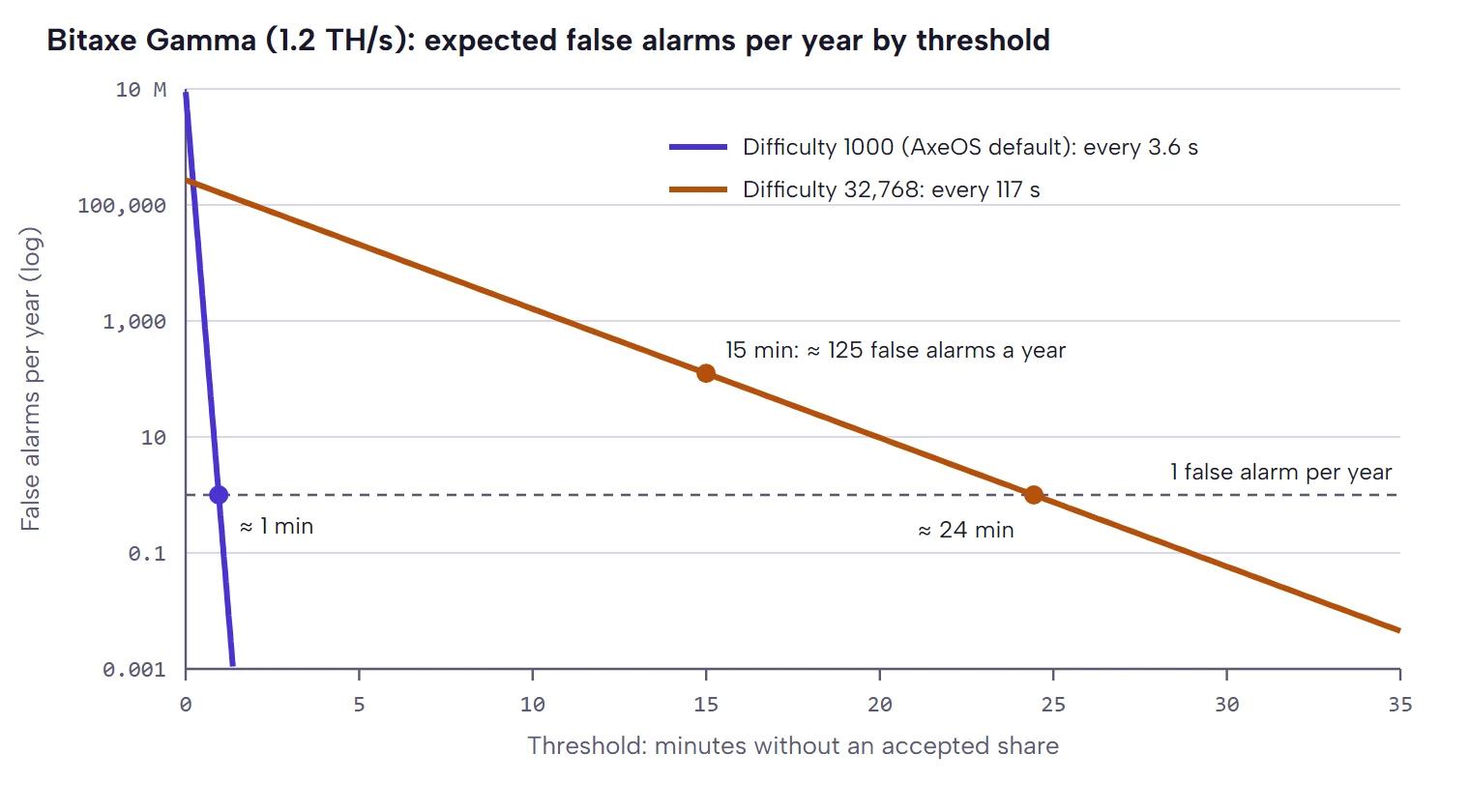
On ckpool pools like pool.bitaxe.de the vardiff assigns the difficulty. It aims at 0.3 shares per second and leaves the difficulty alone as long as the rate stays between 0.15 and 0.4. The miner's suggestion sets the lower bound: after logging in, AxeOS suggests 1000 (a pool setting, in the API stratumSuggestedDifficulty). A Gamma with 1.2 TH/s manages 279 shares of difficulty 1 per second, so 0.28 shares per second at difficulty 1000, one every 3.6 seconds. Bigger miners push the difficulty up until they land at about one share every 2.4 seconds.
Shares arrive at random. The probability that a healthy miner finds none for t seconds is e−r·t at r shares per second. Over a year a Gamma produces about 8.8 million gaps between two shares. Even one minute without a share happens less than once a year on average. As a rule of thumb, 16 average gaps without a share plus two minutes of buffer for restarts are enough; that keeps every miner below one false alarm a year.
The difficulty only gets high if you set it up that way. Port 4334 of pool.bitaxe.de is a high-difficulty port for large ASICs and rented hashrate and first gives every miner a floor of 32,768. A Bitaxe with the AxeOS default still ends up at 1000 there, because ckpool accepts the miner's suggestion on every port. That is what the function suggest_diff() in ckpool says, and that is how our pool works too. The 32,768 only stays if you set the suggestion in AxeOS to 0. Then a Gamma delivers only one share every 117 seconds, and an alert after 15 minutes would wrongly report it about 125 times a year, twice a week. The same happens if you suggest a high difficulty yourself.
| Device | TH/s | AxeOS default: one share every | Threshold | Difficulty 32,768: one share every | Threshold |
|---|---|---|---|---|---|
| Older Bitaxe, e.g. Ultra | 0.5 | 8.6 s | 130 s | 282 s | 55 min |
| Bitaxe Gamma | 1.2 | 3.6 s | 57 s | 117 s | 24 min |
| Bitaxe GT | 2.15 | 2.4 s | 39 s | 65 s | 14 min |
| Nerdaxe Gaia | 2.6 | 2.4 s | 39 s | 54 s | 12 min |
| NerdQaxe++ | 4.8 | 2.4 s | 39 s | 29 s | 7 min |
| NerdOctaxe | 12 | 2.4 s | 39 s | 12 s | 3 min |
“Threshold” means: from this duration without a share, a healthy miner causes a false alarm less than once a year on average. In practice you add a little, because restarts, firmware updates and Wi-Fi changes take one to two minutes. With the AxeOS default we recommend 10 minutes. At difficulty 32,768, 30 minutes are enough for a Gamma; older models with about 0.5 TH/s need an hour, with 30 minutes they would collect about 190 false alarms a year. Other pools assign the difficulty differently; there you read poolDifficulty and use the same formula. The watch script below does that by itself.
Tools compared
| Solution | Alert | Device values | without access to the home network | Effort |
|---|---|---|---|---|
| AxeOS Swarm | no | yes, as an overview | no | none |
| Pool alert @bitaxepool_bot | Telegram | no | yes | one minute |
| NerdOS alerts | Discord | partly | the device sends them itself | low |
| Watch script (below) | ntfy | yes | no, runs on the home network | half an hour |
| Home Assistant | every channel HA has | yes | no | medium |
| InfluxDB and Grafana | Grafana alerts | yes, with history | no | high |
AxeOS Swarm: an overview, not a guard
The Swarm page in AxeOS searches the device's network for other miners, but only within the /24 range, meaning the 254 addresses around its own. You add devices in another subnet by hand by address. Swarm recognises AxeOS, NerdOS and Bitforge, refreshes every 30 seconds by default and stores the list in the browser, not on the miner. So it only runs while the page is open and never alerts. It is ideal as an overview and unsuitable as a guard. How the other AxeOS pages work is in AxeOS explained.
Pool alert via Telegram
The pool.bitaxe.de bot only needs your address: send /watch with your address to @bitaxepool_bot, done. It reports when a worker stops delivering shares, after 30 minutes by default, adjustable with /alerts offline 15, 30, 60 or off. On top come messages when the worker delivers again, on a new best share, a rank promotion and a found block, plus the weekly summary on Mondays. With the AxeOS default, 15 minutes work as well. If you have set a high difficulty in AxeOS, keep the 30 minutes, and for older models use 60. Because the bot sits on the pool side, it reports even when power and internet are gone at home. It also notices a switch to the fallback pool, because shares then stop arriving at our pool. It does not see temperature and fan. More on the pool in the Bitaxe Pool.
Nerd firmware: alerts and InfluxDB built in
NerdOS 1.1.0.1 brings two things AxeOS lacks. In the settings you can store a Discord webhook the device reports to itself: a restart by the watchdog when no share came for an hour, a found block, a new best difficulty and a failed coinbase check. That check verifies whether your address is in the coinbase and whether the pool fee exceeds a limit you set. NerdOS can also write directly to an InfluxDB (URL, port, token, organisation, bucket, prefix). Then you no longer need a polling service of your own.
Home Assistant
If you run Home Assistant anyway, poll the API with the built-in REST sensor and build alerts as automations. One request per minute is enough; the fields are the same as above.
rest:
  - resource: http://192.168.1.50/api/system/info
    scan_interval: 60
    sensor:
      - name: "Bitaxe hashrate 10 min"
        value_template: "{{ value_json.hashRate_10m | round(0) }}"
        unit_of_measurement: "GH/s"
      - name: "Bitaxe voltage regulator"
        value_template: "{{ value_json.vrTemp }}"
        unit_of_measurement: "°C"
    binary_sensor:
      - name: "Bitaxe on fallback pool"
        value_template: "{{ value_json.isUsingFallbackStratum == 1 }}"
InfluxDB and Grafana
If you want to analyse histories over months, for example temperature against room temperature or hashrate per firmware version, write a record into a time-series database every 30 to 60 seconds and build alerts in Grafana. Nerd devices write by themselves, for AxeOS you need a poller, for example Telegraf with an HTTP input and JSON parsing. For three devices that is a lot of effort. From ten devices on, or for measurement series, it pays off.
A watch script for several miners
The following script runs the six checks for any number of AxeOS and NerdOS devices. It needs Python 3 and nothing else, runs on a Raspberry Pi, a NAS or any computer on the same network and reports to your phone via ntfy. It keeps its state in a file, reports a problem once and tells you when it is fixed. As long as a miner does not answer, old problems stay open instead of counting as fixed. It calculates the threshold for missing shares from the pool difficulty, sets the temperature limits for NerdOS devices 5 °C below their shutdown temperatures and, when started by hand, shows why a device does not answer. It is tested against simulated answers for every case it reports.
#!/usr/bin/env python3
"""bitaxe-watch.py: checks Bitaxe and Nerd miners through the local API and reports problems via ntfy.

Runs once per call; start it every minute with cron or a systemd timer. Python standard library only.
The computer must sit in the same private network as the miners (AxeOS only answers private addresses).
"""
import base64
import json
import pathlib
import sys
import time
import urllib.request

MINERS = ["192.168.1.50", "192.168.1.51"]   # IP addresses or names like bitaxe.local
NTFY = "https://ntfy.sh/put-a-long-random-topic-here"
STATE = pathlib.Path.home() / ".bitaxe-watch.json"
# Check the coinbase on solo pools only: on shared pools it usually pays the pool
SOLO_POOL = True

LIMITS = {
    "offline_rounds": 3,       # this many polls in a row without an answer
    "no_share_s": 600,         # lower bound; with a high pool difficulty the script waits longer
    "hashrate_share": 0.85,    # 10-minute average below this share of expected ...
    "hashrate_rounds": 15,     # ... this many polls in a row
    "chip_c": 70,              # NerdOS: 5 °C below its shutdown temperature, see below
    "regulator_c": 95,
    "wifi_dbm": -75,
    "wifi_rounds": 10,
    "voltage_share": 0.949,    # like the "Danger: Low Voltage" warning in AxeOS 2.15
}


def read_info(host):
    with urllib.request.urlopen(f"http://{host}/api/system/info", timeout=5) as response:
        return json.load(response)


def notify(title, text, priority="default"):
    # Title encoded as RFC 2047 so non-ASCII characters arrive intact (recommended in the ntfy docs)
    encoded = "=?UTF-8?B?" + base64.b64encode(title.encode("utf-8")).decode("ascii") + "?="
    request = urllib.request.Request(NTFY, data=text.encode("utf-8"),
                                     headers={"Title": encoded, "Priority": priority})
    try:
        urllib.request.urlopen(request, timeout=10).close()
    except OSError as error:
        print(f"Notification not delivered: {error}")


def expected(info):
    """Expected hashrate in GH/s: AxeOS reports it, for NerdOS it is clock x cores x chips."""
    if info.get("expectedHashrate"):
        return info["expectedHashrate"]
    if info.get("frequency") and info.get("smallCoreCount"):
        return info["frequency"] * info["smallCoreCount"] * info.get("asicCount", 1) / 1000
    return None


def check(host, info, memo, now):
    """Returns a list of (key, priority, text) for the problems that exist right now."""
    problems = []
    uptime = info.get("uptimeSeconds", 0)

    # 1. Restart: uptime lower than at the last poll
    if uptime < memo.get("uptime", 0):
        reason = info.get("resetReason") or info.get("lastResetReason") or "unknown"
        serious = any(w in reason for w in ("Brownout", "watchdog", "panic", "glitch", "lock up"))
        problems.append((f"restart-{now}", "high" if serious else "default", f"Restarted: {reason}"))
        memo["shares_ts"] = now
    memo["uptime"] = uptime

    # 2. No new accepted shares. The limit grows with the pool difficulty: a share takes difficulty x 2^32
    #    hashes on average, and 16 average gaps without a share happen less than once a year.
    accepted = info.get("sharesAccepted", 0)
    if accepted != memo.get("shares") or "shares_ts" not in memo:
        memo["shares"], memo["shares_ts"] = accepted, now
    rate = (expected(info) or info.get("hashRate_10m") or 0) * 1e9
    gap = (info.get("poolDifficulty") or 0) * 2**32 / rate if rate else 0
    limit = min(max(LIMITS["no_share_s"], 16 * gap + 120), 4 * 3600)
    silence = now - memo["shares_ts"]
    if silence > limit and not info.get("miningPaused"):
        problems.append(("shares", "high", f"No accepted share for {silence // 60} minutes"))

    # 3. Hashrate below expected (only judged 15 minutes after a start)
    target, actual = expected(info), info.get("hashRate_10m")
    if target and actual is not None and uptime > 900 and actual < LIMITS["hashrate_share"] * target:
        memo["low"] = memo.get("low", 0) + 1
    else:
        memo["low"] = 0
    if memo["low"] >= LIMITS["hashrate_rounds"]:
        problems.append(("hashrate", "default", f"Hashrate {actual:.0f} GH/s, expected {target:.0f} GH/s"))

    # 4. Temperature, fan, hardware and power faults. NerdOS shuts down per fan channel at
    #    "overheatTemp" (chip 70 °C by default, regulator 80 °C on two channels): warn 5 °C earlier.
    channels = info.get("fans") or []
    cutoff_chip = (channels[0].get("overheatTemp") if channels else None) or info.get("overheat_temp")
    cutoff_regulator = channels[1].get("overheatTemp") if len(channels) > 1 else None
    chip = max([info.get("temp") or 0] + (info.get("asicTemps") or []))
    if chip > min(LIMITS["chip_c"], (cutoff_chip or 999) - 5):
        problems.append(("chip", "high", f"Chip {chip:.0f} °C"))
    regulator = info.get("vrTemp") or 0
    if regulator > min(LIMITS["regulator_c"], (cutoff_regulator or 999) - 5):
        problems.append(("regulator", "high", f"Voltage regulator {regulator:.0f} °C"))
    if info.get("overheat_mode"):
        problems.append(("overheated", "urgent", "Overheat protection active, mining stopped"))
    if info.get("fanspeed", 0) > 0 and info.get("fanrpm", 1) == 0:
        problems.append(("fan", "urgent", "Fan is not spinning"))
    for field in ("hardware_fault", "power_fault"):
        if info.get(field):
            problems.append((field, "urgent", f"{field}: {info[field]}"))
    nominal = info.get("nominalVoltage")
    if nominal and info.get("voltage"):
        nominal_mv = nominal * 1000 if nominal < 100 else nominal
        if info["voltage"] < LIMITS["voltage_share"] * nominal_mv:
            problems.append(("voltage", "high", f"Input voltage {info['voltage'] / 1000:.2f} V"))

    # 5. Payout: fallback pool, changed address, coinbase without your own output
    stratum = info.get("stratum") if isinstance(info.get("stratum"), dict) else {}  # NerdOS
    if info.get("isUsingFallbackStratum") or stratum.get("usingFallback"):
        problems.append(("fallback", "high", "Miner is working on the fallback pool"))
    user = info.get("stratumUser")
    memo.setdefault("user", user)
    if user != memo["user"]:
        problems.append((f"user-{user}", "urgent", f"Stratum user changed to {user}"))
    total, own = info.get("coinbaseValueTotalSatoshis"), info.get("coinbaseValueUserSatoshis")
    if SOLO_POOL and total and own == 0:
        problems.append(("coinbase", "urgent", "The coinbase does not pay your address"))

    # 6. Settings away from the baseline (e.g. after the overheat protection)
    memo.setdefault("clock", info.get("frequency"))
    memo.setdefault("autofan", info.get("autofanspeed"))
    if info.get("frequency") and memo["clock"] and info["frequency"] < memo["clock"] - 50:
        problems.append(("clock", "default", f"Clock {info['frequency']:.0f} MHz instead of {memo['clock']:.0f} MHz"))
    if info.get("autofanspeed") != memo["autofan"]:
        problems.append(("autofan", "default", "Fan control changed"))

    # Wi-Fi: only report a signal that stays weak
    rssi = info.get("wifiRSSI")
    memo["weak"] = memo.get("weak", 0) + 1 if rssi is not None and rssi < LIMITS["wifi_dbm"] else 0
    if memo["weak"] >= LIMITS["wifi_rounds"]:
        problems.append(("wifi", "low", f"Weak Wi-Fi: {rssi} dBm"))
    return problems


def main():
    try:
        state = json.loads(STATE.read_text())
    except (OSError, ValueError):
        state = {}
    now = int(time.time())
    for host in MINERS:
        memo = state.setdefault(host, {})
        info = {}
        try:
            info = read_info(host)
        except (OSError, ValueError) as error:
            if sys.stdout.isatty():
                print(f"{host}: {error}")   # started by hand: show why, e.g. HTTP Error 401
            memo["missing"] = memo.get("missing", 0) + 1
            problems = [("offline", "high", "Miner does not respond")] if memo["missing"] >= LIMITS["offline_rounds"] else []
        else:
            memo["missing"] = 0
            problems = check(host, info, memo, now)
        reachable = memo["missing"] == 0
        name = info.get("hostname") or host
        pending = memo.get("open", {})
        current = {key: text for key, _, text in problems if not key.startswith("restart")}
        if not reachable:
            # Without an answer it is unclear whether old problems are fixed: keep them open
            current = {**{key: text for key, text in pending.items() if key != "offline"}, **current}
        for key, priority, text in problems:
            if key not in pending:
                notify(f"{name}: problem", text, priority)
        for key in pending.keys() - current.keys():
            notify(f"{name}: back to normal", f"Fixed: {pending[key]}", "low")
        memo["open"] = current
    STATE.write_text(json.dumps(state, indent=1))


if __name__ == "__main__":
main()- Save the script as
bitaxe-watch.pyand fillMINERSwith the addresses of your devices. Ideally give them fixed addresses in the router or use their names ending in.local. - Enter a long, random topic for
NTFYand subscribe to it in the ntfy app. Topics on ntfy.sh are not protected; anyone who guesses the name can read along. - On a shared pool set
SOLO_POOL = False.no_share_sis only the lower bound; with a high pool difficulty the script waits longer by itself. - Start it every minute with cron:
* * * * * /usr/bin/python3 /home/pi/bitaxe-watch.py - Test it: unplug a miner. After three minutes “Miner does not respond” arrives, after plugging it back in “Restarted: Reset due to power-on event” and the all-clear.
On its first run the script remembers user, clock and automatic fan control of every device. If you change these values on purpose, delete ~/.bitaxe-watch.json afterwards so it takes over the new values.
Typical false alarms and real problems
- Briefly offline at night: the router restarts or changes the Wi-Fi channel, or the miner got a new address. Use a fixed address in the router or the name ending in
.local. - A restart with “Brownout” every few hours: the voltage collapses. On 5 V devices a long, thin cable or a tired power supply is enough to cost the necessary tenths of a volt.
- Hashrate 16 % lower, fan loud: the overheat protection kicked in and throttled. Fix the cause, then reset clock, voltage and automatic fan control.
- Pool reports offline, dashboard looks normal: the miner is working on the fallback pool (
isUsingFallbackStratum1), or user and worker name do not match. - The script reports “Miner does not respond”, but the dashboard works: start the script by hand and it shows the reason. If it says “HTTP Error 401”, the request does not come from a private network, typically through a VPN without SNAT.
- Swarm does not find a device: it is in another subnet. Add it by hand by address.
- More rejected shares right after a new block: shares that were on their way for the old block arrive too late. Short peaks are normal. If the share stays high, the reasons in
sharesRejectedReasonshelp. - Hashrate permanently just below expected at normal temperature: clock and voltage do not match; the steps are in the overclocking guide. If it stays that way on factory settings, the miner troubleshooter helps.
Monitoring without a new attack surface
Monitoring must not make the miner more vulnerable than it is. Four rules are enough:
- No port forwarding. The AxeOS sender check is not a password. If the miner can be reached from the internet, anyone who knows how can change its settings. On the road the pool alert is enough; fetch device values through a VPN with SNAT.
- Whoever is on the home network may do everything. That includes guests and smart home devices with questionable firmware. A separate guest network keeps them out. The coinbase check makes a changed address visible at once.
- Third-party apps get the same rights as you. An app that monitors your miners can also change their settings. Local, open-source tools are therefore the better choice.
- Encrypt the connection to the pool. With Stratum V2 nobody on the way can swap the jobs; the setup is in setting up Stratum V2 on a Bitaxe.
Frequently asked questions
Does the AxeOS API have a password?
Can I monitor my Bitaxe on the road?
How do I find out why my Bitaxe restarted?
Why does the pool still show hashrate although my miner is off?
Why is my Bitaxe slower and louder after overheating?
Can a Bitaxe send alerts by itself?
What does coinbaseValueUserSatoshis mean?
Does the high-difficulty port change the alert threshold?
Is there an app to monitor a Bitaxe?
How do I add a Bitaxe to Home Assistant?
At what temperature should I start to worry?
Sources
- AxeOS 2.15.3: API access check, fields of /api/system/info and reset reasons, overheat protection, dashboard warnings
- NerdOS 1.1.0.1: Discord alerts, shutdown per fan channel, API fields
- ckpool: vardiff and suggest_diff() in stratifier.c
- Tailscale: subnet routers and SNAT, ntfy: publishing messages, Home Assistant: REST integration
Matching products


Read more
Nerdaxe Gaia: what the BM1373 miner can do, which firmware to run and who it is for
A single BM1373 in the familiar Nerdaxe format: factory settings from the source code, hashrate and power draw with every documented figure, the 12-volt power supply, OSM-OS from the flasher, setup, overclocking up to the current limit, block odds and electricity cost, plus a comparison with the Nerdaxe Gamma, Bitaxe GT and NerdQaxe++.
Guides & knowledgeSetting up Stratum V2 on a Bitaxe: encrypted solo mining in five fields
Since AxeOS 2.14 every Bitaxe speaks Stratum V2, and since September 2026 so does the Bitaxe Pool. This guide walks through the AxeOS fields one by one, shows how to set up the fallback and verify the connection, and lists what goes wrong when no shares arrive. For Bitaxe, NerdQaxe and large ASICs.
Guides & knowledgeNerdQaxe++ review: 4.8 TH/s from four BM1370, and who should upgrade from a Bitaxe
Four BM1370 on one board, 4.9 TH/s expected out of the box, about 76 W, two fans and NerdOS in the browser: we put the NerdQaxe++ in context. Factory values from the firmware, board revisions, noise, running costs, block odds, setup in NerdOS and the comparison with the Bitaxe Gamma, GT and 702, Copper Pro, Hydro, NerdQX and NerdOctaxe.