








Nerdaxe Gaia: what the BM1373 miner can do, which firmware to run and who it is for
14 September 2026 · 18 min read · Updated on 26 September 2026

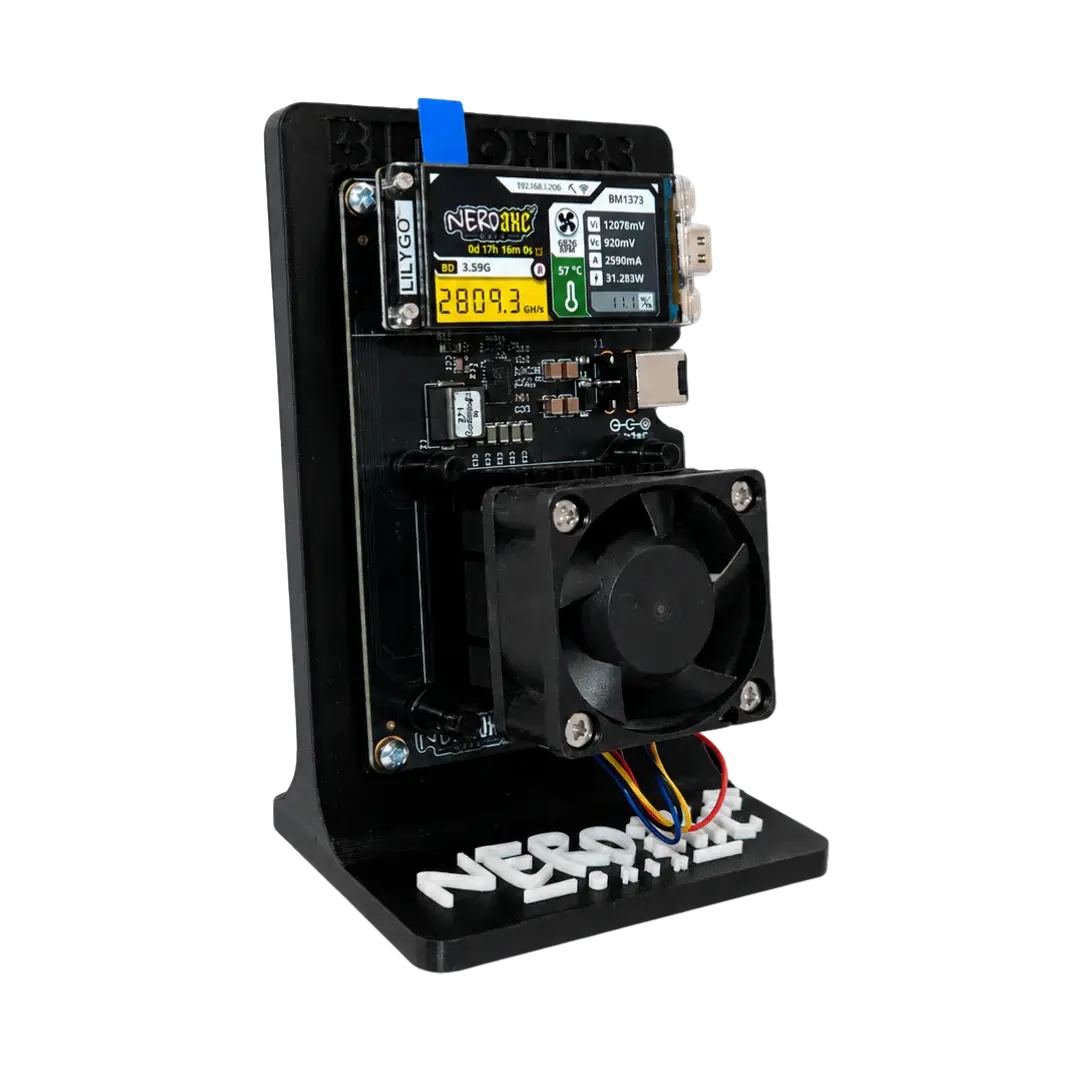
The Nerdaxe Gaia is the first miner in the Nerdaxe format with Bitmain’s BM1373. On the outside much stays the way Nerdaxe owners know it: a board in portrait format, a colour display at the top, a 40 mm fan below it and a stand for your desk. Under the fan, though, the most important number has moved: a single chip delivers more hashrate out of the box than the two chips of a Bitaxe GT. We read the firmware and board definition in the source code, went through the manufacturer’s figures and the first public user report, and put in context what the Nerdaxe Gaia can do, where its limits are and who it is for. The first batch is sold out, the second ships from 7 November 2026. We will add our own measurements as soon as the units are here.
stratum.bitaxe.de, port 3333 and your own Bitcoin address. When overclocking, one user report shows 420 MHz running stable while at 440 MHz the voltage regulator shut down. Second batch, shipping from 7 November 2026. What the Nerdaxe Gaia is
The Gaia belongs to the Nerdaxe line from the BitMaker circle. The hardware was developed by Bitronics, as the firmware’s own System page says; BitMaker maintains the firmware in its own branch of shufps’ Nerd firmware. The principle is the same as with the Nerdaxe Gamma: a single Bitmain ASIC, an ESP32-S3 as controller, a display with the operating values and an interface in the browser. No account, no cloud, no software on your PC.
What is new is the power supply. The Bitaxe Gamma and Nerdaxe Gamma run on 5 volts, the Gaia on 12 volts. The core is fed by a TPS546D24A voltage regulator, which BitMaker lists in the source code as rated for 40 amps. The chip does not need that headroom in normal operation, but it is what makes higher frequency steps possible in the first place.
| Aspect | Nerdaxe Gaia |
|---|---|
| ASIC | 1 × Bitmain BM1373 |
| Factory setting (firmware) | 350 MHz frequency, 940 mV core voltage |
| Expected hashrate out of the box | 2.40 TH/s (firmware calculation) |
| Manufacturer figure | about 2.4 TH/s at 26 to 30 W |
| Efficiency | about 11 to 12.5 J/TH (from the manufacturer figure) |
| Power | 12 V, power supply included; the firmware expects 10.8 to 13.2 V |
| Voltage regulator | TPS546D24A, current limit 28 A (warning) and 33 A (shutdown) |
| Microcontroller | ESP32-S3, Wi-Fi 2.4 GHz only |
| Display | 1.9-inch colour display (LILYGO T-Display S3) |
| Cooling | heatsink with 40 mm PWM fan |
| Firmware | Nerd firmware (NerdOS) in BitMaker’s branch, based on 1.1.0; recommended: OSM-OS gaia-v1.1.1-osm |
| Delivery | pre-order, first batch sold out, second batch from 7 November 2026 |
The BM1373 and what the firmware reveals about it
Home miners use the same chips as the big machines, just one at a time instead of by the hundred. The Bitaxe Ultra uses the BM1366, the Bitaxe Gamma and Nerdaxe Gamma the BM1370, the Gaia the newer BM1373. How BitMaker runs the chip is in the board definition of the Gaia firmware, which is GPL-3.0 like AxeOS:
- 350 MHz frequency and 940 mV core voltage out of the box.
- The drop-down lists offer 300, 320, 340, 350, 360, 380, 400, 420 and 440 MHz, and 900 to 1,040 mV in steps of 20 mV.
- As hard limits for the core voltage the firmware sets 800 and 1,300 mV. There is no frequency cap; it is commented out in the code.
- The fan controller (PID) targets a chip temperature of 60 °C.
- BitMaker raised the regulator’s current limit to 28 A (warning) and 33 A (shutdown). A code comment gives the reason: the shared defaults of 25 and 30 A tripped on the Gaia around 440 MHz at 1 volt, at about 31 A.
These values are not marketing claims but what the miner actually sets on first start. 350 MHz and 940 mV sit in the lower part of the available steps: the Gaia starts efficient and cool, not at the edge.
How the firmware calculates hashrate
The expected hashrate is frequency times core count. The Nerd firmware counts 6,860 small cores for the BM1373, so 350 MHz becomes 2.40 TH/s. That core count is still marked as provisional in the source code; AxeOS uses 6,725 cores for the same chip, which would give 2.35 TH/s. The hashrate on the dashboard, on the other hand, is read from the chip’s own counter and fluctuates around this calculated value.
Hashrate, power draw and efficiency: which number is right?
Different numbers circulate for the Gaia because they describe different operating points. Out of the box the firmware expects 2.40 TH/s. Bitronics states about 2.4 TH/s and for power 26 W on the standard profile or 30 W on its product page, which is 10.8 to 12.5 J/TH. The manufacturer photo above shows 2,809 GH/s at 31.3 W, about 11.1 J/TH. And in September 2026 a user tried higher frequency steps and documented them publicly:
| Operating point | Hashrate | Power | Efficiency | Source |
|---|---|---|---|---|
| 350 MHz / 940 mV (factory) | 2.40 TH/s (calculated) | 26 to 30 W | 10.8 to 12.5 J/TH | firmware, manufacturer figure |
| Manufacturer photo (920 mV) | 2.81 TH/s | 31.3 W | 11.1 J/TH | display on the product photo |
| 400 MHz / 960 mV | 2.7 TH/s | 34.2 W | about 12.7 J/TH | user report, stable for hours |
| 420 MHz / 960 mV | 2.88 TH/s (calculated) | 35.8 W | about 12.4 J/TH | user report, stable for hours |
| 440 MHz / 970 mV | 0 after about 30 seconds | regulator shuts down, about 5 W | not usable | user report, confirmed by BitMaker |
Two things matter here. First, the firmware does not measure watts at the wall on the Gaia: it multiplies voltage and current at the output of the core regulator and adds a flat 5 W. At the wall the figure is somewhat higher because of power supply losses. Second, there is only one public report on higher frequency steps so far (issue #709), and chips differ. Until we have measured it ourselves: about 2.4 TH/s at 26 to 30 W out of the box, and with more frequency up to just under 2.9 TH/s at about 36 W.
What stands out is how little efficiency moves: between about 11 and 12.7 J/TH, whether stock or at 420 MHz. Within the available range, more frequency costs the BM1373 little efficiency as long as the voltage hardly has to rise.
The Gaia compared
This is where the Gaia stands next to the miners it is most often compared with. Hashrate is the firmware’s factory value in each case, power the best available figure with its source:
| Miner | ASIC | Voltage | Hashrate out of the box | Power | Efficiency | Price |
|---|---|---|---|---|---|---|
| Nerdaxe Gaia | 1 × BM1373 | 12 V | 2.40 TH/s | 26 to 30 W (manufacturer) | about 11 to 12.5 J/TH | €249.00 |
| Nerdaxe Gamma | 1 × BM1370 | 5 V | 1.05 TH/s (NerdOS), 1.33 TH/s (OSM-OS) | not measured yet | not measured yet | €159.00 |
| Bitaxe Gamma | 1 × BM1370 | 5 V | 1.07 TH/s, in daily use about 1.1 to 1.2 TH/s | about 17 W (measured at the wall) | about 14 to 16 J/TH | from €139.00 |
| Bitaxe GT | 2 × BM1370 | 12 V | 2.14 TH/s | about 43 W (retailer figure) | about 20 J/TH | €229.00 |
| NerdQaxe++ | 4 × BM1370 | 12 V | 4.90 TH/s | about 76 W (developer) | about 16 J/TH | €349.00 |
The Gaia is not the fastest miner on this list, but the one that needs the least power per terahash. The watt figures come from different sources and measuring methods; our own wall measurement of all devices is still to come.
Gaia or Nerdaxe Gamma?
Both look alike, are operated the same way and sit on the same stand. The difference is under the fan: the Gamma works with a BM1370 and reaches 1.05 TH/s out of the box with NerdOS or 1.33 TH/s with OSM-OS, the Gaia with a BM1373 reaches 2.40 TH/s. That is roughly twice the hashrate from a single chip.

In favour of the Gamma: it is long proven and runs on 5 volts, the same power supply as a Bitaxe Gamma. If you run several 5-volt miners and want to swap power supplies between them, the Gamma keeps things simpler. For everyone else the Gaia is the better choice. How the Nerdaxe family differs from the Bitaxe in general is covered in Bitaxe or Nerdaxe.
Gaia or Bitaxe GT?
The Bitaxe GT is the most direct competitor: both run on 12 volts and sit between 2 and 2.5 TH/s. The GT needs two BM1370 and about 43 W for that, the Gaia one BM1373 and 26 to 30 W. The 13 to 17 W difference adds up to 114 to 149 kWh a year, so about €34 to €45 of electricity at €0.30/kWh, with slightly more hashrate on the Gaia’s side. In favour of the GT: it is a reference design from bitaxe.org, with AxeOS from the main branch and the largest community behind it.
And the NerdQaxe++?
If you are mainly after hashrate, you end up with the NerdQaxe++: four BM1370, 4.90 TH/s out of the box, about 76 W according to its developer. It delivers roughly twice the hashrate of a Gaia and needs two and a half to three times the power for it. The Gaia is the compact, frugal device for the desk, the NerdQaxe++ the workhorse for the shelf. More in our NerdQaxe++ review.
The BM1373 in other miners
The Gaia is not the only device with the new chip. AxeOS, the firmware of the Bitaxe project, gained a driver for the BM1372 and BM1373 in version 2.15.2 (pre-release from 18 September 2026, included in the current 2.15.3). The groundwork was a pull request from August 2026, explicitly for the “Naja Duo 1201” series. The same release added two boards of the “Bitaxe Color” line with a colour display:
- Naja Duo (board 1201): two BM1373 on 12 volts. AxeOS starts the chips at 327 MHz and 1,000 mV and offers 327 to 410 MHz and 1,000 to 1,250 mV. By the firmware’s calculation that is about 4.4 TH/s out of the box.
- Gamma Hex (board 1300): comes from the same release but uses six BM1370, not the BM1373.
The two firmwares count the BM1373 differently, AxeOS with 6,725 small cores, the Nerd firmware with 6,860. We have no measurements of the Naja Duo or Gamma Hex yet, and neither is currently in our range. The release notes are on GitHub.
What the hashrate means for your block odds
Solo mining works like a lottery with fixed tickets: every hash is one attempt. At a difficulty of 132.76 trillion (26 September 2026) a miner with 1 TH/s has odds of about 1 in 18,000 per year. For the devices in the comparison:
| Miner | Hashrate | Odds per day | Odds per year |
|---|---|---|---|
| Nerdaxe Gaia | 2.40 TH/s | 1 in 2.7 million | 1 in 7,500 |
| Nerdaxe Gamma | 1.05 to 1.33 TH/s | 1 in 5.0 to 6.3 million | 1 in 13,600 to 17,200 |
| Bitaxe Gamma | 1.07 TH/s | 1 in 6.2 million | 1 in 16,900 |
| Bitaxe GT | 2.14 TH/s | 1 in 3.1 million | 1 in 8,400 |
| NerdQaxe++ | 4.90 TH/s | 1 in 1.35 million | 1 in 3,700 |
These numbers are meant to sober you up. Odds of 1 in 7,500 per year do not mean a block is due after 7,500 years: it can come tomorrow or never. The Gaia does draw roughly twice as many tickets as a Gamma, though, on only slightly more power. If it finds a block, the whole reward is yours, currently about 3.14 BTC including fees, provided you mine on a solo pool such as pool.bitaxe.de. On average that works out to about 114 satoshis a day for the Gaia.
The mining calculator works out the current figures for the Gaia. How these probabilities come about and which home miners have already found blocks is explained in Finding a block with a Bitaxe.
Electricity cost in daily use
Running around the clock, 26 to 30 W add up to about 19 to 22 kWh a month. At €0.30/kWh:
| Power | kWh per month | Cost per month | Cost per year |
|---|---|---|---|
| 26 W (standard profile per manufacturer) | 19.0 | about €5.70 | about €68 |
| 30 W (manufacturer’s product page) | 21.9 | about €6.60 | about €79 |
| 34 W (400 MHz, user report) | 25.0 | about €7.50 | about €90 |
Compared with a Bitaxe Gamma at about 17 W you pay about €23 to €34 more a year; compared with a Bitaxe GT you save about €34 to €45. How to work out the cost of your whole setup is explained in Bitaxe power consumption and cost.
Power supply: 12 volts instead of 5
The most important practical difference from the Nerdaxe Gamma is the power supply. The Gaia’s firmware expects 10.8 to 13.2 volts at the input; it only switches the core regulator on from 10.5 volts and off again below 9.5 volts. A 5-volt power supply will therefore not get the Gaia running. Above 14 volts the regulator reports overvoltage, so a laptop power supply with 19 or 20 volts does not belong on a Gaia.
A matching 12-volt power supply with a barrel plug is included. If you ever need to replace it, look for 12 volts, enough current headroom and the right plug; the firmware assumes up to 6 amps at the input. A power supply running at its limit gets warm and delivers an unsteady voltage, which can show up as fluctuating hashrate. What matters in general is covered in Which power supply for a Bitaxe.
Cooling, temperature and noise
The BM1373 is cooled by a heatsink with a 40 mm PWM fan whose speed is controlled by an EMC2101 fan controller. With “Auto Fan Control (PID)” the firmware regulates to a chip temperature of 60 °C and by default uses the higher of chip and voltage regulator temperature, because the Gaia has only one fan. OSM-OS enables this control out of the box. BitMaker’s build instead defaults to a fixed fan speed of 70 percent, which you can change in the “Fan Controller” card. The manufacturer photo shows 57 °C at 6,826 RPM.
If it still gets too hot, the “Shutdown Temperature” kicks in: 75 °C in BitMaker’s build, 70 °C in OSM-OS, adjustable in both. The fan then goes to 100 percent, the core voltage drops to zero and the display shows “MINER OVERHEATED”. According to the source code the miner does not restart by itself after that; you restart it.
We will only give a noise figure after measuring it ourselves. A 40 mm fan at almost 7,000 RPM is audible, and the surroundings matter a lot: in a warm shelf without airflow every small miner spins faster than freely on a desk. The levers for quieter operation are in Making your Bitaxe quieter; the article is written for the Bitaxe, but the principles apply here too.
Firmware: the NerdOS branch, OSM-OS and Stratum V2
The Gaia does not run AxeOS but the Nerd firmware (NerdOS), which shufps developed for the NerdQaxe and NerdOctaxe. It comes from the same roots as AxeOS and is operated the same way in the browser. The official NerdOS releases do not contain a Gaia image yet, not even 1.1.0.1 from 24 September 2026. That leaves two sources:
- BitMaker gaia-v1.1.1 (22 September 2026): NerdOS 1.1.0 plus Gaia support. According to a user report, the first units shipped with this code. It is preset with the Bitronics pool and a Bitcoin address that is not yours.
- OSM-OS gaia-v1.1.1-osm (23 September 2026): the same code with adjusted defaults, namely pool
stratum.bitaxe.de:3333, fan control with a 60 °C target, shutdown at 70 °C and the hostname “OSM-Miner”. On top come update tiles for the OSM releases.
We recommend OSM-OS. In the web flasher flasher.bitaxe.de it is preselected for the Gaia, with factory image and update file available; the “AxeOS original” channel has nothing for the Gaia yet. With the install type “Update”, Wi-Fi, pool and address survive the update. The process with screenshots is in Updating AxeOS on a Bitaxe; for the Gaia you simply pick the Nerdaxe Gaia tile in the flasher.
Both Gaia builds are based on NerdOS 1.1.0. The two fixes from 1.1.0.1 are still missing there: larger Stratum V2 jobs as sent by pools with many payouts (PPLNS), and a more precise check of your address in the coinbase. We will update this article as soon as a newer Gaia version appears.
What the firmware can do
Stratum V2 has been on board since NerdOS 1.0.37: an encrypted connection in which the pool identifies itself with its authority key. Since 1.1.0 there is also “Require Authentication”, which only allows verified connections. On top come the “Dual Pool” mode, which splits the work between two pools, a “Coinbase Verification” that checks whether your address is in the block template, and webhook alerts, for example when a block is found. How to set up the encrypted connection is shown in Setting up Stratum V2; on our pool you use port 3336 for it.
What is still open
The source code of the Gaia firmware is public on GitHub. BitMaker has published the board files for the Nerdaxe Gamma in the NerdAxe repository; for the Gaia they are still missing there (as of 26 September 2026).
Setup: on the pool in a few minutes
The new chip changes nothing about the setup. You need a power socket, a 2.4 GHz Wi-Fi and a Bitcoin address from a wallet whose keys you hold yourself.
- Connect. Plug in the power supply. As long as the Gaia cannot reach a known Wi-Fi, it opens an open setup network called
Nerdaxe_XXXX; the name is shown on the display. - Enter your Wi-Fi. Join this network with your phone or laptop. The interface usually opens by itself; under “Settings”, in the “WiFi Settings” card, enter your network and password. The Gaia only supports 2.4 GHz. If your router sends both bands under one name, a separate 2.4 GHz network helps during setup.
- Enter pool and address. In the “Stratum Settings” card fill in Stratum Host, Stratum Port, Username and Password; the values are in the table below. Then “Save” and “Restart”.
- Open the dashboard. After the restart the display shows the IP address. Alternatively you reach the Gaia by its hostname with
.local, on OSM-OS “OSM-Miner” by default. - Check. The first shares arrive after a short while. On pool.bitaxe.de your worker appears as soon as you enter your address there.
| Field in NerdOS | Value for pool.bitaxe.de |
|---|---|
| Stratum Host | stratum.bitaxe.de (without stratum+tcp:// and without port) |
| Stratum Port | 3333, with Stratum V2 3336 |
| Stratum Protocol | Stratum V1, or Stratum V2 with port 3336 and the authority key |
| Username | your Bitcoin address, optionally with a worker name, for example bc1q….gaia |
| Password | x |
The steps with screenshots for the Nerdaxe line are in the Nerdaxe setup guide, and the pool configurator creates the values ready to copy. Choosing a Bitaxe mining pool compares the options. If you want to mine through your own node, Connecting a Bitaxe to your own node applies to the Gaia just the same. If the miner is on Wi-Fi but not hashing, Bitaxe connected but not mining and the miner troubleshooter help.
Overclocking: headroom and limits
The drop-down list goes up to 440 MHz and 1,040 mV. Free values are only available through the barely visible “Danger Zone” button in the “Mining Settings” card; anyone going beyond the list with it gets a clear warning when saving. Frequency and voltage do not need a restart.
Where the limit is shows the user report in issue #709: 400 MHz and 420 MHz at 960 mV ran stable for hours, with the voltage regulator at 68 and 72 °C; already at 400 MHz the fan was at 100 percent. At 440 MHz and 970 mV the core voltage dropped to zero after about 30 seconds and power fell to 5 W. Only a restart brought the Gaia back, and the firmware reported no fault. BitMaker confirmed that the current limit set on the regulator had tripped. Whether it can safely be raised is still being evaluated, as is a fault message for this case.
For daily use this means: go in small steps, watch hashrate and the chip and regulator temperatures for at least 15 to 20 minutes after each step, and do not copy values from a forum, because every chip is a little different. Based on the only report so far, 420 MHz is the ceiling for now; efficiency there is about 12.4 J/TH, hardly worse than stock, but the fan has no headroom left. The overclocking guide describes the process in detail; its section on the Nerd firmware applies to the Gaia just the same.
Pre-order: what you should know
The Gaia is a pre-order item. The first batch is sold out; orders from now on belong to the second batch, shipping from 7 November 2026, strictly in order of receipt. As soon as the units are here, we will add our own measurements of hashrate, power at the wall, temperature and noise to this article.
Who the Gaia is for
The Gaia suits you if you want to stay with the Nerdaxe format and roughly double your hashrate without changing device class. It suits you if power per terahash matters more to you than the last bit of hashrate, and if you want a miner that runs permanently on your desk. As a second device next to a Bitaxe or Nerdaxe Gamma it complements an existing setup well, because the pool settings are the same.
It suits you less if you want to mine right away and do not want to wait until November, or if you are mainly after maximum hashrate; the NerdQaxe++ or the NerdOctaxe are the right class for that. And if you specifically want a bitaxe.org reference design with AxeOS, go for the Bitaxe Gamma or the Bitaxe GT.
Conclusion
The Nerdaxe Gaia is not a leap in size but in efficiency. A single BM1373 delivers about 2.4 TH/s out of the box, more than the two chips of a Bitaxe GT, on considerably less power. The firmware is open, supports Stratum V2 and starts with cautious factory settings, and OSM-OS is ready in the flasher. Still open are the board files, a Gaia build on NerdOS 1.1.0.1 and our own measurements. If you are looking for a frugal, compact solo miner and can wait until November, the Gaia is, based on the figures so far, the most efficient device in our range.
Frequently asked questions about the Nerdaxe Gaia
When does the Nerdaxe Gaia ship?
How much hashrate does the Nerdaxe Gaia deliver?
How much power does the Nerdaxe Gaia use?
Which firmware should I flash on the Nerdaxe Gaia?
Does the Nerdaxe Gaia run AxeOS?
Which power supply does the Nerdaxe Gaia need?
What is the difference between the Nerdaxe Gaia and the Nerdaxe Gamma?
Nerdaxe Gaia or Bitaxe GT?
Does the Nerdaxe Gaia support Stratum V2?
3336 and the authority key; the guide is in Setting up Stratum V2. Can I overclock the Nerdaxe Gaia?
What are the odds of finding a block with the Gaia?
Why is there already an address in the settings on first start?
Matching products


Read more
Bitaxe security: AxeOS login and password, home network, hotspot and remote access
AxeOS never asks for a password: anyone on the same network can change the pool and the payout address. Which gaps are open as of October 2026, how to separate the miner on your home network, reach it without port forwarding and notice a foreign address right away.
Guides & knowledgeMonitoring a Bitaxe: catch outages, heat and wrong payouts without false alarms
Which values the AxeOS API really delivers, when “no share for …” is a real outage, why a Bitaxe runs slower for good after overheating, and how a small script on your home network watches heat, power, fallback pool and coinbase.
Guides & knowledgeSetting up Stratum V2 on a Bitaxe: encrypted solo mining in five fields
Since AxeOS 2.14 every Bitaxe speaks Stratum V2, and since September 2026 so does the Bitaxe Pool. This guide walks through the AxeOS fields one by one, shows how to set up the fallback and verify the connection, and lists what goes wrong when no shares arrive. For Bitaxe, NerdQaxe and large ASICs.