








Power supply for Bitaxe and NerdQaxe: voltage, connector and headroom for every model
15 April 2026 · 11 min read · Updated on 26 September 2026

The power supply is the least noticeable part of a miner and the most common cause of restarts nobody can explain. Every miner from our shop ships with the right supply. This article lists voltage, supply and connector for every model, explains how AxeOS shows you a weak supply, and works out when a stronger unit or one shared supply for several miners makes sense. We checked the connectors in the open hardware files of each device and the limits in the source code of AxeOS 2.15.3 and NerdOS 1.1.0.1.
Which device needs which power supply?
The most important rule first: the voltage has to match exactly. A 5 V supply on a 12 V device never gets its voltage regulator going; the GT, for example, only starts from 11 V. A 12 V supply on a 5 V board damages it. The Gamma designers put it bluntly: “5V DC Only! Anything else will damage the Bitaxe.” These are the supplies that ship with our devices and the connectors on the boards:
| Device | Voltage | Supply in the box | Connector on the device |
|---|---|---|---|
| Bitaxe Gamma 601, Bitaxe Copperzilla, Nerdaxe Gamma | 5 V | 5 V / 6 A (30 W) | barrel jack 5.5 × 2.1 mm, centre positive |
| Nerdaxe Gaia | 12 V | 12 V / 6 A (72 W) | barrel jack 5.5 × 2.1 mm |
| Bitaxe GT 801 | 12 V | 12 V / 5 A (60 W) | XT30 |
| Bitaxe Supra Hex 702 | 12 V | 12 V / 10 A (120 W) | depends on the manufacturer; the open 701 reference design uses screw terminals |
| NerdQaxe++, Copper Pro, NerdQaxe++ Hydro | 12 V | 12 V / 10 A (120 W) | depends on the board revision: 5.5 mm barrel jack rated for 8 A (up to rev. 5.1) or XT30 (rev. 7) |
| NerdQX | 12 V | 12.4 V / 20 A (248 W) | XT60, plus a 15 A fuse on the board |
| NerdOctaxe, NerdOctaxe Hydro | 12 V | 12 V / 20 A (240 W) | XT60 |
| Avalon Nano 3S | up to 28 V via USB-C PD 3.1 | USB-C supply with 140 W | USB-C |
The connectors come from the hardware files: Gamma and Nerdaxe Gamma use the same DC jack (Tensility 54-00164), which according to the Gamma documentation takes a 5.5 × 2.1 mm barrel plug with the centre positive; the designers add that 5.5 × 2.5 mm plugs have been known to work too. The Copperzilla is electrically a Gamma 601 with a large copper cooler. The GT has an XT30 socket as its only power input, NerdQX and NerdOctaxe an XT60 socket. On the NerdQaxe++ it depends on the revision: the open files up to rev. 5.1 show a barrel jack rated for 8 A with an 8 A fuse, rev. 7 an XT30 socket. If in doubt, look at your device; the supplied unit always fits.
USB-C is not a power input. On the Gamma and the GT the USB-C socket is not even connected to the power rail according to the schematic; only the data lines are wired. It is there for flashing and the serial console. The same applies in practice to every Bitaxe and Nerd device: the miner only hashes with the supply on its power socket. The one exception in the table is the Avalon Nano 3S, which is powered through USB-C Power Delivery.
Same plug, different voltage: the most dangerous mix-up
The 5.5 × 2.1 mm barrel plug is one of the most common connectors there is. Routers and many other small devices use it at 12 V, and so does the Nerdaxe Gaia in our range. The Gamma designers warn about exactly this: many supplies with a different voltage use the same connector. A plug that fits mechanically tells you nothing about whether the supply is the right one.
- Check the label before plugging in: the output voltage is printed next to “Output”. For Gamma, Copperzilla and Nerdaxe Gamma it has to say 5 V.
- Label your supplies: if 5 V and 12 V devices share a shelf, put a sticker with device name and voltage on each supply and plug.
- Polarity: Bitaxe devices expect centre positive. The symbol for it is printed on almost every supply. Centre-negative supplies exist, for example for some guitar pedals; they do not belong on a miner.
- XT30 and XT60 only fit one way round. With home-made adapter cables, for example from barrel plug to XT30, still check the polarity with a multimeter before the miner goes on it.
Volts, amps, watts: what a power supply has to deliver
Every supply lists three values. The voltage must match the device exactly. The current in amps is an upper limit: the supply delivers up to that value and the miner only takes what it needs, so more amps never hurt. The power in watts is voltage times current. For continuous use a supply should deliver no more than 80 % of it; above that it runs hot, ages faster and is more likely to sag under load peaks.
| Device | Supply | 80 % of it | Draw at factory settings, roughly |
|---|---|---|---|
| Bitaxe Gamma | 30 W | 24 W | 17 W at the wall (our measurement) |
| Nerdaxe Gaia | 72 W | 57 W | 30 W (manufacturer) |
| Bitaxe GT 801 | 60 W | 48 W | 43 W ±10 % (retailer figure) |
| Bitaxe Supra Hex 702 | 120 W | 96 W | 75 to 90 W (701 designer, retailer) |
| NerdQaxe++ | 120 W | 96 W | about 76 W (designer) |
| NerdQX | 248 W | 198 W | up to 160 W at 8 TH/s (manufacturer) |
| NerdOctaxe | 240 W | 192 W | 160 to 200 W (manufacturer) |
At factory settings almost every device has headroom. On the GT it is small, and on the NerdOctaxe the top of the manufacturer range is even slightly above the 80 % mark. If you want to overclock, look here first. The Gamma has a second limit: the DC jack on the board is rated for 5.5 A, which is 27.5 W, and a stronger supply does not help beyond that. With the stock supply a Gamma therefore tops out at around 24 to 27 W as shown in AxeOS. On a NerdQaxe++ with barrel jack the 8 A fuse on the board is sized for about 96 W at 12 V; overclockers report that it blows above roughly 100 W. On the NerdQX the manufacturer matched the 15 A fuse to the rated power of the device. The NerdOctaxe designer states explicitly that the board is not intended to run overclocked. How far you can go and how to do it is in the overclocking guide; what those watts cost per year is shown in the article on power consumption and in the mining calculator.
How AxeOS shows a weak power supply
You do not have to guess whether your supply is good enough. AxeOS shows it in three places, and each of them is evidence, not a hunch.
1. Input Voltage in the Power card
The Power card on the dashboard shows the Input Voltage, the voltage that actually reaches the board. A small marker on the bar shows the nominal value. On a Gamma 5.0 to 5.2 V is normal. Since AxeOS 2.15 a red “Danger: Low Voltage” appears below it as soon as the voltage drops under 94.9 % of nominal: below 4.75 V on 5 V devices, below 11.39 V on the GT and Supra Hex.
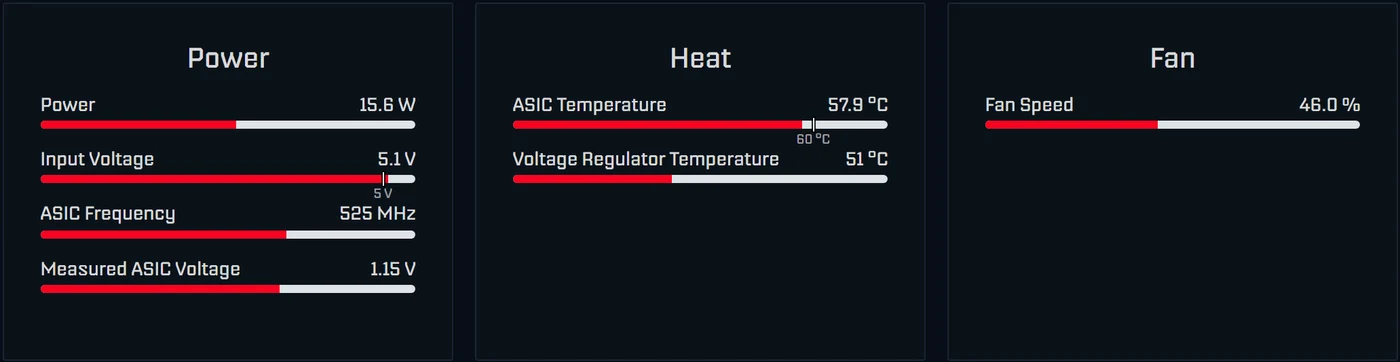
Read the value under load, not right after switching on. If it sits just below 5 V and drops further with every load peak, the supply is too weak, the cable too thin or the plug is not seated properly.
2. “Power Fault Detected. Check your Power Supply.”
If the input voltage falls further, the voltage regulator shuts down. The dashboard then shows “Power Fault Detected. Check your Power Supply.” at the top, the cards say “Not available - Power fault” and the miner stops hashing. The thresholds are in the source code:
| Device | Regulator starts from | Regulator shuts off below | “Danger: Low Voltage” below |
|---|---|---|---|
| Bitaxe Gamma, Copperzilla | 4.8 V | 4.5 V | 4.75 V |
| Bitaxe GT 801 | 11.0 V | 10.5 V | 11.39 V |
| Bitaxe Supra Hex 702 | 11.5 V | 11.0 V | 11.39 V |
The same message appears when the regulator shuts down because of overcurrent or overtemperature, for example after overclocking too hard. After an overcurrent shutdown only a restart helps. There is one trap on the Gamma: its regulator does not accept a core voltage below 1000 mV. If you set the chip below that, or end up there after an overheat event, you also get “Check your Power Supply” although the supply is fine. In that case set the Core Voltage under Settings back to at least 1000 mV; the details are in the overclocking guide.
3. Reset Reason on the System page
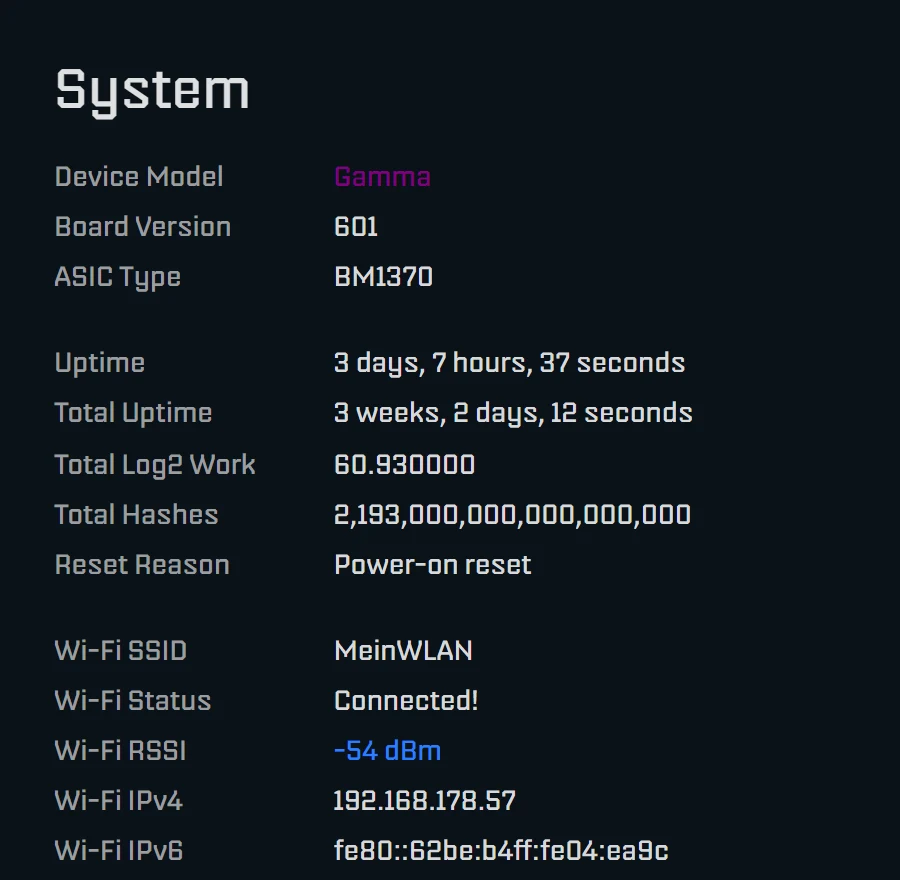
If the miner restarts for no apparent reason, open the System page. Reset Reason shows why it last restarted. “Brownout reset (software or hardware)” means the supply voltage of the ESP32 dipped briefly and the chip restarted itself for protection. That happens when the power supply gives way under a load peak. After a normal power-up it says “Reset due to power-on event” instead.
A quieter sign is the Error value in the hashrate card. AxeOS explains it in its own tooltip and explicitly names undervoltage and a bad power supply as causes of a high error rate. Staying below 0.1 % is very good; what is behind it is explained in Bitaxe hashrate error explained. All dashboard readings at a glance: AxeOS explained.
NerdOS on Nerdaxe, NerdQaxe and NerdOctaxe shows the input voltage on the dashboard in the “Power Usage” card as “Current Voltage”; there is no red warning like in AxeOS. The reason for the last restart is on the System page as “Last Reset Reason”, and after a voltage dip it reads “Brownout reset”. On the 12 V devices the scale of this reading runs from 11 to 13 V; if the value sits at the low end under load, check supply and cable.
Restarts without a temperature problem are almost always down to the power supply. The miner troubleshooter asks exactly that first.
Cables and plugs: where the tenths of a volt go
At 5 V a few tenths of a volt decide between stable and unstable, and every centimetre of cable costs some of them. An example calculation for copper: a Gamma draws about 3.5 A at factory settings (17 W at the wall divided by 5 V). One metre of lead with 0.5 mm² cross-section (roughly 20 AWG) has 2 m of conductor there and back, about 0.07 Ω. That costs 0.25 V. 5.0 V at the supply becomes 4.75 V at the board, exactly where the warning starts. With 1.0 mm² (roughly 17 AWG) it is half that.
- Short, not long: move the supply next to the miner rather than extending the cable. Barrel-plug extension leads are often very thin.
- Push the plug all the way in: a half-seated barrel plug has more contact resistance. One of the Bitaxe developers put it simply: no matter how many watts your supply has, if the connector has too much resistance the Bitaxe will fault (issue 1188).
- Take warm plugs seriously: if the plug or jack gets noticeably warmer than the cable, the resistance there is too high. Replace plug and supply.
- A little more voltage is allowed: according to the schematic the Gamma input range is 4.5 to 5.5 V. A supply set to 5.1 or 5.2 V compensates for cable losses and is harmless. The NerdQX even ships with a 12.4 V supply.
Several miners on one power supply
If you run several miners, you can combine them on one shared supply. For 5 V devices the Mean Well LRS-100-5 is a common choice: 5 V, up to 18 A, 90 W. By the 80 % rule, 14.4 A of continuous load is sensible. The maths with about 3.5 A per Gamma at factory settings:
| Gammas on one LRS-100-5 | Total current | Load | Verdict |
|---|---|---|---|
| 3 at factory settings | about 10.5 A | about 58 % | good, with headroom |
| 4 at factory settings | about 14 A | about 78 % | at the limit, do not overclock |
| 2 overclocked (625 MHz / 1250 mV, about 25 W) | about 10 A | about 56 % | good |
| 3 overclocked | about 15 A | about 84 % | too tight |
- Every miner gets its own lead to the supply, no daisy-chaining from device to device. At least 0.75 mm², better 1.0 mm², and as short as possible.
- Set the output voltage: the LRS units have a small trimmer (V ADJ). With a multimeter at the end of the lead, set 5.1 V.
- Mains wiring only by someone qualified: the LRS series are built-in supplies with screw terminals, and the input side carries mains voltage. Wiring, protective earth and touch protection belong in qualified hands.
- Leave room: the LRS-100-5 is passively cooled and needs space around it.
For 12 V devices the counterparts are the LRS-150-12 (12 V / 12.5 A) for one NerdQaxe++ with plenty of headroom or the LRS-350-12 (12 V / 29 A) for several. With one or two miners the supplied unit is the simpler and equally reliable solution. A shared supply only pays off once the setup is meant to run permanently and tidily.
Bench supply, battery and solar
A bench power supply works if it can deliver the current continuously: for a Gamma the designers ask for more than 4 A, 6 A is better. Set the voltage before connecting the miner and put the current limit above the demand, otherwise the supply turns the voltage down under load.
For running from a battery or a solar system the 12 V devices are a better fit than the 5 V ones. Since AxeOS 2.15 the GT and Supra Hex accept up to 14.8 V at the input before the regulator shuts off; before that the limit was 14.0 V. The developers raised it explicitly for solar setups. The lower thresholds are the ones in the table above. 5 V devices always need a converter that delivers a stable 5 V and never go straight onto a battery. Whether a miner pays off on surplus power is covered in the article on power consumption.
When a stronger power supply actually helps
- Overclocking: as soon as the draw rises above 80 % of the rated power. On the Gamma, though, the jack sets the limit at 27.5 W, and on a NerdQaxe++ with barrel jack the 8 A fuse does.
- Several miners: see above.
- “Danger: Low Voltage” despite a short cable: then the supply is too weak or worn out. Replace it, do not live with it.
- Replacement after a defect: same voltage, at least the same current, a matching plug, in that order. For the Gamma the designers name the Mean Well GST60A05-P1J (5 V, 30 W) as a proven supply.
An upgrade does not make sense in the hope that more watts bring more hashrate. Hashrate depends only on the clock and voltage of the chip, which you set in AxeOS. The supply just has to deliver them steadily. It will not make the miner quieter either; what does is in making a Bitaxe quieter.
Running a miner abroad: mains voltage and plug
The label lists the input range next to “Input”. If it says 100 to 240 V, the supply works on household mains anywhere in the world and you need at most a travel adapter for the mains plug; no voltage converter is required. The output side does not change, the miner still gets its 5 or 12 V.
Setup and first start are covered in the guides for the Bitaxe Gamma, for all Bitaxe models and for the NerdQaxe++; long-term experience with the NerdQaxe++ is in the NerdQaxe++ review.
Frequently asked questions about power supplies
Which power supply does the Bitaxe Gamma need?
Which connector do the Bitaxe GT, NerdQaxe++ and NerdOctaxe use?
Can I power a Bitaxe over USB-C?
What does “Danger: Low Voltage” mean in AxeOS?
What does “Brownout reset” under Reset Reason mean?
What does “Power Fault Detected. Check your Power Supply.” mean?
Can the power supply deliver 5.1 or 5.2 V?
Can I use a 12 V supply on the Gamma if the plug fits?
Does a power supply with more amps do any harm?
How many Gammas can run on one Mean Well LRS-100-5?
Can I run a Bitaxe from a bench power supply?
Why does my power supply get warm?
Matching products


Read more
Nerdaxe Gaia: what the BM1373 miner can do, which firmware to run and who it is for
A single BM1373 in the familiar Nerdaxe format: factory settings from the source code, hashrate and power draw with every documented figure, the 12-volt power supply, OSM-OS from the flasher, setup, overclocking up to the current limit, block odds and electricity cost, plus a comparison with the Nerdaxe Gamma, Bitaxe GT and NerdQaxe++.
Guides & knowledgeSetting up Stratum V2 on a Bitaxe: encrypted solo mining in five fields
Since AxeOS 2.14 every Bitaxe speaks Stratum V2, and since September 2026 so does the Bitaxe Pool. This guide walks through the AxeOS fields one by one, shows how to set up the fallback and verify the connection, and lists what goes wrong when no shares arrive. For Bitaxe, NerdQaxe and large ASICs.
Guides & knowledgeNerdQaxe++ review: 4.8 TH/s from four BM1370, and who should upgrade from a Bitaxe
Four BM1370 on one board, 4.9 TH/s expected out of the box, about 76 W, two fans and NerdOS in the browser: we put the NerdQaxe++ in context. Factory values from the firmware, board revisions, noise, running costs, block odds, setup in NerdOS and the comparison with the Bitaxe Gamma, GT and 702, Copper Pro, Hydro, NerdQX and NerdOctaxe.