








Connect a Bitaxe to your own node: Public Pool on Umbrel with port 2018 and a fallback pool
25 April 2026 · 14 min read · Updated on 26 September 2026

The Public Pool app turns your Umbrel into your own solo pool: your Bitcoin node builds the block template, your Bitaxe searches for the winning hash, and if it finds one, the entire reward goes to your address. No third-party server sits in between any more. This guide, as of September 2026 (AxeOS 2.15.3, NerdOS 1.1.0.1, umbrelOS 2.0), shows how to install the app, which values go into the miner, why a fallback pool is a must and how to recognise errors. How to set up the node itself and which hardware is enough is covered in Running your own Bitcoin node.
umbrel.local (or the Umbrel’s IP), Stratum Port 2018, Stratum Protocol Stratum V1, User yourBitcoinAddress.bitaxe, Password x. As a fallback, add stratum.bitaxe.de with port 3333 and the same address in Pool 2, so the miner keeps hashing when the Umbrel restarts. Then Save and Restart. How node, Public Pool and miner work together
Two apps run on the Umbrel for this. The Bitcoin Node app (Bitcoin Core) holds the blockchain and the mempool and validates every block itself. Public Pool by Benjamin Wilson is an open-source solo pool: it fetches the block template from your node via RPC, hands out work to your miners and accepts their connections on port 2018. If a miner finds a valid block, Public Pool submits it to the network through your node. The Bitaxe only supplies the hash rate.
The reward sits in the block’s coinbase transaction and goes entirely to the address in the user field; the Umbrel app takes no fee. Every block Public Pool finds on an Umbrel carries the tag “Public Pool on Umbrel” in its coinbase. Your own node does not change the odds of finding a block, they depend only on your hash rate: for a Bitaxe Gamma they are about 1 in 16,900 per year, exactly as on an external solo pool. What you gain is independence: your own node decides which transactions would be in your block. The numbers for every model are in Finding a block with a Bitaxe.
Prerequisites
| Component | What you need |
|---|---|
| Node | A computer running umbrelOS with the Bitcoin Node app, for example the LiquidBox V5 (Intel N150, 16 GB RAM, 2 TB NVMe, Umbrel preinstalled, about 10 W), another mini PC or a Raspberry Pi 5 with an SSD |
| Storage | The block data took about 770 GB in September 2026 and grows by about 80 GB a year. Get a 2 TB SSD; a 1 TB SSD will soon be tight |
| Sync | The node must be fully synced. Depending on CPU and SSD, the initial sync takes days rather than hours |
| Network | Umbrel on a LAN cable to the router, miner on the 2.4 GHz Wi-Fi of the same home network, not on the guest network |
| Miner | Bitaxe running AxeOS 2.15, or a NerdQaxe, Nerdaxe or NerdOctaxe running NerdOS 1.1, already on Wi-Fi (setup guide) |
| Address | Your own Bitcoin address (on-chain, e.g. bc1q…) from a wallet whose keys you hold yourself. No Lightning address, no exchange address |
The node is ready when the Bitcoin Node app shows the sync as complete and its block height matches the one on mempool.space. Before that, Bitcoin Core hands out no block template and replies with “Bitcoin Core is in initial sync and waiting for blocks...”; Public Pool then has no work for your miner. If you want to buy node and miner together: the Sovereign Stack V1 bundles a LiquidBox V5 with a Bitaxe Gamma, the Sovereign Stack V2 a LiquidBox V5 with a Nerdaxe Gamma. The initial sync still runs once there too.
Step 1: install Public Pool on Umbrel
- Open Umbrel in the browser (
umbrel.local), go to the App Store and search for “Public Pool”. The app’s subtitle is “Fully Open Source Solo Bitcoin Mining Pool” and it is made by Benjamin Wilson. - Click Install. Public Pool requires the Bitcoin Node app and connects to it automatically on umbrelOS. There is nothing to configure.
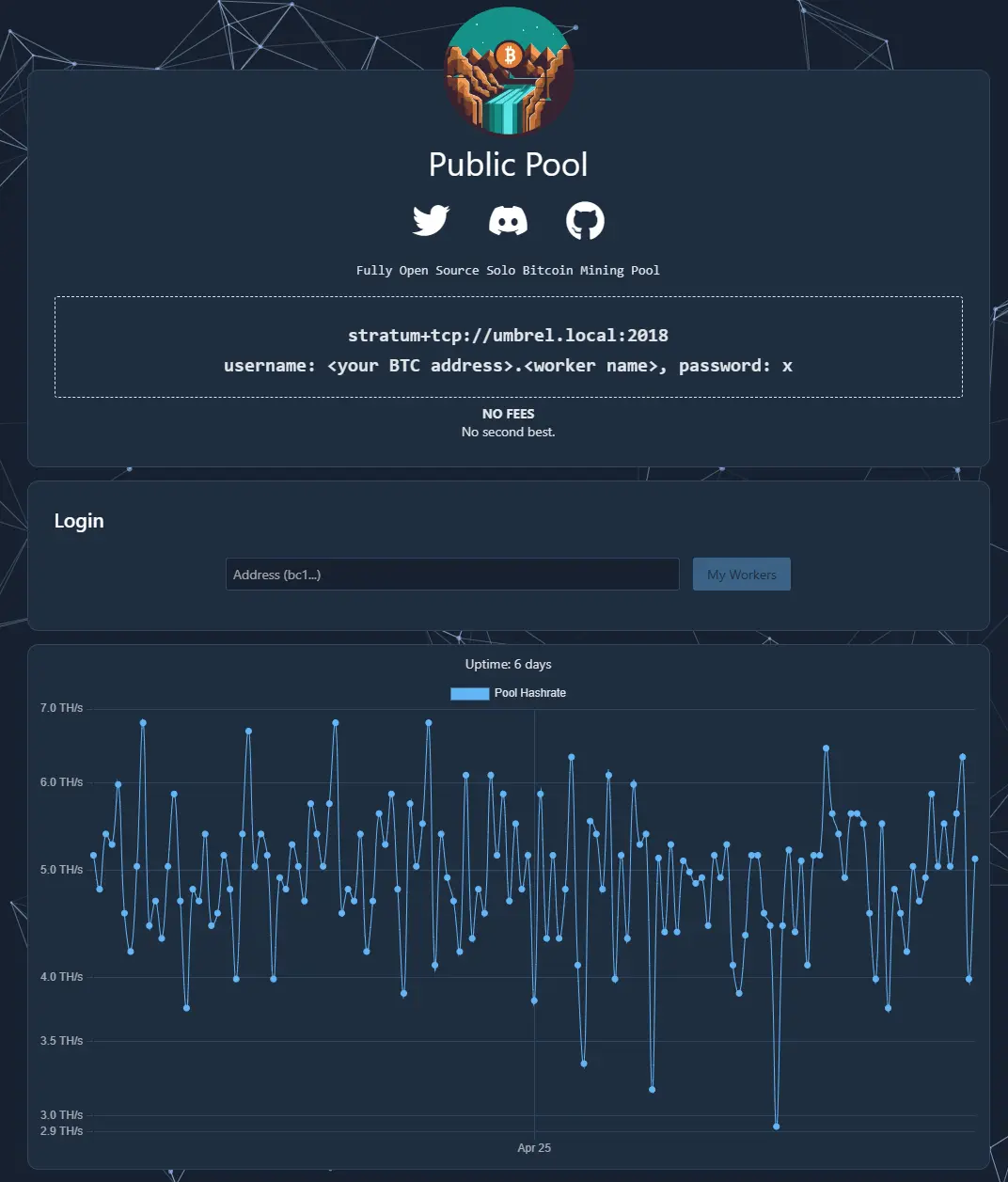
- Open the app. At the top it shows what the miner needs:
stratum+tcp://umbrel.local:2018, the username<your BTC address>.<worker name>and the passwordx. - Public Pool comes with a widget for the Umbrel home screen. It shows Hash Rate, Miners, Blocks Found and Block Height, so you can see at a glance whether your miners are connected.
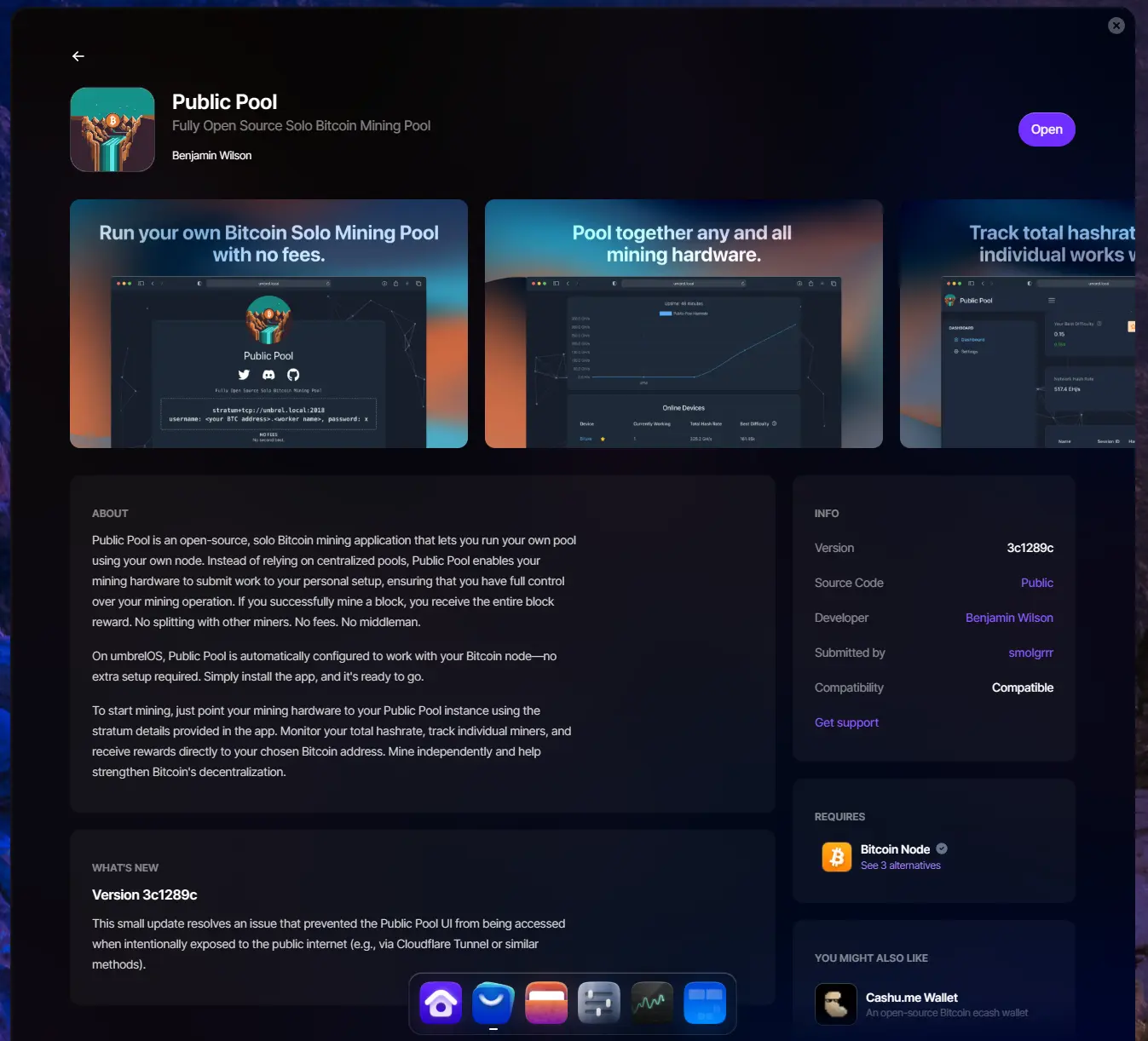
Step 2: enter the Bitaxe in AxeOS 2.15
Open AxeOS in the browser: since version 2.15 at http://bitaxe.local (or your miner’s hostname with .local), otherwise via the IP shown on the display. In the menu on the left, choose Pool.
- Expand Pool 1 and enter
umbrel.localor the Umbrel’s IP under Stratum Host, withoutstratum+tcp://and without the port. If you paste the full linestratum+tcp://umbrel.local:2018from Public Pool, AxeOS 2.15 splits it into host and port by itself. - Enter
2018under Stratum Port and leave Stratum Protocol on Stratum V1. - Under User, delete the factory address and paste your Bitcoin address, with a dot and a device name, e.g.
bc1q….gamma. Under Password enterx; Public Pool does not evaluate the field. - Under “Show Advanced Options”, Connection Security stays on “No TLS”. The Umbrel app has no encrypted port.
- Set up Pool 2 as the fallback (next section), select Pool 1 as Primary Pool and Pool 2 as Fallback Pool under “Active Pool Selection” at the top, then Save and Restart. Pool changes only take effect after the restart.
| Field on the Pool page | Pool 1 (primary) | Pool 2 (fallback) |
|---|---|---|
| Stratum Host | umbrel.local or the Umbrel’s IP | stratum.bitaxe.de |
| Stratum Port | 2018 | 3333 |
| Stratum Protocol | Stratum V1 | Stratum V1 |
| User | bc1q….gamma (your address, a dot, a device name) | the same address, e.g. bc1q….gamma |
| Password | x | x |
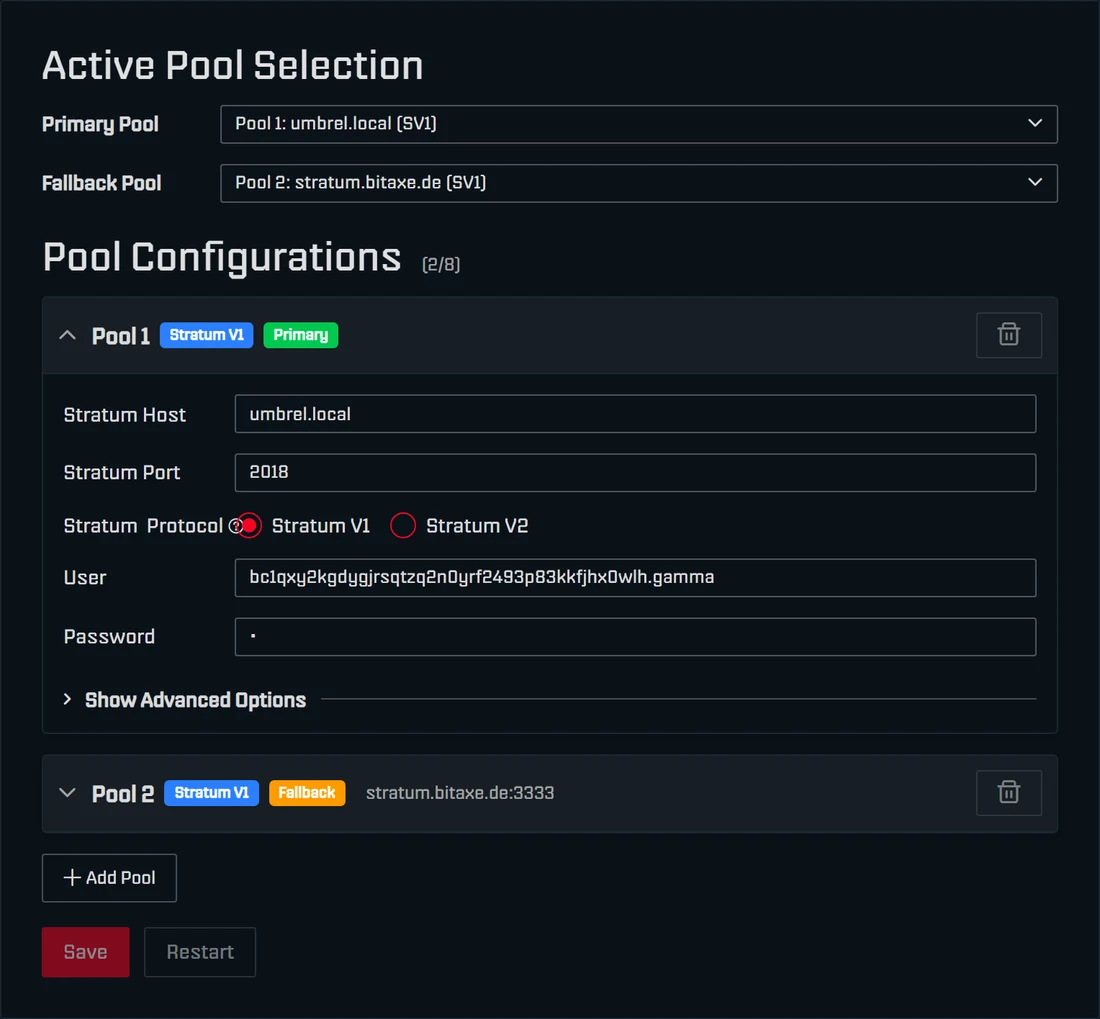
If you see no “Primary Pool” and “Fallback Pool” selection, your miner runs older firmware. In AxeOS 2.14 the same fields sit on the Pool page under “Pool Configuration” and “Fallback Pool Configuration”. Updating to 2.15 is the better option: easiest with flasher.bitaxe.de, where OSM-OS is preselected and the “keep configuration” checkbox preserves Wi-Fi and pool. All routes are in the AxeOS update guide.
The fallback pool: so the miner never stands still
Since AxeOS 2.14, if the miner cannot reach any of its pools, it pauses mining, cuts power to the chips and tries again every 30 seconds. With Public Pool as your only pool, your Bitaxe therefore stops every time the Umbrel restarts, updates or loses power. The logs then show “All configured pools unreachable, pausing mining to conserve power.”
With a fallback it works differently: if the connection to the Umbrel fails three times in a row, AxeOS switches to Pool 2 and shows the notice “Using fallback pool” on the dashboard; the share statistics start from zero. Every minute the miner checks whether the Umbrel is reachable again and then switches back by itself. In the logs this reads “Switching to fallback pool” and later “Primary pool is back! Switching from fallback.” With several miners, the Swarm page flags each device with “Fallback Pool” for as long as it is not hashing on the Umbrel.
As the fallback we recommend our solo pool pool.bitaxe.de: host stratum.bitaxe.de, port 3333, 0 % fee, server in Frankfurt, no account. A block found there would also go entirely to your address. Make sure your own address is in the fallback: from the factory, Pool 2 also holds someone else’s address. The yellow warning on the Pool page only appears for the official AxeOS factory address, not for every foreign address. So check both pools yourself.
Step 3: check that everything works
- AxeOS, Pool card: URL shows
umbrel.local:2018, Fee 0 %, Mode SV1. On the Shares card the number of accepted shares goes up. - AxeOS, Block Header card: under Outputs your address appears with a star. So a found block would go to you.
- Public Pool: your device appears under “Online Devices”. Enter your address in the “Address” field and click My Workers: there you see your workers with Hash Rate, Session Best Difficulty and Last Seen.
- Umbrel widget: Miners counts the connected devices, Hash Rate their total.
NerdQaxe, Nerdaxe and NerdOctaxe: entering the pool in NerdOS
The devices of the Nerd series run NerdOS, the firmware by shufps. There the pool details are not on a page of their own but under Settings in the Stratum Settings card:
- Set Pool Mode to Failover (Primary/Fallback). Not “Dual Pool”: that mode splits the work between both pools, e.g. 70 to 30.
- Primary Stratum Pool tab: Stratum Protocol Stratum V1, Stratum Host
umbrel.localor the IP, Stratum Port2018, Username your address with a device name, Passwordx. NerdOS does not acceptstratum+tcp://or a port in the host field. - Fallback Stratum Pool tab: Stratum Host
stratum.bitaxe.de, Stratum Port3333, the same address, Passwordx. - Save. NerdOS then reconnects. It only asks for a restart after certain changes, such as the protocol or the pool mode, and tells you so.
If the Umbrel goes down, NerdOS connects the fallback pool and disconnects it again as soon as the primary is back. The complete setup is shown in the guides for the NerdQaxe++ and the Nerdaxe Gamma.
Several miners on one node
Every additional miner gets the same values; only the device name after the dot changes: bc1q….gamma1, bc1q….gamma2, bc1q….nerdqaxe. Public Pool splits at the first dot: before it is the address a block would pay, after it the worker name of up to 64 characters. Without a name the worker is simply called “worker”. If a device finds a block, the reward goes to the address in that very device’s user field; Public Pool splits nothing. Block 920,440 shows that an Umbrel can serve a small fleet too: the home setup behind it consisted of six NerdQaxe++ and one Avalon Q.
The most common errors and what the logs say
In AxeOS you find the logs in the menu under Logs. These are the cases we see most often:
- Node still syncing. During the initial sync Bitcoin Core hands out no block template, so Public Pool has no work for the miner. Let the sync finish first, then restart the miner.
- Port 3333 instead of 2018. 3333 is the port of the public Public Pool and of many other pools; the Umbrel app only listens on 2018. The logs then usually show “Transport unable to connect to umbrel.local:3333”.
- umbrel.local does not resolve. Log: “DNS resolution failed for umbrel.local:2018”. Enter the Umbrel’s IP instead and give it a fixed address in the router (DHCP reservation) so it stays the same after a reboot. You find the IP in Umbrel’s settings and in your router’s device list.
- Protocol or port in the host field. AxeOS 2.15 splits pasted addresses by itself and does not allow
stratum+tcp://in the host field. On older AxeOS versions and in NerdOS only the name belongs in the host field and the port in its own field. - Guest Wi-Fi. Guest networks separate their devices from the home network. The miner is online but cannot reach the Umbrel. Move it to the normal 2.4 GHz Wi-Fi of the same router.
- Wrong address. Public Pool checks the address format including its checksum and rejects typos. It cannot recognise a foreign but valid address, such as the factory address in the fallback. Copy the address from your wallet and check on the Block Header card that it appears with a star under Outputs.
- Public Pool outdated after a node update. In October 2024 Public Pool stopped working after the Bitcoin Node app was updated to Bitcoin Core 28, until Umbrel shipped an adapted version on 31 October. If nothing works after a node update, check the App Store for a Public Pool update as well.
- Everything changed at once. Afterwards nobody knows what helped. Order: sync finished? Public Pool opens in Umbrel? Host and port right in AxeOS? Your own address entered? Then Save and Restart.
If the miner still produces no shares, the troubleshooter walks through the remaining causes from router to firmware; Wi-Fi related cases are explained in Bitaxe connected to Wi-Fi but not mining.
Security: open nothing to the outside
This setup needs no port forwarding in the router: miner and node only talk to each other on the home network. If you open port 2018 to the internet, strangers’ miners can use your node, and the Umbrel becomes needlessly exposed. For remote access to the Umbrel interface there is the Tailscale app in the App Store, a VPN for your own devices.
That does not connect a miner at another location, though: neither AxeOS nor NerdOS includes a VPN client. For a miner at a second site, a solo pool such as stratum.bitaxe.de is the simpler route.
Stratum V2, DATUM or a solo pool: the alternatives
Public Pool on Umbrel only speaks Stratum V1. The Umbrel app uses the SQLite-based edition of Public Pool, which contains Stratum V1 only, and exposes port 2018 alone. Stratum V2 and DATUM so far only exist in the branch that runs the public pool at public-pool.io (as of September 2026).
| Public Pool on Umbrel | DATUM on Umbrel | pool.bitaxe.de | |
|---|---|---|---|
| What it is | solo pool on your node | your own block templates, by default in the OCEAN pool | solo pool with its server in Frankfurt |
| Fee | 0 % | 1 % at OCEAN with DATUM | 0 % (SOLO Groups 1 %) |
| A found block | entirely to your address | by default shared via TIDES; solo only after reconfiguring | entirely to your address |
| Entry in the miner | umbrel.local, port 2018 | the Umbrel’s IP, port 23334 | stratum.bitaxe.de, port 3333 |
| Stratum V2 | no | no, DATUM instead of V2 | yes, port 3336 |
| Own node | yes, fully synced | yes, pruned also works | not needed |
| Running cost | node at about 10 W: about €2.20 a month at €0.30/kWh | same as Public Pool | none |
DATUM is the protocol of the OCEAN pool and a separate app on Umbrel. Your node builds the block template, but by default you are paid through OCEAN using the TIDES method: a found block is shared among all of the pool’s miners, OCEAN pays on-chain only from 1,048,576 satoshis, smaller amounts only via Lightning (BOLT12). If OCEAN is unreachable, DATUM disconnects the miners in its default setting. Solo mining via DATUM only works once you switch off the pool server in its configuration. Block 913,272 shows what this looks like in practice: a NerdQaxe++ found it via DATUM in September 2025, and the reward was split across 17 addresses.
For a Bitaxe, Public Pool on Umbrel is therefore the most direct route to your own solo mining. Stratum V2 with an encrypted connection is available on our pool on port 3336; the setup is shown in Setting up Stratum V2. If you do not want to run a node, enter stratum.bitaxe.de directly as the primary. The pool configurator creates the values ready to copy, all pools are compared in Choosing a Bitaxe mining pool, and our own pool is described in Bitaxe Pool: solo mining from Frankfurt.
Blocks found with Public Pool on Umbrel
Solo mining on your own node is not theory, the blockchain proves it. As of 26 September 2026, six blocks carry the tag “Public Pool on Umbrel” in their coinbase, the most recent being block 948,146 on 6 May 2026. For two of them it is known what did the hashing:
| Block | Date (UTC) | Reward | Miner according to reports |
|---|---|---|---|
| 888,989 | 23 March 2025 | 3.15188086 BTC | a Bitaxe; the first block ever found with the Public Pool software |
| 920,440 | 23 October 2025 | 3.14115228 BTC | home setup of six NerdQaxe++ and one Avalon Q; which device hit has not been published |
| 928,985, 937,218, 947,073, 948,146 | December 2025 to May 2026 | about 3.13 to 3.15 BTC each | not published |
For block 888,989 the entire reward went to a single address, no fee was deducted. It is one of five documented solo blocks found by a Bitaxe so far. Hits like this are luck: a Bitaxe Gamma at about 1.07 TH/s needs about 16,900 years for a block on average. What your device costs in electricity and what it can expect on average is calculated by the mining calculator.
Frequently asked questions about Bitaxe, Umbrel and Public Pool
Which port does Public Pool use on Umbrel?
umbrel.local with port 2018 in the miner. Port 2019 only serves the app’s web interface. Port 3333 applies to the public Public Pool at public-pool.io, not to the Umbrel app. What do I enter in AxeOS for Public Pool on Umbrel?
umbrel.local or the Umbrel’s IP, Stratum Port 2018, Stratum Protocol Stratum V1, User your Bitcoin address with a dot and a device name, Password x. Add stratum.bitaxe.de with port 3333 as the fallback in Pool 2. Then Save and Restart. Do I need a fallback pool when mining on my own node?
Does Stratum V2 work with Public Pool on Umbrel?
Does the Bitcoin node have to be fully synced?
My Bitaxe cannot find umbrel.local: what now?
How do I connect a NerdQaxe or Nerdaxe to Public Pool on Umbrel?
umbrel.local with port 2018 and your address in the Primary Stratum Pool tab, and stratum.bitaxe.de with port 3333 in the Fallback Stratum Pool tab. Then Save. Public Pool or DATUM: which is better for a Bitaxe?
What happens to the miner during an Umbrel update?
Can I mine on my Umbrel from outside my home network?
Who gets the block when several miners are connected to my node?
Has anyone found a block with Public Pool on Umbrel?
Matching products


Read more
Nerdaxe Gaia: what the BM1373 miner can do, which firmware to run and who it is for
A single BM1373 in the familiar Nerdaxe format: factory settings from the source code, hashrate and power draw with every documented figure, the 12-volt power supply, OSM-OS from the flasher, setup, overclocking up to the current limit, block odds and electricity cost, plus a comparison with the Nerdaxe Gamma, Bitaxe GT and NerdQaxe++.
Guides & knowledgeSetting up Stratum V2 on a Bitaxe: encrypted solo mining in five fields
Since AxeOS 2.14 every Bitaxe speaks Stratum V2, and since September 2026 so does the Bitaxe Pool. This guide walks through the AxeOS fields one by one, shows how to set up the fallback and verify the connection, and lists what goes wrong when no shares arrive. For Bitaxe, NerdQaxe and large ASICs.
Guides & knowledgeNerdQaxe++ review: 4.8 TH/s from four BM1370, and who should upgrade from a Bitaxe
Four BM1370 on one board, 4.9 TH/s expected out of the box, about 76 W, two fans and NerdOS in the browser: we put the NerdQaxe++ in context. Factory values from the firmware, board revisions, noise, running costs, block odds, setup in NerdOS and the comparison with the Bitaxe Gamma, GT and 702, Copper Pro, Hydro, NerdQX and NerdOctaxe.