








Run your own Bitcoin node: hardware, cost and setup in 2026
28 February 2026 · 14 min read · Updated on 26 September 2026

A wallet app shows you a balance. How does it know? Usually from a server somebody else runs. Your own Bitcoin node replaces that server: it downloads the entire blockchain, checks every block and every transaction itself against the consensus rules and answers the question “is this balance mine?” from its own knowledge. This guide, as of September 2026, shows what a node gives you, which hardware is enough, which software and operating system fit, what running it costs and how the node becomes your own solo pool for your Bitaxe.
umbrel.local, port 2018. What a Bitcoin node does
A node is a computer running Bitcoin software such as Bitcoin Core. It connects to other nodes, receives new transactions and blocks and checks each of them against the rules: valid signatures, no double spend, correct block reward, valid proof of work. Whatever fails is discarded. It keeps the entire blockchain since 2009 locally, up to block height 968,673 on 26 September 2026, and knows the mempool, the transactions waiting for confirmation.
A node produces no hashrate and finds no blocks. It decides which blocks are valid: miners deliver the work, nodes check it. Because many independent nodes perform this check, nobody can change Bitcoin’s rules on their own. Current figures such as block height, difficulty and hashrate are on our Bitcoin network page.
What your own node gives you day to day
- A wallet without third-party servers. Sparrow, Electrum and other wallets query your node instead of a provider. Nobody sees which addresses you are interested in, and nobody can show you a wrong balance.
- Your own mempool and fee estimate. The Mempool app shows you live which fee a transaction needs right now, calculated from your node’s data.
- Lightning and payments. A Lightning node (LND or Core Lightning) and BTCPay Server require your own Bitcoin node. Our shop accepts bitcoin exactly this way, through our own BTCPay Server; Paying with bitcoin at Bitaxe.de shows what that looks like.
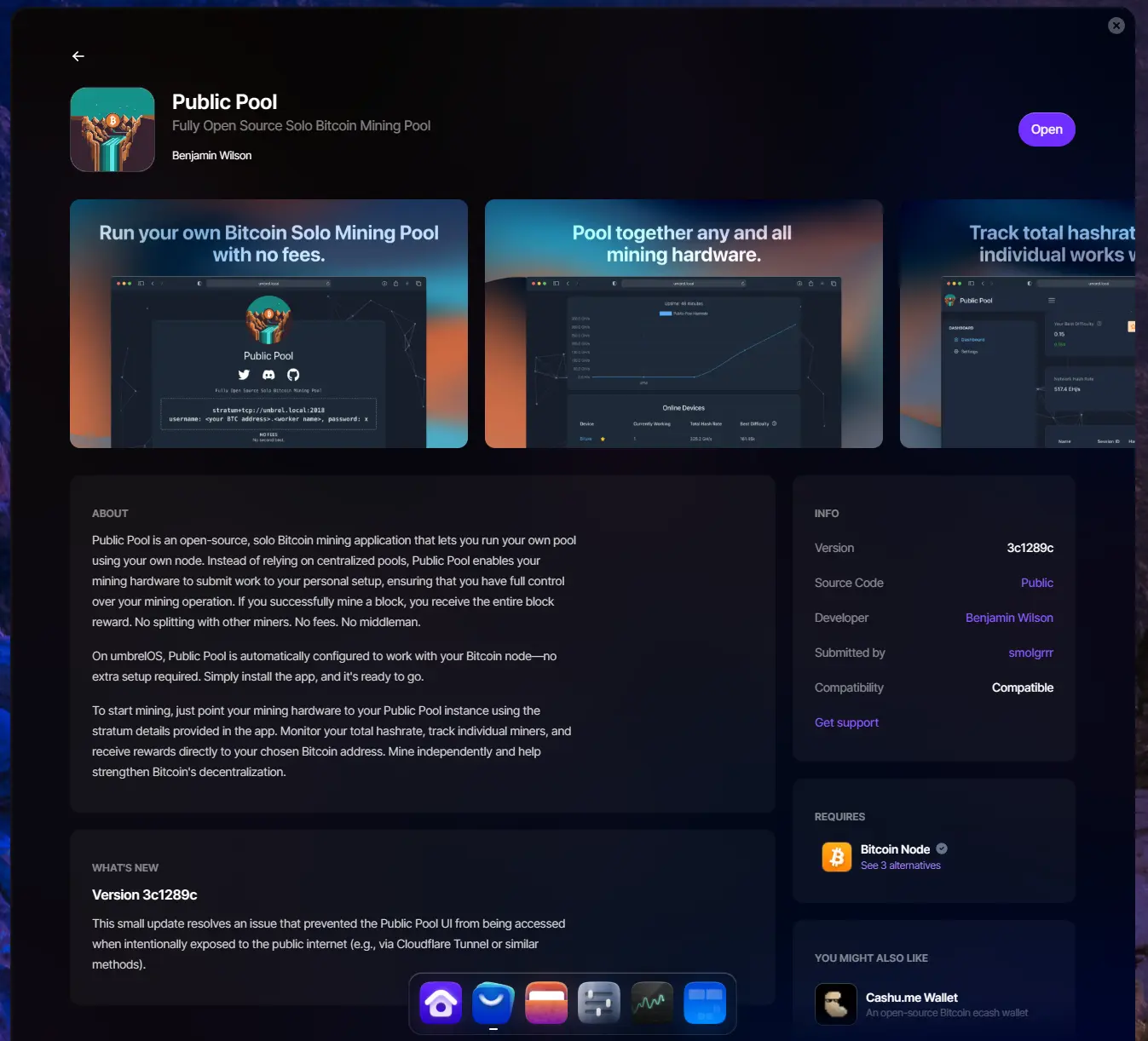
- Your own solo pool. With the Public Pool or DATUM app your node builds the block template for your Bitaxe itself instead of taking it from an external pool.
- A voice in the network. Every node that checks the rules makes Bitcoin more robust against changes its users do not want.

Which hardware is enough in 2026
A node does not need a powerful computer, but one that runs around the clock and has enough fast storage. This is what we recommend in 2026:
| Component | Recommendation | Why |
|---|---|---|
| Storage | 2 TB SSD, ideally NVMe | The block data takes about 770 GB and grows by about 80 GB a year, plus undo data, the chainstate and the indexes of apps such as Electrs. A 1 TB SSD will soon be tight. |
| RAM | 8 GB, better 16 GB | Umbrel lists 4 GB as the minimum and recommends 8 GB or more. With Lightning, Mempool and an Electrum server running in parallel, 16 GB gives you headroom. |
| Processor | 64-bit, two cores minimum, better four | The first sync checks every block since 2009, soon 970,000 of them. That is computing work; afterwards the processor has little to do. |
| Network | LAN cable to the router | The first sync downloads the entire blockchain. Wi-Fi works, a cable is more stable. |
| Power | frugal, always on | A mini PC with an Intel N150 such as the LiquidBox V5 draws about 10 W according to its spec sheet, about 88 kWh a year. |
| Raspberry Pi | Pi 5 with NVMe or USB SSD | Umbrel now supports only the Pi 5 among Raspberry Pis and advises booting from NVMe or USB rather than a microSD card. RaspiBlitz and myNode still run on the Pi 4. |
Buy ready-made or build it yourself
The LiquidBox V5 is this list as a device: Intel N150 with four cores, 16 GB DDR5, 2 TB NVMe SSD, 2.5 gigabit LAN and Wi-Fi 6E, Umbrel preinstalled, about 10 W, 135 × 115 × 36 mm. Plug it in, set it up in the browser, start Bitcoin Node. If you build it yourself, take a mini PC or a Raspberry Pi 5 with an NVMe SSD and install the operating system of your choice. The result is the same; the difference is the time for assembly and installation. All nodes in our range are listed under Bitcoin nodes.
How big is the blockchain?
The block data was about 770 GB on 25 September 2026 (blockchain.com). A year earlier it was about 690 GB, so it grew by a little over 80 GB a year. On disk Bitcoin Core takes somewhat more, because undo data and the database of unspent outputs (the chainstate) sit next to the blocks: the Electrs documentation puts the blocks folder at about 800 GB in July 2026.
Then there are the apps. Electrs builds an index of about 10 percent of the blockchain, Fulcrum needs considerably more; its project page already listed about 133 GB in August 2023. A 2 TB SSD is therefore enough for node, Electrum server and Mempool for many years.
Pruned node: less space, fewer features
Bitcoin Core can delete old blocks after checking them (pruning, with at least 550 MiB kept). The node still verifies everything itself but no longer holds the full history. The consequences: Electrs only works with the full blockchain, you cannot enable the transaction index (txindex), and you cannot serve old blocks to other nodes. According to Umbrel, DATUM works with a pruned node; a wallet on Electrs does not.
Node operating systems compared
Bitcoin Core runs on any Linux, macOS or Windows. More convenient are node operating systems that handle installation, updates and add-on apps. The best known, as of September 2026 according to the projects themselves:
| System | Runs on | Bitcoin apps (selection) | Status September 2026 | Licence |
|---|---|---|---|---|
| Umbrel | Intel and AMD computers (64-bit), Raspberry Pi 5, virtual machines; preinstalled on the LiquidBox V5 | Bitcoin Node (Core 31.1, 30.3 or 29.4 selectable), Electrs, Fulcrum, Mempool, Lightning, BTCPay Server, Public Pool, DATUM | umbrelOS 2.0 from 22 September 2026 | PolyForm Noncommercial: source available, free for personal use |
| StartOS | x86_64, ARM64, Raspberry Pi, RISC-V | Bitcoin and Lightning node, BTCPay Server; Tor as an optional plugin | version 0.4.0 from 24 July 2026, a complete rewrite | MIT |
| RaspiBlitz | Raspberry Pi 4 and 5, with a small display | Bitcoin and Lightning node | version 1.12.1 from 3 March 2026 | MIT |
| myNode | Raspberry Pi 4, RockPro64, Rock Pi 4, PCs, virtual machines | Bitcoin and Lightning node, BTCPay Server, LNbits | version 0.3.49 from 25 September 2026; Community Edition free, Premium paid | own licence |
| Parmanode | existing Linux and Mac computers (installer), plus an image for the Raspberry Pi | Bitcoin Core, Electrs, Fulcrum, Mempool, BTCPay Server, Public Pool, DATUM | version 3.70.11 | MIT |
For Bitaxe owners Umbrel is the obvious choice: Public Pool and DATUM are ready-made apps there, and on umbrelOS Public Pool connects to the node by itself. If a classic open source licence matters to you, look at StartOS or RaspiBlitz. If you want to use an existing Linux computer, Parmanode is the right fit.
Setting up Umbrel in five steps
- Connect. Computer on a LAN cable to the router, power on. Umbrel is preinstalled on the LiquidBox V5; on your own hardware you install umbrelOS first, on a Raspberry Pi 5 onto an NVMe or USB SSD rather than a microSD card.
- Open Umbrel. In the browser of a device on the same network open
http://umbrel.local, create an account and set a password. - Install Bitcoin Node. In the App Store install the “Bitcoin Node” app (Bitcoin Core). In its settings you choose the Core version and whether the node talks to other nodes over Tor, clearnet or I2P.
- Wait for the sync. The node now downloads and verifies the blockchain, the app shows the progress. Depending on processor and SSD this takes days rather than hours.
- Add apps. Install Electrs or Fulcrum for wallets, Mempool for fees, Public Pool or DATUM for your miner. The Electrum servers build their index after the sync.
You install updates for umbrelOS and the apps through the interface. After a power cut the node continues where it was interrupted.
The first sync
On first start the node downloads all blocks from other nodes and verifies every single one; this is called the initial block download. How long it takes depends mainly on processor, SSD and RAM. A current mini PC with an NVMe SSD finishes considerably faster than a Raspberry Pi with a USB hard drive. Plan for days and leave the computer running during that time.
Electrs and Fulcrum build their index only afterwards. The Electrs documentation puts that at about two hours on a six-core machine with 32 GB of RAM and an NVMe SSD (as of July 2026); on smaller hardware it takes longer.
Connecting your wallet: Electrs or Fulcrum
Most desktop and mobile wallets do not talk to Bitcoin Core directly but to an Electrum server. Umbrel offers two:
- Electrs is frugal: its index takes about 10 percent of the blockchain, and once built it needs little CPU and memory. That is enough for a personal wallet.
- Fulcrum is written in multi-threaded C++ and built for speed, but needs considerably more disk space for it. It pays off rather with many or large wallets.
In Sparrow or Electrum you then enter the address of your Electrum server shown in the app. From then on your wallet only asks your own node.
Tor, clearnet or I2P?
Which network your node uses to talk to other nodes is set in the Bitcoin Node app: Tor, clearnet (the regular internet) or I2P. Over clearnet other nodes see your IP address and therefore that you run a Bitcoin node. Tor and I2P hide it but are slower, which can mainly slow down the first sync. Tor is not required; it is a question of how much you want to reveal about your connection.
What running a node costs
The running costs are electricity and internet. A mini PC drawing about 10 W needs about 7.3 kWh a month around the clock, at €0.30/kWh that is about €2.20 a month or €26 a year. Software and updates cost nothing.
On the internet side there is the first sync once, the entire blockchain as a download. After that come the new blocks, about 80 GB a year, plus the exchange of transactions. According to the Bitcoin Core documentation, the largest share of uploads comes from serving old blocks to nodes that are syncing. The Bitcoin Node app has a daily upload limit for this; set it if your plan is tight.
From node to miner: Public Pool and DATUM
A node without a miner verifies. A miner without a node works on a block template that a pool built. Together they close the loop: your node builds the template from its own mempool, your Bitaxe searches for the matching hash, and if it finds it, your node submits the block to the network. Umbrel has two apps for this:
| Public Pool | DATUM Gateway | |
|---|---|---|
| What it is | solo pool on your node, a found block goes entirely to your address | protocol by OCEAN: your own block templates, solo or in the OCEAN pool |
| Entry in the miner | host umbrel.local, port 2018 | IP address of the Umbrel, port 23334 |
| User | your Bitcoin address, optionally with .worker | your Bitcoin address, optionally with .worker |
| Node | Bitcoin Node | Bitcoin Core, pruned works too |
| Connection to the miner | Stratum V1 | Stratum V1 |
Block 888,989 shows this is not just theory: on 23 March 2025 a Bitaxe found it through Public Pool on an Umbrel, and the entire reward went to its owner. Your own node does not change the chance of a block, though; that depends only on your hashrate. The numbers are in Finding a block with a Bitaxe.
The step-by-step setup is in Connecting a Bitaxe to your own node. Two points up front. First: on the AxeOS Pool page, add a fallback, for example stratum.bitaxe.de with port 3333. Since AxeOS 2.14 the Bitaxe pauses mining when no pool is reachable, for instance during an Umbrel update. Second: The Public Pool app on Umbrel only speaks Stratum V1; if you want the encrypted connection, use our pool on port 3336, see Setting up Stratum V2.
You do not need your own node for solo mining. Our solo pool pool.bitaxe.de runs node and stratum server, pays a found block entirely to your address and charges 0 % fee. Choosing a Bitaxe mining pool compares the options, and the pool configurator creates the values ready to copy. The principle is explained in Solo mining and in our article on the Bitaxe Pool.
Node and miner as a set: what the electricity costs
The Sovereign Stack V1 bundles LiquidBox V5 and Bitaxe Gamma, the Sovereign Stack V2 LiquidBox V5 and Nerdaxe Gamma. This is the electricity for the V1 at €0.30/kWh, running around the clock:
| Device | Power | kWh per month | Cost per month | Cost per year |
|---|---|---|---|---|
| LiquidBox V5 | about 10 W | 7.3 | about €2.20 | about €26 |
| Bitaxe Gamma | about 17 W | 12.4 | about €3.70 | about €45 |
| Together | about 27 W | 19.7 | about €5.90 | about €71 |
The Nerdaxe Gamma in the V2 uses the same chip and is in the same range. The mining calculator works it out for your own tariff.
Who your own node is for
For anyone who holds bitcoin for longer and does not want to query their wallet through other people’s servers; that is the real reason. For anyone who wants to run Lightning or BTCPay Server themselves. And for solo miners who want to build their block template themselves. If you only want to mine, you do not need a node: a good solo pool pays a found block just as completely.
Frequently asked questions about running a Bitcoin node
Do I need my own node to mine with a Bitaxe?
How much storage does a Bitcoin node need in 2026?
How long does the first sync take?
What does running a Bitcoin node cost?
Is a Raspberry Pi 4 still enough for a node?
How much internet traffic does a Bitcoin node use?
Do I need Tor for my node?
Is my wallet safer with my own node?
What is missing on a pruned node?
Electrs or Fulcrum: which Electrum server?
Can I solo mine with my own node?
umbrel.local and port 2018 on the Bitaxe, with DATUM the IP address of the Umbrel and port 23334. The block chance stays the same, but the block template then comes from your node.Matching products


Read more
Nerdaxe Gaia: what the BM1373 miner can do, which firmware to run and who it is for
A single BM1373 in the familiar Nerdaxe format: factory settings from the source code, hashrate and power draw with every documented figure, the 12-volt power supply, OSM-OS from the flasher, setup, overclocking up to the current limit, block odds and electricity cost, plus a comparison with the Nerdaxe Gamma, Bitaxe GT and NerdQaxe++.
Guides & knowledgeSetting up Stratum V2 on a Bitaxe: encrypted solo mining in five fields
Since AxeOS 2.14 every Bitaxe speaks Stratum V2, and since September 2026 so does the Bitaxe Pool. This guide walks through the AxeOS fields one by one, shows how to set up the fallback and verify the connection, and lists what goes wrong when no shares arrive. For Bitaxe, NerdQaxe and large ASICs.
Guides & knowledgeNerdQaxe++ review: 4.8 TH/s from four BM1370, and who should upgrade from a Bitaxe
Four BM1370 on one board, 4.9 TH/s expected out of the box, about 76 W, two fans and NerdOS in the browser: we put the NerdQaxe++ in context. Factory values from the firmware, board revisions, noise, running costs, block odds, setup in NerdOS and the comparison with the Bitaxe Gamma, GT and 702, Copper Pro, Hydro, NerdQX and NerdOctaxe.