








Choosing a Bitaxe mining pool: solo pools, fees and settings compared
19 February 2026 · 12 min read · Updated on 26 September 2026

After unboxing, the pool is the first real decision. It determines whether your Bitaxe plays for the whole block or collects tiny amounts, how much fee is deducted if you hit, and whether you ever see a payout at all. This article compares all pools worth considering for a Bitaxe as of 26 September 2026 and shows how to enter pool and fallback in AxeOS 2.15.
stratum.bitaxe.de, port 3333, your Bitcoin address as user, password x. 0 % fee, server in Frankfurt, no account, the block goes straight to your address. The pool configurator creates the values ready to copy. Solo pool or shared pool?
A solo pool only pays when your miner finds a valid block itself, but then the whole block, currently 3.125 BTC plus fees, about 232,000 euros, straight to your address. Nothing in between. A shared pool combines the hashrate of many miners and pays each a share according to submitted work, with FPPS even daily, whether or not the pool finds a block.
On average the result is the same. The expected value of a Bitaxe Gamma is about 51 satoshis a day, solo or shared; a pool only changes the distribution, not the amount, minus its fee. The difference is in practice:
| Bitaxe Gamma, 1.07 TH/s | Solo (pool.bitaxe.de, 0 %) | FPPS (Braiins Pool, 2.5 %) | FPPS (F2Pool, 4 %) | TIDES (OCEAN, 2 %) |
|---|---|---|---|---|
| Average per day | 51 satoshis, but only as a whole block | 50 satoshis | 49 satoshis | 50 satoshis, fluctuating |
| Average per year | about 13.80 euros | about 13.40 euros | about 13.20 euros | about 13.50 euros |
| Actually per year | a block with odds of 1 in 16,900, otherwise nothing | a few cents daily | a few cents daily | fluctuating, a few cents |
| First payout | only when a block is found | via Lightning daily from 1 satoshi, on-chain after a little over a year | standard threshold 0.005 BTC: about 28 years | on-chain from 1,048,576 satoshis: about 57 years, otherwise Lightning |
| Account | no | yes, no KYC | yes | no |
The electricity cost is the same everywhere: about 45 euros a year at 17 W and 0.30 euros per kWh. A shared pool covers just under a third of it, a solo pool usually nothing, and in the lucky case everything for centuries. Most people who buy a Bitaxe want the ticket for the whole block. How big that chance is exactly is worked out in finding a block with a Bitaxe.
Our recommendation: pool.bitaxe.de
With pool.bitaxe.de we run our own solo pool based on ckpool, built from the questions Bitaxe owners have been asking our support for years:
- 0 % fee: if you find a block, the coinbase transaction pays block subsidy and fees in full to your address. No custody, no payout threshold, no account.
- Server in Frankfurt: about 35 ms response time from Germany; short distances mean fewer stale shares.
- Start difficulty 1,000: a single Bitaxe submits its first shares after seconds, then the pool adjusts the difficulty.
- Stratum V2 on port
3336, encrypted and signed, from AxeOS 2.14 and NerdOS 1.0.37. Setup is shown in setting up Stratum V2. - SOLO Groups: several miners share a found block according to submitted work, with a
#groupnameafter the worker, for a 1 % fee and up to 50 addresses. - Statistics without sign-up: enter your address in the search field to see hashrate, workers, shares and best share.
- Bitaxe Rewards: you collect points for your hashrate on the pool and redeem them in the shop; the rules are under Bitaxe Rewards.
| Field in AxeOS 2.15 (Pool page) | Entry |
|---|---|
| Stratum Host | stratum.bitaxe.de |
| Stratum Port | 3333 (large ASICs 4334) |
| Stratum Protocol | Stratum V1 (V2: port 3336 plus authority key) |
| User | your Bitcoin address, optionally with a device name: bc1q….gamma |
| Password | x |
More about the pool itself, groups, statistics and frequent questions is in Bitaxe Pool: solo mining from Frankfurt.
All pools for home miners compared
These pools work with every Bitaxe and every device of the Nerd series. We checked the details on the operators' pages on 26 September 2026; fees and servers change from time to time.
| Pool | Type | Fee | Host and port | Server | Stratum V2 | Account |
|---|---|---|---|---|---|---|
| pool.bitaxe.de (recommended) | solo | 0 % (groups 1 %) | stratum.bitaxe.de:3333 | Frankfurt | yes, port 3336 | no |
| solo.ckpool.org | solo | 2 % | solo.ckpool.org:3333, Europe: eusolo.ckpool.org:3333 | automatic, incl. Germany | yes, port 3336 | no |
| Braiins Solo | solo | 0.5 % | solo.stratum.braiins.com:3333 | one location | not documented | no |
| Public Pool | solo | 0 % | public-pool.io:3333 | USA | yes, trial | no |
| Public Pool on Umbrel | solo, own node | 0 % | umbrel.local:2018 | at home | no | no |
| AtlasPool | solo | 1.5 % | solo.atlaspool.io:3333 | several, incl. Frankfurt | not mentioned | no |
| SoloLuck | solo | 0 % | stratum.sololuck.io:3333 | Asia and USA | not mentioned | no |
| OCEAN | shared (TIDES) | 2 % | mine.ocean.xyz:3334 | USA | not documented | no |
| Braiins Pool | shared (FPPS) | 2.5 % | stratum.braiins.com:3333 | automatic | with Braiins firmware | yes |
| F2Pool | shared (FPPS / PPLNS) | 4 % / 2 % | btc-euro.f2pool.com:1314 | Europe available | no | yes |
| KanoPool | shared (PPLNS) and solo | 0.5 % | de.kano.is:3333 | Germany, Netherlands | no | yes |
The solo pools in detail
solo.ckpool.org is the classic. Its operator explicitly calls it not a pool but a service for solo miners, anonymous and not for profit, with a 2 % fee if you hit. Three of the five documented Bitaxe blocks were found here. The European server is eusolo.ckpool.org; the often quoted address eu.solo.ckpool.org does not exist. Stratum V2 runs on port 3336. The minimum difficulty is 10,000; if the miner suggests a lower one, as AxeOS does out of the box with 1,000 under Suggested Difficulty, ckpool accepts that too. It does not change the block odds.
Public Pool is open source and fee-free, funded through affiliate programmes. It now runs on port 3333; the old port 21496 still answers but only appears in older guides. The server is in the USA. Two Bitaxe and Nerd blocks in 2026 were found here, including one by a single Bitaxe in July. Since June 2026 the pool also offers a shared mode.
Braiins Solo takes 0.5 % as credit for the ckpool software, AtlasPool 1.5 % with servers also in Frankfurt and London, SoloLuck 0 %, but without a server in Europe. If you find a block, the fee makes the difference: 2 % is about 4,600 euros, 0.5 % about 1,200 euros, 0 % nothing.
The shared pools in detail
Braiins Pool pays your share daily under FPPS, via Lightning from as little as 1 satoshi. For a Gamma that is about 50 satoshis a day. The advertised 0 % fee only applies with its own Braiins OS firmware, not with AxeOS; for a Bitaxe it is 2.5 %. F2Pool takes 4 % under FPPS and by default only pays out from 0.005 BTC, which would take a Gamma about 28 years. OCEAN distributes under TIDES and only pays on-chain from 1,048,576 satoshis; that is only practical via Lightning. A NerdQaxe++ found a block for OCEAN in 2025, but the reward went to 17 participants.
No longer on the list: ViaBTC discontinued its solo mode on 20 May 2026. Parasite Pool is a special case: according to its operator, whoever finds the block gets 1 BTC and the rest goes to everyone by hashrate, paid out only via Lightning.
How to enter the pool in AxeOS 2.15

- Open
http://bitaxe.localor the IP from the display and choose Pool in the menu on the left. - Expand Pool 1. Under Stratum Host enter only the name, without
stratum+tcp://and without a port. If you paste a full address such asstratum+tcp://stratum.bitaxe.de:3333, AxeOS splits it up by itself. - Enter the Stratum Port and leave Stratum Protocol on Stratum V1.
- Under User delete the factory address and paste your own Bitcoin address, optionally with a dot and a device name.
- Enter
xas Password. Solo pools do not evaluate the field. - Save and Restart. The miner only connects after the restart.
The detailed setup with all screenshots is in the Bitaxe setup guide; Nerd devices have their own guides for the NerdQaxe++ and the Nerdaxe Gamma. Whether everything works you see on the dashboard in the Pool card: address, response time, fee and protocol.
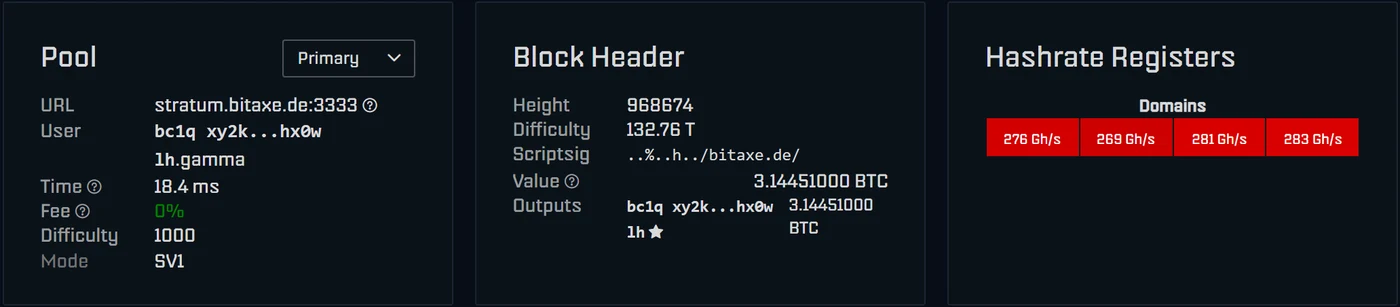
Using the fallback pool properly
AxeOS 2.15 stores up to eight pools. One is the primary pool, a second the fallback. If the first cannot be reached three times in a row, the miner switches to the fallback and checks every minute whether the first is back. If all pools are down, it pauses mining and tries again every 30 seconds. While it hashes on the fallback, the dashboard shows “Using fallback pool” and the share statistics start from zero.
Enter a second solo pool with the same address of your own as the fallback, for example eusolo.ckpool.org with port 3333. Important: out of the box the fallback also holds a foreign address. If it stays, your miner would hash for someone else in case of a failure.
Pool difficulty: what it means
The difficulty in the Pool card is the difficulty from which the pool accepts a share. It has nothing to do with your chance of a block. A pool with a low start difficulty like ours at 1,000 shows you many shares quickly; a pool with a high start difficulty shows fewer. A block, however, is only found when a hash reaches the network difficulty, which is about 133 trillion. Most pools adjust the share difficulty to your hashrate automatically. You only need the “Suggested Difficulty” field under “Show Advanced Options” if a pool explicitly recommends it.
Several miners on one address
Give each device its own name after the dot: bc1q….gamma1, bc1q….gamma2, bc1q….nerdqaxe. The pool shows them separately, and a found block still goes to the same address. On our pool you can additionally combine several addresses into a SOLO Group. The Nerd firmware also has a “Dual Pool” mode that splits a device's hashrate between two pools; AxeOS only has the fallback.
When your own node comes into play
A solo pool runs the Bitcoin node and builds the block template for you. If you want to run both yourself, install the “Public Pool” app on an Umbrel and enter the Umbrel with port 2018 in AxeOS. The block then also goes entirely to you, and your own node chooses the transactions in it. A Bitaxe found exactly such a block in March 2025. The steps are in Bitaxe with your own node; suitable hardware is for example the LiquidBox V5.
The most common mistakes
stratum+tcp://or a port in the host field: AxeOS 2.15 rejects it or splits it up when you paste; on older versions the connection failed.- Lightning address as user: solo pools pay on-chain in the coinbase transaction. A Lightning address cannot go there.
- Exchange address: some exchanges do not credit coinbase payments, or only with a delay. Use an address from a wallet whose keys you hold yourself.
- Forgotten factory address: in Pool 1 or in the fallback. AxeOS shows a yellow warning on the Pool page as long as the factory address appears anywhere.
- Old port: Public Pool runs on 3333; guides using 21496 are outdated.
If the miner is online but delivers no shares, the miner troubleshooter leads you to the cause; the most common cases are explained in Bitaxe connected but not mining.
Frequently asked questions about choosing a pool
Which pool is best for a Bitaxe?
Solo or pool: which earns more with a Bitaxe?
What do I enter as the pool password?
Which port does Public Pool use: 21496 or 3333?
What is the European server of solo.ckpool.org?
Does the pool change my chance of a block?
What is the pool difficulty on a Bitaxe?
Can a Bitaxe mine on two pools at the same time?
Is a solo pool safe? Who holds my money?
May I enter my exchange address as the user?
Is pool mining with a Bitaxe worth it?
Do I need my own node for solo mining?
Matching products

Read more
Nerdaxe Gaia: what the BM1373 miner can do, which firmware to run and who it is for
A single BM1373 in the familiar Nerdaxe format: factory settings from the source code, hashrate and power draw with every documented figure, the 12-volt power supply, OSM-OS from the flasher, setup, overclocking up to the current limit, block odds and electricity cost, plus a comparison with the Nerdaxe Gamma, Bitaxe GT and NerdQaxe++.
Guides & knowledgeSetting up Stratum V2 on a Bitaxe: encrypted solo mining in five fields
Since AxeOS 2.14 every Bitaxe speaks Stratum V2, and since September 2026 so does the Bitaxe Pool. This guide walks through the AxeOS fields one by one, shows how to set up the fallback and verify the connection, and lists what goes wrong when no shares arrive. For Bitaxe, NerdQaxe and large ASICs.
Guides & knowledgeNerdQaxe++ review: 4.8 TH/s from four BM1370, and who should upgrade from a Bitaxe
Four BM1370 on one board, 4.9 TH/s expected out of the box, about 76 W, two fans and NerdOS in the browser: we put the NerdQaxe++ in context. Factory values from the firmware, board revisions, noise, running costs, block odds, setup in NerdOS and the comparison with the Bitaxe Gamma, GT and 702, Copper Pro, Hydro, NerdQX and NerdOctaxe.