








Bitaxe security: AxeOS login and password, home network, hotspot and remote access
25 October 2026 · 20 min read

A Bitaxe has no user accounts. Anyone who can open its web interface, AxeOS, in a browser can change everything: the pool, the payout address, the Wi-Fi, frequency and voltage, even the firmware. The miner never asks for a password. That is not an oversight but a decision by the developers: AxeOS is built for the private home network, and there the router is supposed to do the protecting. For you this means: how safe your miner is depends almost entirely on who gets into your network and whether the miner can be reached from the internet.
Four measures close the important paths. Never expose the miner to the internet through port forwarding. Put it in a separate network if your router can do that. Keep the Wi-Fi stable where the miner sits, because after every Wi-Fi outage the miner opens a hotspot without a password. And let the pool warn you when your address stops receiving shares. This guide explains how, step by step, and which weaknesses are open as of 25 October 2026. Everything we say about the firmware’s behaviour we read in the source code of AxeOS 2.15.4 and our OSM-OS 2.15.3-osm.
- How AxeOS checks access
- What an attacker can change
- The weaknesses at a glance, as of October 2026
- Everyday access: IP address, bitaxe.local and login
- Splitting the home network: IoT network, guest network, VLAN
- Remote access without port forwarding
- The open hotspot after a Wi-Fi outage
- Firmware: origin, checksum, updates
- NerdQaxe and NerdOS: turn on the one-time code
- Keeping an eye on the payout address
- Checklist in 15 minutes
- Frequently asked questions
How AxeOS checks access
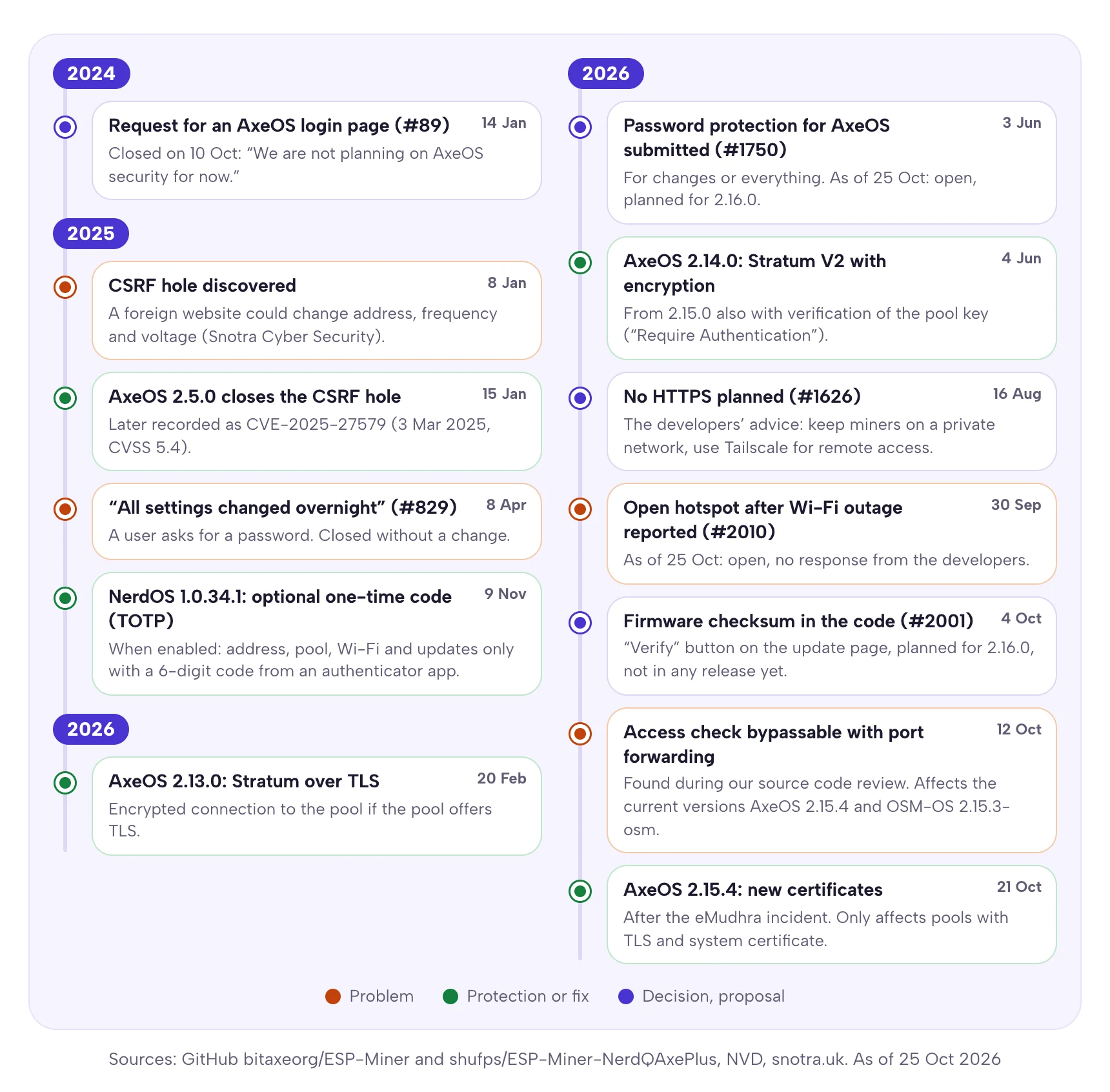
AxeOS is a small web server on the miner’s ESP32 chip. It serves the interface on port 80 and answers the API under /api. The interface itself saves every setting through exactly this API. None of it is encrypted: the connection runs over HTTP, not HTTPS. There is no login. The developers turned down a request for a login page in October 2024 (issue #89): “We are not planning on AxeOS security for now.” They closed a request for HTTPS in August 2026, saying the Bitaxe is meant for a private network. For access from outside they recommend Tailscale (issue #1626).
Instead of a password, AxeOS checks where a request comes from. It allows the three private address ranges defined in RFC 1918: 10.0.0.0/8, 172.16.0.0/12 and 192.168.0.0/16. Anyone with an address from these ranges may do everything. That sounds like protection, but it is only a location. Every device on your home network has such an address: your laptop, but also the smart TV, the camera with outdated firmware and a guest’s phone.
| Situation | What AxeOS does |
|---|---|
Request from 192.168.x.x, 10.x.x.x or 172.16.x.x to 172.31.x.x | allowed, no further check |
| Ordinary request from the internet | rejected with error 401 |
| Request from the internet through a port forward | the check can be bypassed, see weaknesses |
| Miner in setup mode, hotspot on | check off, every request allowed, only the firmware upload is blocked |
Tailscale address 100.x.x.x without a detour | rejected, because the range 100.64.0.0/10 is not on the list |
Password protection is in the works. The AxeOS developer mutatrum submitted login via HTTP Basic Authentication in June 2026, either just for changes including firmware updates or for the whole interface (pull request #1750). As of 25 October 2026 it has not been merged; version 2.16.0 is the stated target. Even with a password one limitation remains: without HTTPS, the password crosses your home network unencrypted. Until then, and afterwards too, the most important protection for your miner is your network.
What an attacker can change
Whoever reaches AxeOS sees the same settings you do. They are not equally dangerous. The most expensive one is a foreign payout address, because it does not show: the miner keeps hashing, the fan keeps running, the display shows a hashrate. Only the reward goes elsewhere. Such a change is a single API call and takes less than a second.
| Setting | What happens | How you notice | Remedy |
|---|---|---|---|
| Stratum User, i.e. the payout address | A block found pays the address entered there | The pool counts no more shares for your address, although the miner is running | pool alert, check the address after every outage |
| Pool and port | Your hashrate goes to someone else’s pool | Same as above: your pool statistics stay empty | pool alert |
| Fallback pool | If the main pool fails, the miner works for someone else | Field isUsingFallbackStratum in the API | set the fallback with your own address |
| Wi-Fi credentials | The miner disappears from your network | offline, hotspot “Bitaxe_XXXX” appears | see hotspot |
| Frequency, voltage, fan | Heat and crashes | temperature, warnings on the dashboard | AxeOS stops above 75 °C on the chip or above 105 °C on the voltage regulator |
| Firmware | Everything above, permanently and invisible in the interface | not reliably | reflash over USB, firmware section |
Out of the box, the Stratum User field does not contain your address. The official AxeOS ships with a preset address, and vendor firmware often with one of its own. If you only unpack the miner and plug it in, you mine for someone else, no attacker needed. How to enter your own address is explained in the setup guide, the fields in detail in AxeOS explained.
The weaknesses at a glance, as of October 2026
There is exactly one officially recorded vulnerability with a CVE number for AxeOS so far, and it has been fixed since early 2025. The remaining points are either intended, like the missing password, or reported and open. The diagram shows every path by which someone can get to your miner, as of 25 October 2026.
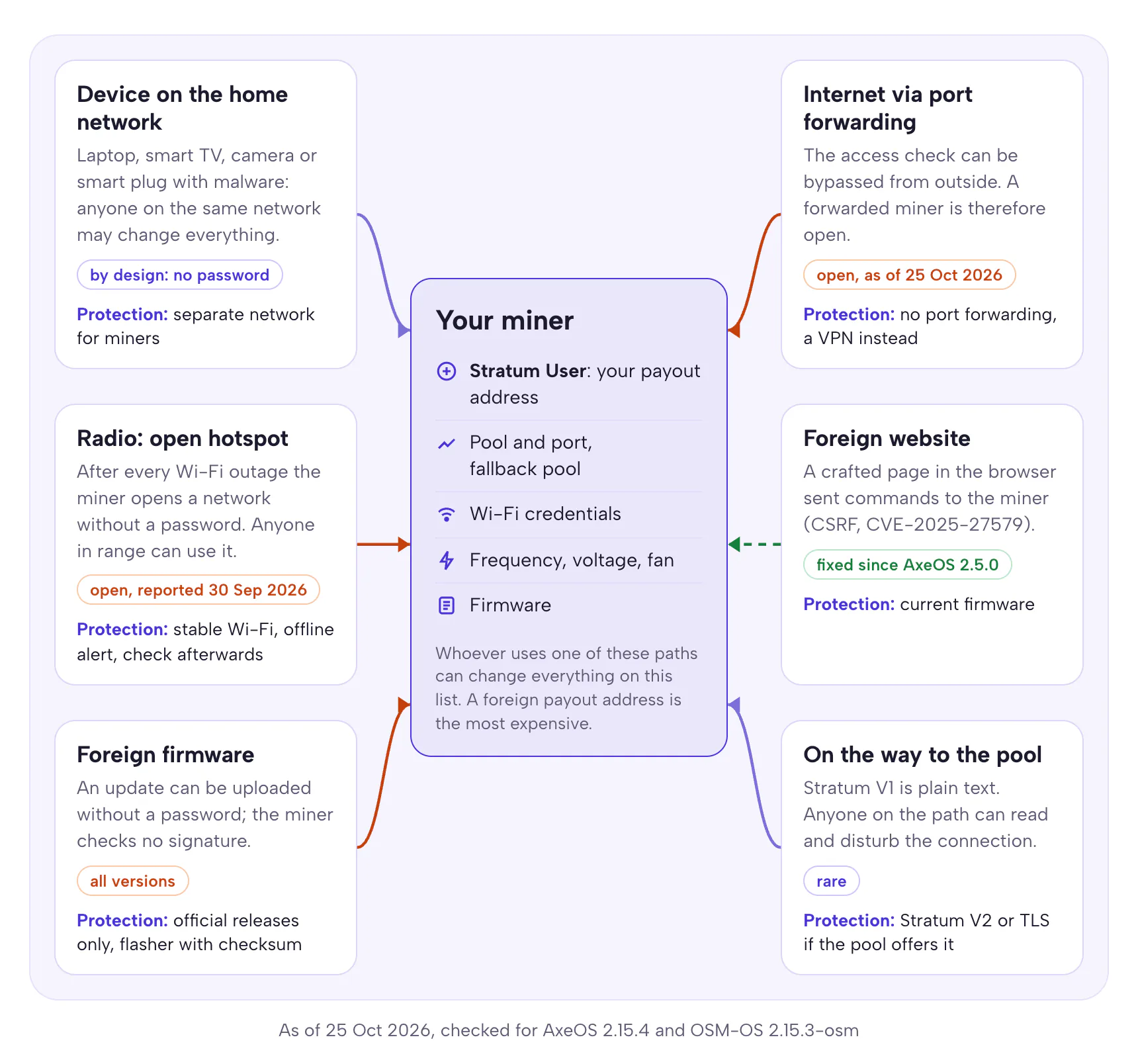
Foreign websites (CSRF): fixed since AxeOS 2.5.0
In January 2025 Shaun of Snotra Cyber Security found that a crafted web page could use a user’s browser to send commands to a Bitaxe on the same network: a different payout address, a different frequency, a different voltage (report from 8 January 2025). AxeOS 2.5.0 of 15 January 2025 closes the hole. The developers wrote: “This update has a critical fix for a CSRF vulnerability.” It is recorded as CVE-2025-27579 with a severity of 5.4 out of 10. If you still run a version before 2.5.0, update now.
Access check bypassable with port forwarding: open
While checking the source code for our monitoring article in October 2026, we noticed that the AxeOS origin check can be bypassed for requests from the internet. If you make your miner reachable through port forwarding, you give everyone on the internet full control, including over the firmware. AxeOS 2.15.0 to 2.15.4 and OSM-OS 2.15.x are affected, version 2.14 and older are not. The AxeOS development branch of 21 October 2026 does not change this either. We will publish the technical details only once a fix is available, so this article does not become a how-to. For you, one rule counts: a miner does not belong on the internet via port forwarding. How to find an existing port forward is covered in remote access. As soon as OSM-OS closes the gap, we will add it here with the version number.
Open hotspot after every Wi-Fi outage: open
When the miner loses its Wi-Fi, it opens a setup hotspot without a password. While it is running, AxeOS accepts every setting, including a new payout address. This was reported on 30 September 2026 (issue #2010), and the developers have not responded so far. What exactly happens and how to keep the risk small is covered in the hotspot section.
Firmware without a signature: applies to all versions
During an update, a Bitaxe checks whether the file is a valid firmware image, but not who it comes from. Signature checking with Secure Boot is not enabled. Anyone who reaches AxeOS can therefore install any firmware built for the chip. Manipulated firmware can hard-code a foreign address and still show yours in the interface. Only two things help: keep everyone else away from AxeOS, and install firmware only from official releases.
Certificates for TLS pools: fixed in AxeOS 2.15.4
Since AxeOS 2.13.0 the miner can talk to the pool encrypted via TLS. In the mode “TLS (System certificate)” it checks the pool’s certificate against a built-in list of trusted authorities. After an incident at the certificate authority eMudhra, AxeOS 2.15.4 of 21 October 2026 replaced this list (pull request #2040). The release contains only this fix. Only users of a TLS pool in system-certificate mode are affected. If you mine without TLS or via Stratum V2, you do not need to update for this. OSM-OS 2.15.3-osm does not yet contain the new certificate store. If you use it with a TLS pool in system-certificate mode, switch to AxeOS 2.15.4 or enter your pool’s certificate yourself (mode “Custom CA certificate”).
Stratum V1 in plain text: rarely a real risk
Classic Stratum V1 sends jobs and shares unencrypted. Anyone sitting on the path between miner and pool can read along and alter jobs. On a home network with your own router this is a theoretical risk. If you want to rule it out anyway, use Stratum V2: AxeOS supports it with encryption since version 2.14.0, and since 2.15.0 also with verification of the pool key (“Require Authentication”). At the Bitaxe Pool, Stratum V2 runs on port 3336; setup including the key is in the Stratum V2 guide.
Everyday access: IP address, bitaxe.local and login
Because AxeOS has no login, there is no default password either. Anyone searching for “Bitaxe login” really needs the miner’s address. You can find it in four ways:
- On the display. AxeOS shows the IP address on the miner’s small screen.
- In the router. The device list shows the miner under its hostname:
bitaxewith the official AxeOS,gammahexon the Gamma Hex,OSM-Minerwith our OSM-OS. - By name. Since version 2.15.0, AxeOS announces itself via mDNS as
http://hostname.local, so out of the box usuallyhttp://bitaxe.local. That does not work on every network: separate networks and some Android devices do not resolve.localnames. - Through another miner. The Swarm page in AxeOS has an “Auto Scan” button that searches your network for other miners.
Give the miner a fixed address in your router. On a FRITZ!Box you do this under Home Network > Network > Network Connections (German interface: Heimnetz > Netzwerk > Netzwerkverbindungen): edit the device and, on the Home Network tab, enable “Assign permanent IPv4 address” (older FRITZ!OS: “Always assign this network device the same IPv4 address”). Then it does not change after a restart, bookmarks and monitoring keep working, and a firewall rule always hits the right device. Also change the hostname in AxeOS to something unique like gamma-living-room. Then you recognise the miner in the device list right away, and a second miner gets its own name too.
Splitting the home network: IoT network, guest network, VLAN
AxeOS trusts every device on the same network. The fewer devices share a network with the miner, the fewer can tamper with it. The best solution is a separate network for miners and other smart devices, often called an IoT network. Your laptop may go in to open AxeOS. The miner may go out to its pool. Everything else is blocked. The researcher who found the CSRF hole also recommends putting the Bitaxe on a network segmented from the devices you browse the internet with.
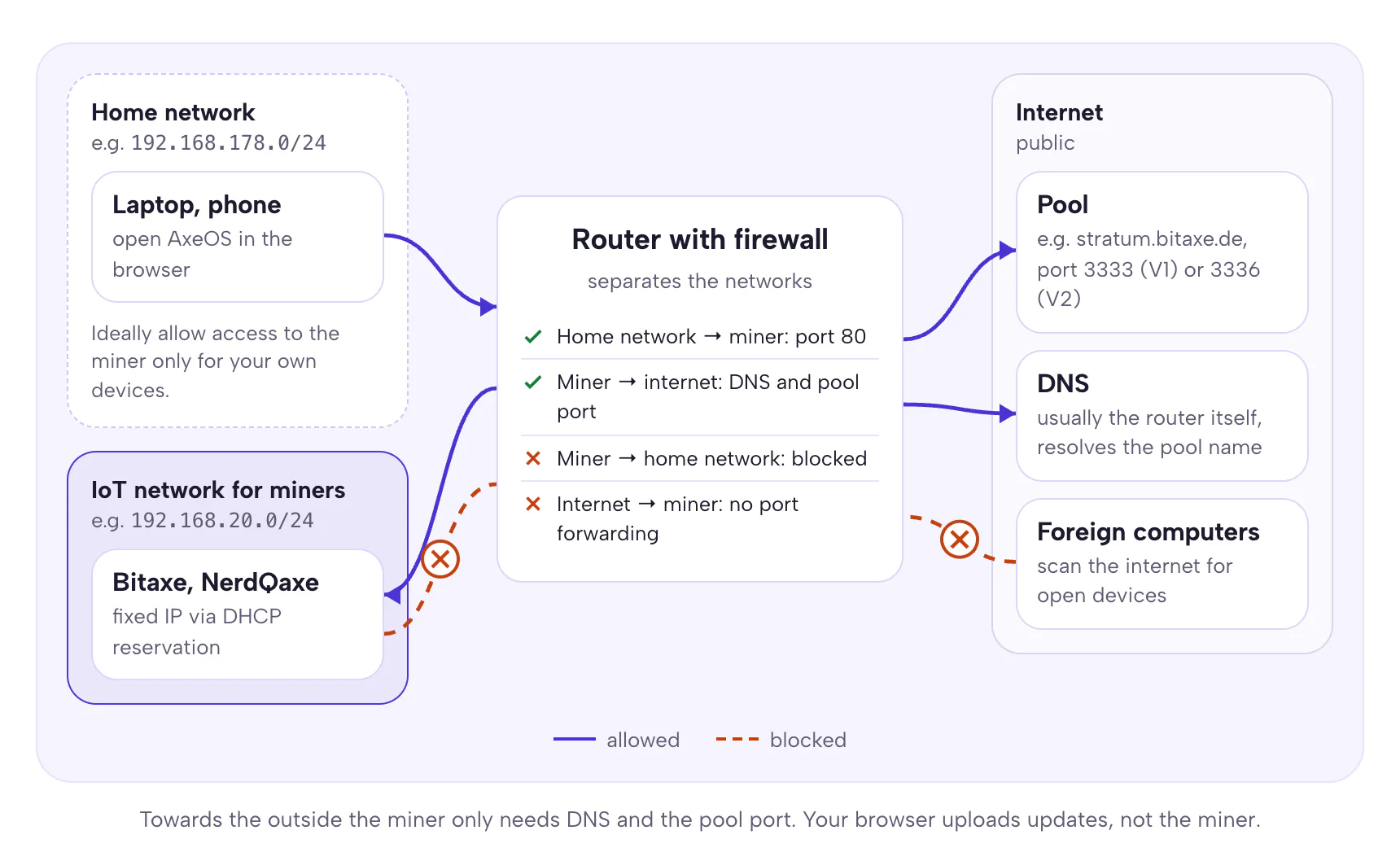
We checked in the source code which connections a Bitaxe really needs. The miner itself opens exactly two kinds of connections: name resolution via DNS and the connection to the pool. The AxeOS update check queries GitHub from your browser, not from the miner, and your browser also uploads new firmware. AxeOS does not use time synchronisation via NTP. That keeps the firewall rules short:
| Direction | Rule | Why |
|---|---|---|
| Home network → miner, TCP 80 | allow, ideally only for your own devices | open AxeOS in the browser |
| Miner → home network | block | a compromised device should not get further |
| Miner → internet, DNS (port 53) | allow, usually to the router itself | resolve the pool name |
| Miner → internet, pool port | allow, e.g. 3333 for Stratum V1 and 3336 for Stratum V2 at the Bitaxe Pool | mining |
| Miner → internet, everything else | block | AxeOS does not need it |
| Internet → miner | block, no port forwarding | protection from outside access |
| Replies to allowed connections | allow (established, related) | otherwise AxeOS will not load in the browser |
One exception: NerdOS on the NerdQaxe++ can send alerts to Discord. If you use that, the miner also needs HTTPS to the outside.
FRITZ!Box
The FRITZ!Box has no firewall between devices on the home network. It does have a guest network, as guest Wi-Fi under Wi-Fi > Guest Access and for the LAN 4 port under Home Network > Network > Network Settings. According to AVM, devices in the guest and home network “are completely separated from each other and are denied access to devices in the other network” (FRITZ! knowledge base). For a miner that cuts both ways: it cannot reach your other devices, but you can no longer reach AxeOS from the home network either. AVM also describes the FRITZ!Box WireGuard VPN as leading into the home network; the guest network is not mentioned.
If you still want to use the guest Wi-Fi as a network for miners, do not give its password to visitors, enable “Wireless devices may communicate with each other”, and briefly connect your own phone or laptop to the guest Wi-Fi when you need to change settings. Leave “Restrict internet applications” off. It blocks all internet access except browsing and email, and in our assessment that includes the connection to the pool. AVM does not list ports for it. If that is too awkward, keep the miner on the home network and follow what is said below under “If your router can do none of this”. Through parental controls, the FRITZ!Box can only block or allow internet access per device; it does not control traffic within the home network.
UniFi, OpenWrt, OPNsense and other routers with VLANs
Routers with VLANs can do this more cleanly: a separate network with its own address range and rules that apply in one direction only. The pattern is the same everywhere. The home network may connect to the IoT network, the IoT network may only connect to the internet, and replies to allowed connections come back. The UniFi zone firewall has the setting “Auto Allow Return Traffic” for this, and the option “Network Isolation” separates a network from the others (UniFi help). On OpenWrt you create a separate firewall zone and allow forwarding from lan to iot and from iot to wan, but not from iot to lan. A forwarding rule only ever covers one direction there (OpenWrt docs). On OPNsense and pfSense, one rule on the interface where the connection starts is enough. The firewall lets the replies through by itself (OPNsense docs).
One consequence of the separation: bitaxe.local no longer works from the home network, because mDNS names stay in their own network (RFC 6762). An mDNS reflector such as Avahi or the UniFi mDNS proxy helps. The fixed IP address from the previous section is simpler.
If your router can do none of this
Then the miner stays on the home network and the other rules carry the weight: no port forwarding, a strong Wi-Fi password with WPA2 or WPA3, a guest network for visitors and for devices you do not trust, and up-to-date firmware on the router. We also checked that AxeOS does not open any ports on the router by itself: the firmware contains no UPnP. A port forward to the miner only exists if someone sets it up by hand.
Remote access without port forwarding
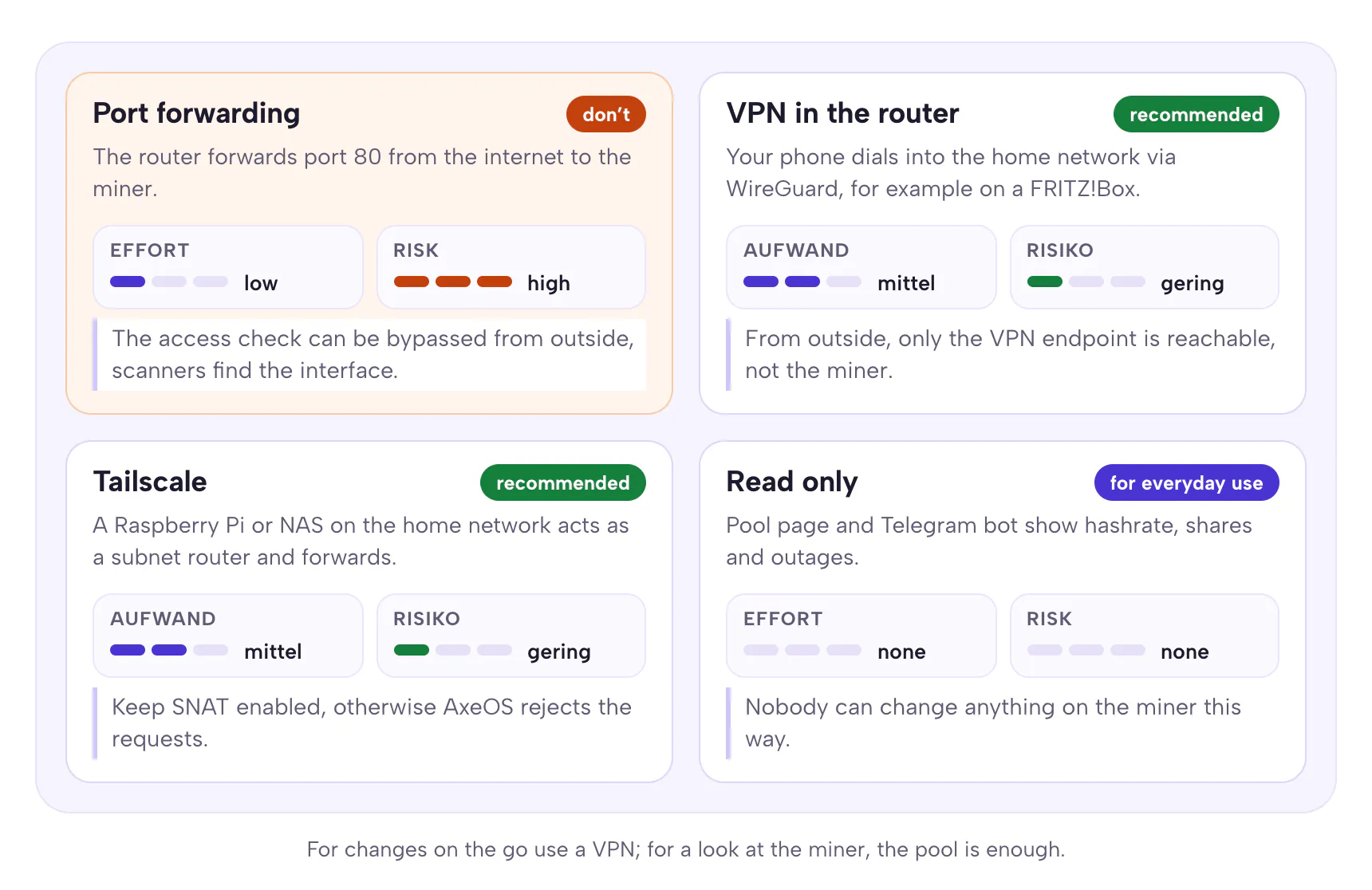
Seeing your miner on the go is convenient. Port forwarding is the wrong way to do it. First, the access check can be bypassed through a port forward, see above. Second, services like Shodan constantly scan the internet for reachable web interfaces and make them searchable. An exposed interface will be found there sooner or later. The German Federal Office for Information Security (BSI) also advises being very sparing with port forwarding and recommends a VPN for access on the go (BSI: Virtual Private Networks, German).
On a FRITZ!Box you can see existing port forwards under Internet > Permit Access > Port Sharing and under Diagnostics > Security (German interface: Internet > Freigaben and Diagnose > Sicherheit). Also check whether devices may open ports themselves: in a network device’s settings this is the option “Permit independent port sharing for this device” (FRITZ! knowledge base). AxeOS does not use it, but other devices on your network might. On other routers the page is usually called port forwarding, NAT or virtual server, and the automatic variant UPnP or PCP.
VPN in the router
Since FRITZ!OS 7.50 the FRITZ!Box supports WireGuard. Under Internet > Permit Access > VPN (WireGuard) click “Add WireGuard Connection”, choose “Connect a single device”, for example your phone, confirm it on the box and scan the QR code with the WireGuard app (AVM guide). You do not need a port forward for this. It does require that your connection has a public IPv4 address or IPv6. With DS-Lite connections, your phone also needs IPv6 on the go. Through the VPN you reach the home network and thus AxeOS at the miner’s IP address. Names ending in .local usually do not work through the VPN; AVM itself recommends using the IP address.
Tailscale with a subnet router
Tailscale is a VPN that needs neither a port forward nor a public IP address, and it is the route the AxeOS developers recommend themselves. It does not run on the miner. You need a device on your home network that is always on, such as a Raspberry Pi or a NAS, and turn it into a subnet router: enable forwarding, advertise the miner’s network with tailscale set --advertise-routes=192.168.178.0/24 (use your own address range) and approve the route in the admin console (Tailscale docs).
There is one default you should not change. Tailscale replaces the sender address with the subnet router’s (SNAT). The miner then sees an address from your home network and allows the request. If you turn SNAT off (--snat-subnet-routes=false), requests arrive with a Tailscale address from 100.64.0.0/10, and AxeOS rejects them with 401. We derived this from the source code; we have not tested it on a device.
Often enough for everyday use: read only
Most of the time you only want to know whether the miner is running. You do not need access to AxeOS for that. The page pool.bitaxe.de shows hashrate, workers and best shares for your address, and the Telegram bot @bitaxepool_bot tells you when a worker has delivered no shares for 15, 30 or 60 minutes and when it is back. Both only see what arrives at the pool. Nobody can change anything on your miner through them.
The open hotspot after a Wi-Fi outage
For the initial setup, every Bitaxe opens its own Wi-Fi named Bitaxe_ plus four characters of its hardware address, for example Bitaxe_3F2A. You connect your phone, enter your Wi-Fi, done. Less well known: the miner does not open this hotspot only on first start. According to the source code, it comes back on whenever the Wi-Fi connection drops and only goes off once the miner is back on your network.
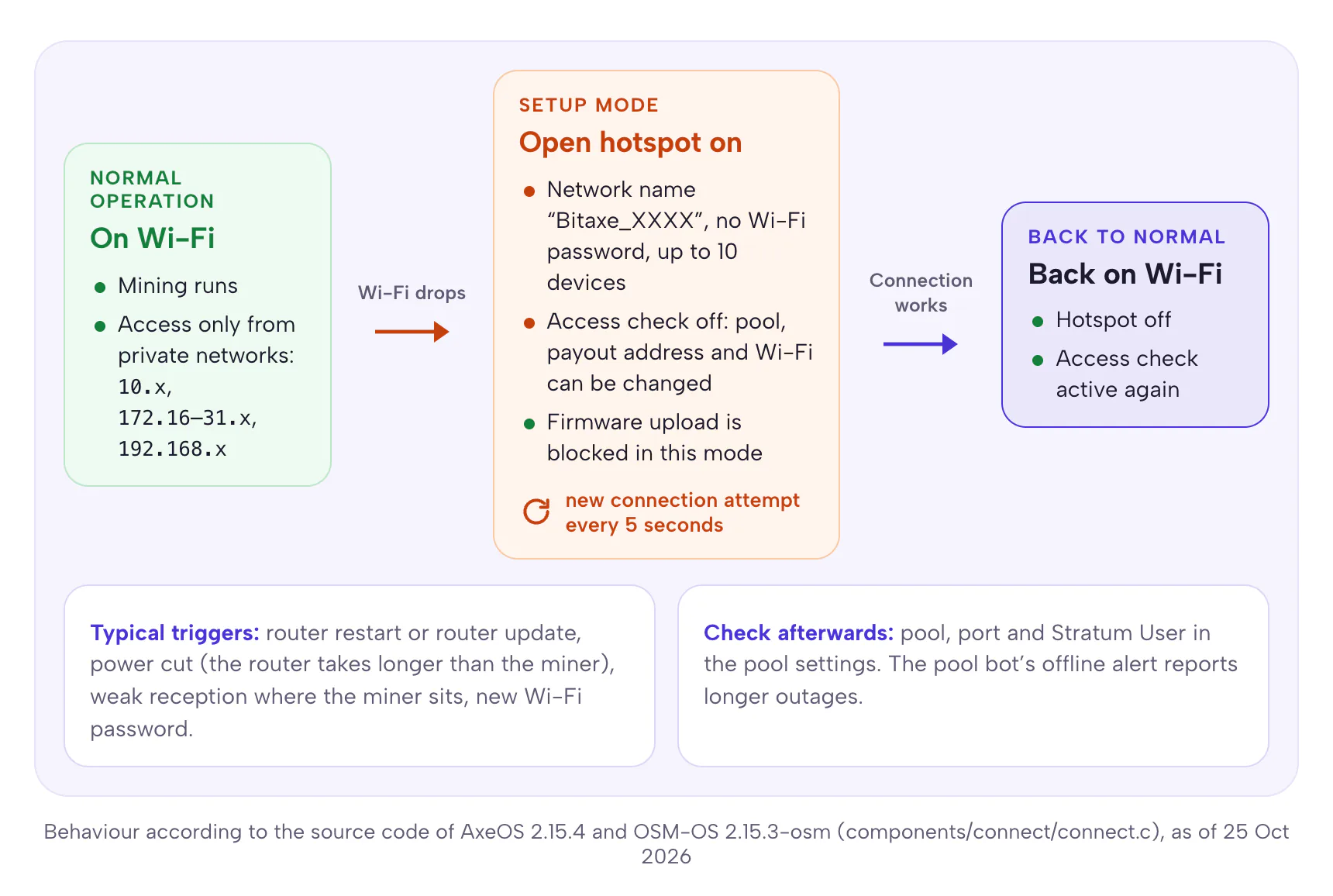
The hotspot is open, so it has no Wi-Fi password, and it accepts up to ten devices. While it runs, AxeOS turns off the access check. Whoever connects can change the pool, the payout address and the Wi-Fi credentials. The miner only refuses firmware uploads in this mode. Every five seconds it tries to get back onto your Wi-Fi. The user who reported this in September 2026 puts it like this: “When wifi crash or reboots, the device enters wifi setup-mode and anyone can then take control for a while until it reconnects.”
How big the risk is depends on two things: how often your Wi-Fi drops and who lives within radio range. Typical triggers are a router restart, for example after an automatic update, a power cut after which the router takes longer to boot than the miner, weak reception where the miner sits, and a new Wi-Fi password. In a flat with neighbours behind every wall, an open Wi-Fi is found quickly. In the countryside the risk is smaller.
- Improve reception. The ESP32 in the Bitaxe only uses 2.4 GHz. Do not put the miner in the farthest corner, and check the signal strength (RSSI) on the AxeOS dashboard. Values worse than about −70 dBm count as weak and make dropouts more likely.
- Plan router restarts. Schedule automatic router updates at night, so the window is short and you know when to check.
- Check after every outage. If the pool bot reported an outage, look at the pool, port and Stratum User in AxeOS.
- Watch for the foreign network. If your phone shows a network “Bitaxe_…” while your miner should be running, it is not on your Wi-Fi at that moment.
There is no setting in AxeOS or OSM-OS that turns the hotspot off after setup or protects it with a password. That is exactly what the report from September 2026 asks for. As soon as a version can do it, you will find it here.
Firmware: origin, checksum, updates
Because the miner does not check who a firmware comes from, you have to. Only install files from official releases: for AxeOS from bitaxeorg/ESP-Miner, for OSM-OS from opensourceminers/OSM-OS-Bitaxe, for the NerdQaxe from shufps/ESP-Miner-NerdQAxePlus. GitHub shows a SHA-256 checksum for every file in a release. If your file’s checksum matches, it is the same file.
Our web flasher does the comparison for you. It loads the firmware from the GitHub release, checks its SHA-256 checksum against GitHub’s value, and only then writes it to the miner over USB. Afterwards it reads the memory back and checks it. If the checksum does not match, it stops. AxeOS itself will probably get such a check with its next major release: the “Verify” button on the update page will then compare the running firmware with the official file (pull request #2001, in the development branch since 4 October 2026, planned for 2.16.0).
OSM-OS deserves an honest assessment. OSM-OS is our open-source variant of AxeOS with presets for our devices and the Bitaxe Pool; the source code and every change are public on GitHub. The current version 2.15.3-osm is based on AxeOS 2.15.3. On the points in this article it therefore behaves like the original: no password, open hotspot after a Wi-Fi outage, bypassable access check with port forwarding. It does not yet contain the new certificate store from 2.15.4, which only matters for TLS pools with system certificates. When we close these points in OSM-OS, we will add them to this article with the version number.
If you suspect someone has been at your miner, do not rely on the interface. Manipulated firmware can show you any address there. Instead, reflash the miner over USB, in the web flasher with the option “Factory Reset”, and set it up again afterwards. The firmware update guide walks you through it step by step.
NerdQaxe and NerdOS: turn on the one-time code
The NerdQaxe++ does not run AxeOS but NerdOS, a fork of AxeOS maintained by the developer shufps. Since version 1.0.34.1 of November 2025, NerdOS has a protection that AxeOS lacks: a one-time code using the TOTP method, like the two-factor login at your bank. You switch it on in NerdOS, scan the QR code on the display with an authenticator app, and from then on the miner asks for a six-digit code for sensitive actions. If you like, it remembers your browser for 24 hours.
According to the source code of NerdOS 1.1.0.1, the protected actions are the settings including pool, address and Wi-Fi, firmware updates, the alert settings and switching the code itself on or off. Restart and shutdown deliberately remain without a code, so home automations keep working. The developers are also clear about what the code is not: “TOTP is not a full authentication solution for exposed setups”. So it replaces neither the separate network nor the rule against port forwarding. But it does make sure a foreign device on your network can no longer simply change the address. If you have a NerdQaxe: turn it on.
Keeping an eye on the payout address
If someone changes the Stratum User, your miner works for a foreign address. To your pool it looks as if your miner were offline: no more shares arrive for your address. That is exactly the signal you can rely on. The pool knows nothing about your firmware or your network; it only counts what arrives for your address.
- Set up a pool alert. Send your address to the bot @bitaxepool_bot with
/watch. It messages you when a worker stops delivering shares. If the miner at home visibly keeps running, that is a reason to check AxeOS immediately. - Check after outages. Look at the pool, port and Stratum User in AxeOS, including the fallback pool.
- Check automatically. If you run several miners, a script can query them and compare address, fallback and coinbase. How to do that without false alarms is in Monitoring a Bitaxe.
AxeOS already has one check built in, but it protects against something else. The dashboard warns if the pool would pay less than 95 percent of the block reward to the address entered. That exposes a dishonest pool. It does not expose a changed address on the miner, because then the foreign address is the one entered.
Checklist in 15 minutes
- Delete every port forward to the miner in your router.
- Check the firmware: at least AxeOS 2.5.0, better the current version. NerdOS from 1.0.34.1.
- Enter your own address as Stratum User and as fallback in AxeOS.
- Give the miner a fixed IP address in the router and a unique hostname.
- If your router can do it: set up a separate network for miners, with rules as in the table above.
- Check the Wi-Fi reception where the miner sits and move it closer to the router if needed.
- Schedule automatic router updates at night.
- Set up a pool alert via @bitaxepool_bot.
- On the NerdQaxe++, turn on the one-time code.
- Only install firmware from official releases, easiest through the web flasher.
- For access on the go, set up a VPN instead of a port forward.
- For more peace of mind at the pool: Stratum V2 with verification of the pool key.
Frequently asked questions
Does AxeOS have a password or a default password?
How do I find my Bitaxe’s IP address?
bitaxe, with OSM-OS OSM-Miner. From AxeOS 2.15.0, http://bitaxe.local also works on many networks. Can I set a password for AxeOS?
Is port forwarding to a Bitaxe dangerous?
How do I access my miner safely on the go?
Can someone steal my block reward?
What happens when my Wi-Fi goes down?
How do I tell whether someone has tampered with my miner?
Do I have to put the miner on the guest network?
Is the connection to the pool encrypted?
Is OSM-OS more secure than the official AxeOS?
Do I need all this for a single miner?
Sources
- AxeOS 2.15.4 source code: access check (http_server.c), Wi-Fi and hotspot (connect.c), release 2.15.4; OSM-OS: opensourceminers/OSM-OS-Bitaxe
- GitHub bitaxeorg/ESP-Miner: #89 login page, #829 settings changed, #1626 HTTPS, #1750 basic authentication, #2001 checksum, #2010 hotspot, #2040 certificates
- NVD: CVE-2025-27579 and Snotra Cyber Security: AxeOS CSRF Vulnerability
- NerdOS: ESP-Miner-NerdQAxePlus releases with the notes on the one-time code (TOTP) from 1.0.34.1
- FRITZ! knowledge base: Wi-Fi guest access, LAN guest access, WireGuard VPN, automatic port sharing, always the same IP address
- Tailscale: subnet routers and SNAT, UniFi: zone-based firewall, OpenWrt: firewall, OPNsense: firewall, RFC 6762: Multicast DNS
- BSI (German): Virtual Private Networks and Smart Home
Matching products


Read more
Monitoring a Bitaxe: catch outages, heat and wrong payouts without false alarms
Which values the AxeOS API really delivers, when “no share for …” is a real outage, why a Bitaxe runs slower for good after overheating, and how a small script on your home network watches heat, power, fallback pool and coinbase.
Guides & knowledgeNerdaxe Gaia: what the BM1373 miner can do, which firmware to run and who it is for
A single BM1373 in the familiar Nerdaxe format: factory settings from the source code, hashrate and power draw with every documented figure, the 12-volt power supply, OSM-OS from the flasher, setup, overclocking up to the current limit, block odds and electricity cost, plus a comparison with the Nerdaxe Gamma, Bitaxe GT and NerdQaxe++.
Guides & knowledgeSetting up Stratum V2 on a Bitaxe: encrypted solo mining in five fields
Since AxeOS 2.14 every Bitaxe speaks Stratum V2, and since September 2026 so does the Bitaxe Pool. This guide walks through the AxeOS fields one by one, shows how to set up the fallback and verify the connection, and lists what goes wrong when no shares arrive. For Bitaxe, NerdQaxe and large ASICs.