
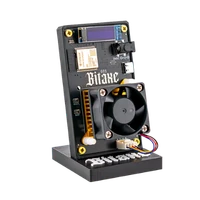

Nerdaxe Gamma | 1.3 TH/s
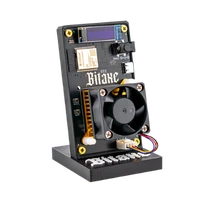
The Bitaxe Gamma’s hardware with every value on a 1.9-inch display – 1.3 TH/s at 15 W
Item no.: NH10003NG · Manufacturer: Bitronics · Series: Nerdaxe
- BM1370 ASIC, around 1.3 TH/s at roughly 15 W
- 1.9-inch TFT instead of a small OLED strip
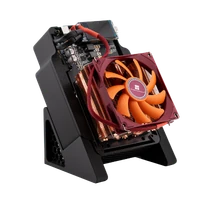
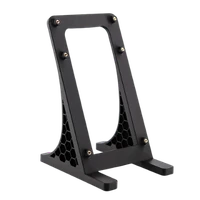
- Available with mount or case
- NerdOS in the browser, your pool, your address
- Hashrate
- ~1.3 TH/s
- Efficiency
- ~15 J/TH
- Power draw
- ~15 W
plus shipping
Sold out
Notify me when it is back
One email as soon as this miner is in stock again. No newsletter.
Product information
Nerdaxe Gamma: Bitcoin miner with 1.3 TH/s and a large display
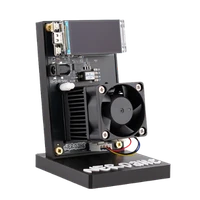
The Nerdaxe Gamma is an open-source Bitcoin miner for your home based on the BM1370 ASIC: around 1.3 TH/s at roughly 15 W, so about 15 J/TH. An ESP32-S3 runs the board itself and NerdOS lives directly on it. The most visible difference to the Bitaxe Gamma is the readout: a 1.9-inch TFT based on the LILYGO T-Display S3 shows the live figures in plain text instead of squeezing them onto a narrow OLED strip.
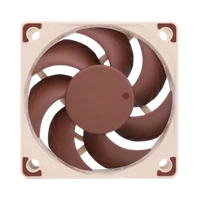
Cooling comes from a 40 mm PWM fan whose curve you define in NerdOS: audible in everyday use, noticeably more restrained with a flatter curve. At around 15 W the miner adds up to roughly 10.8 kWh a month in continuous operation.
When solo mining, the Nerdaxe Gamma works on the same task as an entire mining farm: finding a valid block. Every hash is its own lottery ticket, and if one of them lands, the complete block reward of currently 3.125 BTC plus transaction fees goes to your own Bitcoin address. Until then, your device checks transactions and helps secure the network. How realistic that is, is put into perspective in our solo mining guide.
Why people pick the Nerdaxe Gamma
- Readable without a laptop: the 1.9-inch TFT shows the operating state on the device. For a glance in passing you do not need NerdOS at all.
- Same chip class as the Bitaxe Gamma: the same BM1370, the same ballpark for hash rate and power draw. The premium goes into the display and the board design.
- Configuration stays with you: pool, worker, address, frequency, voltage and fan curve are all set in NerdOS. No account, no contract, no third-party statement.
- Openly documented: hardware design and firmware are open source. Spare parts, updates and community knowledge remain available even if a manufacturer loses interest.
The display and your choice between mount and case
The large TFT is the reason most people pick the Nerdaxe over the Bitaxe. Instead of a single narrow line you get a readout that stays legible from two metres away: hash rate and temperature in view without an open browser. That is what customers mention most often.
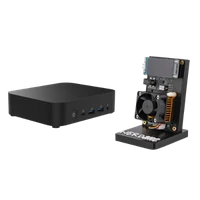
The Nerdaxe Gamma is also a variable product: at checkout you choose between the Nerdaxe mount and the Nerdaxe case, at the same price. On the mount the board stands open and you can reach heatsink, fan and connectors at any time. The case encloses the electronics and looks tidier when the device sits visibly in a living room. Hash rate and power draw are unaffected – it is about looks and location.
Up and running in minutes
Setup needs a socket, a 2.4 GHz Wi-Fi network and a browser. NerdOS lives on the miner itself, and the setup guide walks you through it step by step.
- 1
Connect the miner
Plug in the power supply and start the device. On first boot the Nerdaxe opens its own Wi-Fi network for configuration.
- 2
Join your own Wi-Fi
Connect to that network, select your own 2.4 GHz network and enter the password. The miner is then reachable through your router.
- 3
Set pool and Bitcoin address
Open NerdOS in a browser, store pool address, worker and your own Bitcoin address, save and restart. From then on the miner runs and the first shares go out.
Who the Nerdaxe Gamma is for
For home miners who want to see their hardware: the device sits visibly on the table and reports its state without a detour through the browser. For solo miners with their own address and sober expectations. And for everyone who wants a second miner in a different form factor next to their Bitaxe.
It is less of a fit if you watch every euro: the Bitaxe Gamma delivers the same hash rate for less, just with a small OLED. And if 1.3 TH/s is not enough, the Nerdaxe Gaia doubles the hash rate to around 2.6 TH/s in the same format and with the same display.
What you need to run it
Miner, 5V/6A power supply, stand or case and a quick start guide are included. From you come Wi-Fi, a socket and your Bitcoin address.
For continuous operation the location matters most: standing free, not in a closed cabinet, not above a radiator. In a living room the fan is worth a look – a flatter curve in NerdOS and a good 40 mm fan turn an audible miner into an unobtrusive device.
Accessories and sensible upgrades
The Nerdaxe Gamma is a starting point, not a closed system. Depending on where it stands, the next step is a quieter fan, more cooling surface or your own infrastructure.
- Noctua NF-A4x20 as a replacement for the 40 mm stock fan when the miner lives in a living room.
- Cooling for lower ASIC temperatures and headroom when overclocking.
- Your own Bitcoin node, if your hash rate should later point at your own infrastructure.
Ready for your Nerdaxe Gamma setup?
If you want Bitaxe technology but prefer to read your miner’s state on the device rather than in a browser, the Nerdaxe Gamma is the right variant: same ASIC, bigger display, its own design. Mount or case is your choice at checkout.
Nerdaxe Gamma compared to similar miners
| Model | Hashrate | Power | Efficiency | Price |
|---|---|---|---|---|
| Nerdaxe Gamma (this page) | ~1,3 TH/s | ~15 W | ~15 J/TH | €159.00 |
| Bitaxe Gamma Copper Pro | ~1,5 TH/s | ~22 W | ~15 J/TH | €179.00 |
| Bitaxe GT | 2,15 TH/s | 43 W | ~20 J/TH | €229.00 |
All values are guide figures. Compare all miners, calculate power cost.
Frequently asked questions about the Nerdaxe Gamma
What is the difference between the Nerdaxe Gamma and the Bitaxe Gamma?
Should I choose the mount or the case?
How much electricity does the Nerdaxe Gamma use?
How loud is the Nerdaxe Gamma?
How much hash rate does the Nerdaxe Gamma have?
What does the Nerdaxe Gamma display show?
Do I need a PC or Raspberry Pi for it?
Does the Nerdaxe Gamma work on 5 GHz Wi-Fi?
Can I solo mine with the Nerdaxe Gamma?
Can I overclock the Nerdaxe Gamma?
Do I get firmware updates for the Nerdaxe Gamma?
What is the difference to the Nerdaxe Gaia?
Why buy from Bitaxe.de?
Free shipping from 200 €
Free shipping to almost every EU country from 200 €, shipping to the EU and Switzerland with UPS and a tracking link. Items in stock leave within 24 hours, with no customs surprises inside the EU.
Truly open source
Bitaxe, Nerdaxe, NerdQaxe & co. are open hardware running open firmware (AxeOS or NerdOS): you set pool, clock and voltage yourself. No cloud account, no vendor lock-in, no black box.
CE, warranty & returns
Every product carries the CE marking. Plus statutory warranty and a 14-day right of withdrawal for a safe order. If something is not right, we find a solution with you, person to person.
Direct support
Questions about setup, pool, firmware or your order? By email or Telegram you get help from someone who runs these devices themselves, in English or German, beginners welcome.
Customer reviews
4.8 / 5 · 140 reviews from customers who bought this product from us.
Choosing the case version was easy for us because our cat inspects everything new that appears on a shelf and a bare circuit board with a spinning fan looked like an open invitation. Four months later the board is still covered and the cat has lost interest completely. The case also keeps most of the dust off which matters in an old flat with the windows open half the summer. Setting it up was less scary than I expected for someone who had never done anything like this. The part that took longest was copying my Bitcoin address over and checking it three times. Since then it has been sitting on the hallway shelf showing about 1.1 TH/s and a chip temperature in the high fifties. I had to ask a friend what half the numbers mean and I still do not fully get difficulty but I like seeing it work away. When the power went out for an hour in August it came back on its own and carried on as if nothing had happened. If I ordered another one I would pick the case again without a second thought.
Halbes Jahr Dauerbetrieb, übertaktet stabile 1,3 TH/s!
Geschenk zum 18. Geburtstag meines Patenkinds, das schon mit zwölf seinen ersten Rechner zusammengeschraubt hat. Ich selbst verstehe von Mining so gut wie nichts und kann nur beurteilen, was ich mitbekommen habe: Die Bestellung lief unkompliziert, das Paket kam rechtzeitig und gut gepolstert an, ein Netzteil lag gleich dabei. Am Telefon hat er mir danach zehn Minuten lang erklärt, was die beste Difficulty ist und warum seine gerade gestiegen sei. Verstanden habe ich wenig, gefreut hat er sich hörbar.
Gut eine Woche hat die Zustellung gedauert, das kenne ich von anderen Bestellungen flotter. Eingerichtet war er dann in fünf Minuten, Pool und Adresse tippe ich inzwischen im Schlaf. Ich hab den Takt auf 600 MHz gestellt, seid dem stehen um die 1,23 TH/s bei rund 19 W auf dem Display, Chip bei 58 Grad, VR knapp unter 50. Optisch passt das bunte TFT unter dem zweiten Monitor erstaunlich gut zu meinem restlichen RGB-Gedöns. meistens lasse ich die Seite mit Effizienz und Temperaturen stehen, der Rest interessiert mich selten.
Chegou em dois dias, bem embalado, ecrã enorme.
Beefy 5V/6A brick in the box, so I nudged the clock up without worrying about power. The firmware update though had me hunting for the right board files.
Prenda de anos da namorada e ja não sai da secretária, fica lindo ao lado do monitor! Chip nos 58 graus e eu sempre a espreitar o ecrã.
Einrichtung lief wie beim Bitaxe Gamma meines Bruders, nur habe ich die offene Halterung statt Gehäuse genommen und lese die Werte seit drei Monaten vom Display statt aus dem Browser.
Das Display hat mir schon beim Einrichten mehr geholfen als gedacht. Nach dem Neustart stand dort die IP-Adresse, die habe ich einfach in den Browser getippt, sonst hätte ich gar nicht gewusst, wo ich danach suchen soll. In den drei Tagen seitdem schalte ich mit den zwei Knöpfen ständig zwischen Hashrate, Temperatur und Leistung hin und her, eher aus Neugier als aus Notwendigkeit. Das 5-V-Netzteil lag passend im Karton, nachkaufen musste ich also nichts.
Ordered Sunday night, tracking on Monday, on my desk Wednesday, wrapped like it was going to space. Three months on, the only thing I've touched since is the PID target.
Listed at around 1.3 TH/s and 15 W, mine does 1.05 at 18 W on stock settings; the only thing oversized here is the 30 W power brick. Going back.
Vor dem Kauf hatte ich zwei Tabs offen, den Bitaxe Gamma und diesen hier, und habe per Mail gefragt, was für jemanden ohne Vorkenntnisse besser passt. Die Antwort kam am nächsten Morgen und war erfreulich sachlich: gleicher Chip, praktisch dieselbe Leistung, der Bitaxe etwas günstiger, der Nerdaxe mit dem größeren Display. Ich habe mich für das Display entschieden, weil ich die Werte gern direkt am Gerät sehe. Die Weboberfläche wirkt aufgeräumt, Hashrate mit Verlaufskurve, Temperaturen und Leistung stehen übersichtlich beieinander. Mit Begriffen wie Best Difficulty oder abgelehnten Shares konnte ich anfangs wenig anfangen und habe sie erst nachgeschlagen, inzwischen ergibt das Bild für mich Sinn. Nach drei Tagen zeigt er konstant um die 1,1 TH/s bei etwa 17 Watt, der Chip bleibt unter 60 Grad. Der Einstieg war jedenfalls deutlich unkomplizierter, als ich befürchtet hatte.
Abschiedsgeschenk der Kollegen zum Ruhestand, dazu der Spruch, jetzt hätte ich ja endlich Zeit für so etwas. Recht hatten sie. Den ersten Abend habe ich fast nur mit der Weboberfläche verbracht, und dass die sich auf Deutsch umstellen lässt, war für mich Gold wert: Mein Schulenglisch reicht für den Urlaub, aber nicht für ein Menü voller Fachbegriffe. Inzwischen finde ich mich zurecht, kenne die Hashrate-Kurve und habe sogar verstanden, was die Shares sind, die da ständig hochzählen. Er zeigt brav seine 1,1 TH/s, mehr verlange ich nach fünf Tagen gar nicht. Einen kleinen Haken gibt es, und das ist der Lüfter. Tagsüber geht er unter, abends im stillen Wohnzimmer summt er aber hörbar vor sich hin. Mein Enkel meint, das lasse sich in den Einstellungen regeln, das nehmen wir uns am Sonntag gemeinsam vor. Bis dahin läuft das Radio eben etwas lauter.
Weboberfläche auch für mich als Laie verständlich, auf dem Schreibtisch sieht er gut aus, nur der gedruckte Ständer kippelt bei jeder Berührung; für den Preis hätte ich da mehr erwartet.
Technisch ein Bitaxe Gamma, nur ohne Lupe ablesbar.
Eigentlich wollte ich die Version mit Gehäuse, die war aber gerade nicht zu haben, also ist es die Halterung geworden. Stört mich nach zwei Wochen nicht mehr, man sieht halt die Platine, finde ich inzwischen sogar ganz schick. Eingerichtet hab ich ihn als kompletter Neuling übers Handy, erst ins WLAN vom Miner, dann mein Heimnetz rein und zum Schluss Pool und Adresse im Browser, hat auf Anhieb geklappt. Jetzt steht er am Fenster und zeigt mir seine 1,1 TH/s, mehr wollte ich gar nicht.
Gehäuse statt Halterung bestellt, weil er in der Küche auf dem Sideboard steht, und die Einrichtung ging wie bei meinem anderen Miner über das eigene WLAN, eine Kaffeepause lang.
Getting it onto my network was the fiddly part and the one thing I would mark down. My Android phone noticed that the miner's setup hotspot had no internet and kept hopping back to the home network every minute or so, which closed the configuration page before I could save anything. Three attempts and mobile data switched off later, the settings finally stuck. Not really the miner's fault, but one line about it on the quick-start sheet would have saved me half an evening. It now shares a shelf with my older BM1366 Nerdaxe and does a little over 1 TH/s at around 17 W at the wall, roughly twice what the old one manages in the same footprint. The 40 mm fan is the part you keep noticing. On automatic control it settles into a steady whir that my desktop PC covers during the day, but in a quiet room at night it is clearly there. The display cannot be dimmed either, which matters more than I expected once the lights are off.
Netzteil ok, Lüfter sumt aber Tag und Nacht!!
Vorweg die Hardware ist klasse und die Einrichtung war harmlos: einmal über den Access Point vom Miner ins Heimnetz und danach Pool Worker und Adresse im Webinterface setzen. Ich mine solo auf Public Pool auf meinem eigenen Umbrel und das lief vom ersten Moment an. Der Chip hält sich mit PID bei 60 Grad und ein Blick aufs Display reicht um zu sehen ob alles passt. Was mich nervt ist das Firmware-Update. Ausgeliefert wurde meiner Ende November mit einer älteren Version und fürs erste Update musste ich auf GitHub die zwei Dateien esp-miner.bin und www.bin für genau dieses Board raussuchen und nacheinander hochladen. Die Builds für die verschiedenen Nerd-Boards heißen so ähnlich dass ich beinahe das falsche Image erwischt hätte. Seitdem hätte ich zwar das Update per Klick direkt aus der Oberfläche aber mein Miner hängt in einem eigenen VLAN das nur den Node erreicht und da bringt mir der Knopf nix. Also wieder Dateien schieben zuletzt für die 1.0.37. Für mich kein Drama aber Einsteiger würden da wohl fluchen.
Gehäuse statt Halterung, weil im Wohnzimmer nicths nach Bastelkeller aussehen darf, sagt die Hausordung. Hashrate stabil bei gut 1 TH/s, und das 5V/6A-Netzteil ist bisher das einzige Teil, über das keiner diskutieren wollte.
Paid with Lightning, and the parcel turned up sooner than I expected. What sold me is the screen: hashrate, chip temperature and J/TH are readable from my chair without opening anything. The fan does leave a faint hum once the room is quiet, which is the one thing I notice after ten days. It sits on the shelf above my monitor, so the numbers are always somewhere in the corner of my eye.
i am not a technical person, so please read this with that in mind. i bought it because i wanted to understand what bitcoin mining actually is, and reading about it only got me so far. it comes with its own power adapter, which was a relief, because i would not have known which one to buy. the label says 5v 6a. i had to look that up, and as far as i understand it can deliver more than the miner needs, which seems the right way round. getting it onto my wifi took one evening, mostly because i read every step of the little instruction card twice. it lives in the spare room now, where the fan bothers nobody. i asked the support on telegram whether about 1.05 th/s is normal and had a friendly answer the same day saying that is how it comes. two weeks on it is still running and i have not touched anything. whether it ever finds something is another matter, but i have learned more from watching it than from all the articles.
Gegenüber meinem Bitaxe Gamma gibt es zwei Unterschiede, Chip und Hashrate sind ja gleich. Erstens das Display: Das kleine OLED am Gamma zeigt das Nötigste, das TFT hier deutlich mehr auf einmal, von Spannung und Strom bis zur Lüfterdrehzahl. Zweitens die Weboberfläche: NerdOS wirkt auf mich aufgeräumter als AxeOS, und seit dem Update auf 1.0.37 ist das neue Dashboard Standard, das ich vorher schon testweise eingeschaltet hatte. Beide stehen seit zwei Monaten nebeneinander und laufen unauffällig.
Der kleine Lüfter summt vor sich hin wie jemand, der die Melodie vergessen hat. Geliefert wurde flott, und die 1,3 TH/s aus dem Forum gibt's nur übertaktet, ich lass es bei 1,05.
L'adresse IP s'affiche directement sur l'écran du mineur, donc pas besoin de fouiller dans la box internet : je l'ai tapée dans le navigateur de mon portable et mise en favori. Pour un débutant, l'interface web reste lisible, le pool et mon adresse bitcoin se règlent sur une seule page. Il y a aussi une rubrique « Danger Zone » : vu le nom, je n'y touche pas tant que je ne sais pas ce qu'elle contient. Je ne l'ai que depuis mardi, mais pour l'instant tout tourne.
Den ganzen Winter lief der im Büro übertaktet auf 650 MHz mit knapp 1.3 TH/s weil der Raum eh kühl war. jetzt wo es draußen wärmer wird hab ich ihn auf 600 zurückgenommen und er schafft immer noch gut 1.2 bei deutlich leiserem Lüfter. Der Spannungswandler kam seid November auch übertaktet nie über 55 Grad. Mal schauen ob ich im Juli noch weiter runter muss.
En Sevilla mayo ya pega fuerte y el piso está a 27 °C, pero con el PID en 62 el ASIC se mantiene ahí y el regulador ronda los 48.
Wegen unserer Katze habe ich die Variante mit Gehäuse genommen, sie läuft gern über den Schreibtisch, und eine offene Platine war mir da zu riskant. Von Technik verstehe ich wenig, und die Weboberfläche sah für mich anfangs nach sehr vielen Knöpfen aus. Gebraucht habe ich am Ende nur die Einstellungen für Pool und Bitcoin-Adresse, alles andere lasse ich bewusst, wie es ist. Nach zehn Tagen läuft er ohne Probleme, und die Katze ignoriert ihn inzwischen.
Skeptisch war ich vor allem beim mitgelieferten 5-V/6-A-Netzteil, weil billige Steckernetzteile bei mir schon öfter gefiept haben. Dieses hier gibt keinen Mucks von sich. Seit Neujahr hängen Miner und Router gemeinsam an einer kleinen USV, zwei kurze Stromausfälle im Februar hat der Nerdaxe deshalb gar nicht mitbekommen. Mit Werkseinstellungen liegt die Hashrate konstant um 1,05 TH/s. Mehr gibt es nach vier Monaten nicht zu berichten, und so soll es auch sein.
das display allein war den wechsel wert! mein alter bitaxe gamma ist an meinen bruder gegangen, und hier sehe ich hashrate, asic- und vr-temperatur und leistung sofort, ohne erst den browser aufzumachen. an der hashrate ändert sich nichts, bei mir läuft er auf 600 mhz mit gut 1,2 th/s, wie vorher der gamma. das 5v/6a-netzteil hat dabei reichlich luft, laut display zieht er rund 17 w. schwachpunkt ist der gedruckte ständer: das steife netzteilkabel zieht den miner leicht zur seite, ohne ein bisschen klebeknete am fuß kippelt er.
Riesen-Display, und ein Gehäuse brauch ich nicht.
Ewig zwischen Bitaxe Gamma und dem hier geschwankt, der Bitaxe wär günstiger, aber als Anfängerin will ich auf einen Blick sehen, was das Ding macht. Keinen Tag bereut!
Gemessen habe ich mit einem Zwischenstecker, der den Verbrauch mitschreibt: Nach zehn Tagen stehen 3,8 kWh auf dem Zähler, im Schnitt also knapp 16 W. Das Display des Miners zeigt etwas über 14 W an, die Differenz dürfte auf das Netzteil gehen. Die Hashrate liegt mit Werkseinstellungen bei etwa 1,06 TH/s, an der Steckdose gerechnet sind das rund 15 J/TH, was gut zu den Angaben passt. Gekauft habe ich ihn aber wegen des Displays. Es ist mit 1,9 Zoll deutlich größer, als ich es von anderen Minern kenne, und ich kann es ohne Brille von der Tür aus lesen. Mit den beiden Tasten schaltet man zwischen den Seiten um, meistens lasse ich die Ansicht mit Hashrate und Chiptemperatur stehen. Übertakten habe ich bisher nicht ausprobiert, mich interessiert zuerst, wie sich der Verbrauch über einen ganzen Monat entwickelt.
Same chip and hashrate as the Gamma 601 next to it, but this screen is a joy! Its fan hums noticeably more than the Gamma's though, even on PID.
As a total beginner I've ended up enjoying the small details more than the mining itself. Take the power supply: a proper 5 V / 6 A brick with a round barrel plug, a cable long enough to reach the socket behind my desk, and it stays only lukewarm after running day and night since mid-February. One less thing to think about. The 40 mm fan worried me more. At first it ran at full speed all the time and I could hear it from the hallway. Someone on a forum told me to switch on the automatic fan control with a 60 °C target, and the difference is huge! Now it speeds up a little when the chip warms and otherwise stays calm. The screen says the chip sits around 58 to 60 °C, the hashrate is a bit above 1 TH/s, and I keep catching myself watching the numbers while my tea goes cold. My flatmate has started calling it my aquarium.
Miner's fine. Captive portal isn't, go to 192.168.4.1.
Mir selbst geschenkt. 15 Watt, Firmware-Update etwas umständlich.
Kumpel hat den Bitaxe Gamma, ich den Nerdaxe: Einrichtung genauso simpel, Hashrate gleich bei 1,1 TH/s, nur das ich meine quer durchs Zimmer auf dem Dispaly ablese statt im Browser!
Solid miner but I'd have liked a case
Wer die beworbenen 1,3 TH/s ab Werk erwartet, wird kurz enttäuscht: auf dem Display stehen erst mal etwa 1,1. Die restlichen 200 Gigahash holt man sich in der Danger Zone mit ein paar MHz mehr, der Lüfter kommentiert das etwas lauter. Ich bin bei knapp 1,25 TH/s und 19 Watt gelandet und lasse es dabei, mehr Ehrgeiz braucht ein Gerät mit der Blockchance einer Schneeflocke in der Sahara nicht. Seit vier Wochen begrüßt es mich im Flur mit Zahlen.
Dienstag bestellt, Donnerstag da, ausgepackt, WLAN rein, Pool rein, läuft. Display top, Shares kommen, mehr brauch ich nicht!
Hätte ich mir selbst nie gekauft, war ein Geschenk von der Tochter. Zieht laut dem Messgerät vom Nachbarn nicht mal 20 Watt, weniger als meine Stehlampe, also darf er bleiben.
Konečně miner, který se mnou komunikuje sám od sebe: displej ukazuje hashrate, teplotu čipu, napětí i otáčky ventilátoru a dvěma tlačítky listuju stránkami jako v jídelním lístku. Webové rozhraní je přehledné a firmware se aktualizuje jedním kliknutím přímo z GitHubu, takže odpadá hledání správných souborů. Na stock hodnotách sedí kolem 1,07 TH/s a PID nastavený na 60 drží čip kolem 58 stupňů. Týden provozu, blok zatím žádný, ale to by bylo i podezřelé.
Sieht auf dem Schreibtisch deutlich erwachsener aus als mein anderer Miner, das große Display macht den Unterschied. Seit Januar im Dauerbetrieb, die Optik war mir das wert.
Petit bémol d'abord : mon routeur mélange 2,4 et 5 GHz sous un seul nom, et le portail de configuration n'a rien voulu savoir avant que je crée un réseau 2,4 GHz séparé, une heure de perdue. Une fois dessus, l'interface web est propre, les réglages de fréquence et de tension sont rangés dans la Danger Zone, bien nommée. Un peu plus de 1 TH/s pour 18 W à la prise. Cinq jours c'est court, mais le démarrage laborieux reste le seul vrai défaut.
Schneller da als die Pizza am selben Abend, und besser gepolstert. Wegen des Displays hab ich den Nerdaxe genommen und nicht den kleinen Bruder mit OLED: Hashrate, Chiptemperatur, Spannung und Lüfterdrehzahl vom Sofa aus lesbar, der Laptop bleibt zu. Netzteil: ein ordentlicher Klotz mit Hohlstecker, der im Dauerbetrieb kaum handwarm wird. Nach drei Wochen hat sich die VR-Temperatur bei 48 Grad eingependelt und ich bei zwei Blicken pro Stunde.
Whoever designed the 3D-printed stand trusts gravity more than I do: the board stands, technically, but a firm sneeze would relocate it. A blob of mounting putty under the base solved that in thirty seconds, so file it under cosmetic. Everything else is solidly over-engineered. The power brick is a proper 5 V / 6 A unit on a barrel jack, rated for 30 W while the miner pulls 17 to 18 W from the wall, so there is headroom to play with. The USB-C port is for flashing only. Out of the box the 40 mm fan runs flat out, which sounds like a tiny hair dryer with ambitions. Switching to PID with a 60 °C target took one setting and the ASIC settled around 57 °C at stock frequency, fan barely audible from a metre away. I nudged the frequency up a little on day two and the display now reads about 1.2 TH/s for roughly 19 W, which is in line with what the chip should do. Firmware is NerdOS 1.0.36, the update was two files uploaded through the web UI, nothing dramatic. Stand aside, I have no idea what I would change.
Also, ich hab von Technik wenig Ahnung und hatte Respekt vor der Einrichtung, aber das war mit der beiliegenden Kurzanleitung in einer Viertelstunde durch: Handy mit dem Miner-WLAN koppeln, Heimnetz auswählen, im Browser Pool und Adresse eintragen, fertig. Jetzt steht er neben der Lampe auf dem Sideboard und sieht mit dem bunten Display eher nach Deko aus als nach Computer. Besuch hält ihn regelmäßig für eine Wetterstation. Und ich verstehe jetzt endlich, worüber mein Bruder seit einem Jahr redet.
Ours sits on the bookshelf in the living room, between the router and a plant that is doing worse than the miner. My girlfriend was not thrilled about a miner next to the books, but with the fan on auto it is quieter than the aquarium pump and she has stopped commenting. Temperature wise it is pretty boring in a good way: the ASIC sits between 55 and 59 °C all day, the voltage regulator around 47, and when the heating is on in the evening it creeps up maybe two degrees. I check more often than I should because the big display makes it so easy, you walk past and there it is. Hashrate shows around 1.1 TH/s at stock settings, I have not touched the frequency yet, that is a project for a rainy weekend. It replaced a smaller miner that lived in the hallway cupboard and for me the display is the whole point, you actually see the thing working. Three weeks so far, zero restarts needed.
Was ein Pool ist wusste ich im Oktober noch nicht und inzwischen erkläre ich es ungefragt meinen Kollegen in der Mittagspause! Die Einrichtung selbst war dabei das kleinste Problem weil das Display einem sagt was als Nächstes zu tun ist und der Miner nach zehn Minuten im Heimnetz hing. Viel länger gegrübelt habe ich über die Frage welchen Pool ich nehme und wo ich überhaupt eine eigene Bitcoin-Adresse herbekomme. Am Ende kam eine Wallet aufs Handy und dazu ein Solo-Pool den mehrere Leute im Forum empfohlen hatten. Seitdem läuft er ohne eine einzige Pause im Gästezimmer. Auf dem Display steht bei mir etwas über ein TH/s und die höheren Werte die man so liest gibt es wohl nur mit mehr Takt. Daran traue ich mich noch nicht heran und vermisst habe ich die paar Gigahash bisher auch nicht. Viel spannender finde ich jeden Morgen beim Kaffee den Blick darauf ob die beste Difficulty über Nacht gestiegen ist. Ein Block wird das realistisch nie aber genau dieses Nachschauen macht mir mehr Spaß als ich je gedacht hätte!
binnen twee dagen in de bus en netjes verpakt dus dat begon al goed. de voeding zit er gewoon bij en is een degelijk 5v 6a blok met ronde stekker dus geen gezoek naar een adapter die het aankan. wat ik echt fijn vind is dat je de ventilatorcurve zelf kunt instellen in de webinterface. ik heb hem op auto gezet met 60 graden als doel en nu hoor ik vooral mijn eigen pc. dit ding blijft staan!
Arrived on Monday, running since Monday evening. I am new to this, so I followed the quick-start card and left every setting as it was. Two things: the fan is audible in a quiet room, and the display shows around 1.05 TH/s, a bit under the number on the product page. The open board on the stand looks techy, just keep it away from dust. Content anyway, and I will try the fan settings once I understand them.
Im Auslieferungszustand lief der Lüfter auf voller Drehzahl, das war im Arbeitszimmer schon deutlich zu hören. Nach etwas Suchen habe ich in den Einstellungen die automatische Regelung mit Zieltemperatur gefunden, auf 60 Grad gestellt, und seitdem ist das Gerät leise genug, dass ich es beim Arbeiten vergesse. Der Chip pendelt laut Anzeige zwischen 56 und 59 Grad. Mehr Hürde gab es für mich als Anfänger nicht, WLAN und Pool waren schnell erledigt.
spedizione un po' lenta ma il miner è una bomba: noctua al posto della ventola stock, pid a 60 e il chip sta sui 57 gradi in silenzio totale.
Für mich als Einsteiger zählt, dass es ordentlich auf dem Schreibtisch aussieht und ich mit einem Blick sehe, ob alles läuft. Nach zwei Monaten kann ich sagen: Es läuft.
Zehn Minuten vom Auspacken bis zu den ersten Shares, Rekord unter meinen Minern. Dass die Weboberfläche auf Deutsch umschaltbar ist, hätte ich bei einem Nerd-Projekt nicht erwartet!
Keine Ahnung von Technik, trotzdem lief das Gerät nach einer Viertelstunde. Das Netzteil ist ein ordentlicher Klotz mit 5 V und 6 A, wird aber nur handwarm, USB-C ist wie ich gelernt habe nur zum Flashen. Der kleine 40er Lüfter war am ersten Abend laut, bis mir der Support per Mail die Temperaturregelung erklärt hat, jetzt hört man ihn im Wohnzimmer kaum noch. Seid einer Woche angeschlosen und ich schaue öfter aufs Display als auf mein Handy, macht einfach Spaß!
Meiner rennt seit Juli ohne Pause, 40er Lüfer auf 50 Prozent gestellt und im Regal nicht zu hören. Zu Weihnachten gab es einen zweiten für meinen Vater, genauso unauffällig.
Erst das Negative: der mitgelieferte Ständer ist eine ziemlich leichte gedruckte Konstruktion, die bei jedem Einstecken des Netzteilsteckers mitwandert und einmal fast umgekippt ist. Zwei Gummifüße drunter geklebt, jetzt steht er, ab Werk hätte ich mir das aber stabiler gewünscht. Zum Lüfter: der 40er läuft nach dem ersten Start auf vollen Touren und ist in einem ruhigen Arbeitszimmer eindeutig präsent. In der Weboberfläche auf PID mit 60 Grad Ziel gestellt, seitdem dreht er meist zwischen 40 und 50 Prozent und man hört ihn nur noch, wenn sonst nichts läuft. Chip liegt dabei um 59 Grad, der Spannungswandler um 47. Hashrate steht bei mir unverändert bei rund 1,1 TH/s, also in dem Bereich, den mein Bitaxe mit demselben Chip auch liefert. Das Display ist der eigentliche Mehrwert, ein Blick vom Schreibtisch und man weiß, was Sache ist. Sieben Tage sind natürlich noch keine Aussage zur Langzeitstabilität.
Technisch passt alles, 16 W, Chip hält seine 58 Grad, läuft seit Oktober durch. Nervt aber zunehmend: das Display leuchtet nachts wie ein kleiner Fernseher und eine Dimm-Option finde ich nirgends.
I knew nothing about mining when this arrived in July, and it still catches my eye several times a day. Setup was a learning curve, but a gentle one: the screen tells you to connect your phone to the miner, a page pops up for your WiFi details, and afterwards you fill in a pool and your Bitcoin address in the browser. The only thing I'd improve is the quick-start sheet, which assumes you already know what a pool or a worker name is. Looking those two up took me longer than the setup itself! The numbers: on the factory settings it showed about 1.05 to 1.1 TH/s. A few weeks later I worked up the courage to raise the frequency a little, and now it reads around 1.2 most days while drawing under 20 W at the wall. I picked it over the Bitaxe purely because of the colour display, and half a year on I'd make the same choice.
Geschenk läuft mit gut 1 TH/s Ständer wackelt
Lieferung im Oktober innerhalb von zwei Tagen, seitdem durchgehend in Betrieb. Werkseinstellung: rund 1,1 TH/s bei knapp 18 W, Chip mit eingeschalteter PID-Regelung bei 60 Grad. Mehr gibt es nicht zu berichten.
Sits by the monitor and gets more comments than the PC, love it! Noctua instead of the 40 mm fan and now the keyboard is the loudest thing on the desk.
Three weeks from order to doorstep over the holidays and barely an update, which soured it. Miner is fine: readable display, ten-minute setup, fan howls at 100% until PID is on.
Lag unterm Weihnachtsbaum und lief nach zehn Minuten, bloß der gedruckte Ständer wackelt, sobald man am Stecker hantiert. Jetzt hängt er mit 600 MHz und knapp 1,25 TH/s am Solo-Pool, großartig!
Shipping crawled in the Christmas post, most of a week. Since then 16-17 W at the plug for a steady 1.1 TH/s on stock clocks, about 15 J/TH, fair enough.
Das Paket kam schneller als erwartet, zwei Tage nach der Bestellung, und am selben Abend hat der Miner schon gerechnet! Die beiliegende Kurzanleitung ist allerdings arg knapp, ein paar Begriffe musste ich nachschlagen.
The web interface was the part I was curious about, since I know AxeOS inside out from my Bitaxe Gamma. The Nerd firmware looks related but goes its own way: clock and voltage sit behind a Danger Zone warning, updates are now one click straight from GitHub (my Bitaxe still wants files uploaded), and since the latest release it can mine on two pools at once, so it now feeds a solo pool and a regular one side by side. First thing I changed was the fan, which arrived set to full speed; with PID aiming for 60 it is a different machine. Temperature-wise the two are close. The Nerdaxe chip holds 59 to 60 with that target and the regulator sits in the mid 40s, while the Gamma beside it runs a couple of degrees warmer on its own fan curve. Hashrate is the same story, about 1.1 TH/s each. The difference you live with every day is that the Nerdaxe shows all of this on its screen, so the browser tab mostly stays closed.
Bare board on its printed stand beats any enclosure for looks, captive portal config took five minutes, and it pulls 17 W at a steady 1.1 TH/s!
Prezent od brata na urodziny i od tygodnia nie mogę oderwać od niego wzroku! Konfiguracja przez telefon poszła gładko, a po podniesieniu częstotliwości trzyma stabilnie około 1,2 TH/s.
Gekauft als Geschenk für meinen Sohn, vorher aber selbst eingerichtet und getestet. Die Weboberfläche lässt sich inzwischen auf Deutsch umstellen, das hilft ihm, und auf dem gedruckten Ständer macht die offene Platine was her.
kam nach drei tagen, weboberfläche selbsterklärend auch für mich als anfänger. lüfter lief erst auf 100 prozent, seit ich auf die automatische regelung umgestellt hab hört man ihn kaum.
Was expecting something fiddly, but the web page the miner serves is simple enough that I found the pool settings without googling anything. Fourteen days running, zero drama.
Vom Sofa aus die Chiptemperatur ablesen, ohne ein Browserfenster zu öffnen: dafür zahlt man hier den Aufpreis gegenüber dem kleinen OLED des Bitaxe, und ich bereue keinen Cent. Das 1,9-Zoll-TFT blättert per Taste durch Hashrate, Best Difficulty, VR-Temperatur und Shares, und die Taste klickt dabei herrlich altmodisch. Mit PID auf 60 Grad pendelt der Chip bei 56 bis 57, die 1,1 TH/s stehen seit drei Wochen wie festgenagelt. Nicht eingeplant war nur, dass ich jetzt alle zehn Minuten rübergucke.
Mir ging es beim Kauf um Zahlen, also hier die Zahlen nach zwei Wochen Dauerbetrieb. An der Messsteckdose zieht der Nerdaxe im Auslieferungszustand 17 bis 18 W inklusive Netzteil und liefert dafür rund 1,05 TH/s, macht etwa 16 bis 17 J/TH. Auf 600 MHz hochgestellt sind es knapp 20 W bei gut 1,2 TH/s, die Effizienz bleibt also fast gleich, nur die Abwärme wird grösser. Der ASIC liegt mit PID auf 60 Grad bei 58 bis 61, der Spannungswandler gut zehn Grad tiefer, und das Display zeigt mir beides, ohne dass ich den Browser aufmachen muss. Der Punkt, der mich stört, ist der Lüfter. Mit den Werkseinstellungen läuft er auf Anschlag und ist schlicht laut; mit PID geht die Drehzahl zwar deutlich runter, aber ein leichtes Summen bleibt im Raum, das man im Büro vergisst und im Schlafzimmer nicht. Ich habe einen Noctua NF-A4x20 bestellt und werde tauschen, grundsätzlich hätte ich mir aber ab Werk einen ruhigeren Lüfter gewünscht. Ausserdem: Netzteil wird kaum warm, Ständer hält, Einrichtung über das eigene WLAN war unkompliziert. Für den Wohnraum fehlt mir noch der Beweis, dass er wirklich leise wird.
ich hab echt lange überlegt ob so ein miner auf dem schreibtisch nicht albern aussieht und jetzt steht er seit einem monat neben dem monitor und ich finde ihn schöner als jede deko. der ständer aus dem 3d drucker hält die platine aufrecht und man sieht kühlkörper lüfter und das große display mit hashrate und temperatur in farbe. abends im dunkeln leuchtet das richtig schön. die einrichtung hab ich als anfänger ohne hilfe hingekriegt: stecker rein mit dem handy ins nerdaxe wlan dann mein eigenes wlan auswählen und im browser den pool und meine bitcoin adresse eintragen. hat vielleicht eine viertelstunde gedauert inklusive googeln was ein worker ist. seitdem zeigt er mir rund 1 th/s an und ich schaue jeden morgen ob die beste difficulty über nacht gestiegen ist. der lüfter war am anfang ziemlich laut aber ein kumpel hat mir gezeigt wo man die automatische regelung einschaltet und jetzt hört man ihn kaum noch. meine freundin fand die idee erst komisch und fragt jetzt selber wie viel wir heute nacht gehasht haben. einen block hab ich natürlich nicht gefunden aber darum geht es mir gar nicht. einfach ein schönes stück technik das bei mir auf dem tisch arbeitet.
Was mich vor dem Kauf am meisten beschäftigt hat, war die Frage, wie warm so ein Miner im Dauerbetrieb wirklich wird, denn er steht bei uns im Wohnzimmerregal und nicht im Keller. Nach zwei Wochen lässt sich das nüchtern beantworten: Mit der PID-Regelung auf 60 Grad pendelt der ASIC zwischen 57 und 60 Grad, der Spannungswandler liegt bei 46 bis 48 Grad, beides steht auf dem Display. Raumtemperatur bei uns rund 22 Grad. Der Lüfter dreht dabei etwa mit halber Drehzahl und ist aus zwei Metern nur als leises Rauschen wahrnehmbar. Zum Test habe ich das Ziel einmal auf 65 Grad gesetzt; dann wird der Lüfter fast unhörbar und die Hashrate bleibt mit knapp 1,1 TH/s unverändert, ich bin aber auf 60 zurück, weil mir der Abstand zur Abschaltschwelle bei 70 Grad lieber ist. Entscheidend ist offenbar nur, dass das Gerät frei steht: In der ersten Nacht stand es eingeklemmt zwischen zwei Büchern und lag gleich drei bis vier Grad höher. Der Kühlkörper ist noch sauber, die Werte sind seit Tag drei praktisch eine gerade Linie. Unspektakulär, und genau so wollte ich es.
Finalmente un alimentatore serio nella scatola: 5V 6A con jack tondo, niente adattatori da cercare e dopo dieci giorni acceso resta fresco. Il display lo guardo più del telefono.
Lüfter per PID gezähmt, Netzteil kalt. Kühlschrank lauter.
Hab ihn meinem Mann zum Geburtstag geschenkt und seitdem erklärt er jedem Besuch die Hashrate. Läuft seit einem halben Jahr durch, er leider auch.
regalo para mi padre y la configuracion la hice yo en diez minutos. La interfaz web con frecuencia y voltaje es una joya y él ya no suelta la pantalla
Love that it stands upright on the printed bracket with the board fully exposed, like a little piece of lab equipment on the shelf. The screen is the star: hashrate, temps and best difficulty in big friendly digits, and visitors ask what it is. Only wish is a way to dim the display, at night it lights the living room like a tiny billboard, so it now faces the wall. Hashrate hovers around 1.1 TH/s and it has not missed a beat in ten days.
Für die gemessenen 17 W ist das 30-W-Netzteil klar überdimensioniert, gut so. ASIC mit PID-Ziel 60 bei 59 Grad, Spannungswandler bei 44, beides seit Tagen stabil.
The power brick was my main worry before buying, since cheap chargers never last here. This one is a proper 5 V 6 A block with a round plug, has fed the miner since spring without a hiccup and barely gets warm. The display says about 1.05 TH/s, a bit under the 1.2 everyone advertises, but apparently that is normal at the factory settings and I have no urge to tinker. I check the screen in the morning like other people check the weather.
Bought it as a second miner because my Bitaxe Gamma lives on a high shelf and I never look at it. Hashrate is no different, both run a bit over 1 TH/s on the same chip, so the extra money goes into the screen and the upright format: hashrate, temperature and best difficulty in readable colour. The supplied 5 V 6 A adapter feels like decent quality and the cable is long enough that I did not have to move the power strip. I wont go back to checking a browser tab untill something breaks.
Das Warten war der einzige Haken: Freitagabend bestellt, und erst am Freitag drauf stand der Karton vor der Tür, weil das Paket zwei Tage beim Zusteller hängen blieb – eher Pech als Schuld vom Shop, aber ich hatte eben schon ab Dienstag jeden Tag auf den Boten gewartet. Verpackt war alles ordentlich, Miner, Netzteil und der gedruckte Ständer in Luftpolsterfolie, dazu ein Zettel mit QR-Code zur Anleitung. Die Einrichtung hat mich dann versöhnt: Stecker rein, auf dem Display steht CONFIG WIFI PORTAL, mit dem Handy ins Nerdaxe-WLAN, WLAN-Passwort eingeben, fertig. Einziger Stolperer war mein Router, der 2,4 und 5 GHz unter demselben Namen funkt; nachdem ich das 5-GHz-Band kurz abgeschaltet hatte, fand der Miner das Netz sofort. Pool, Worker und Adresse im Browser eingetragen, Neustart, und nach einer Minute kamen die ersten Shares rein. Mit den zwei Knöpfen blättert man am Gerät durch Hashrate, Temperaturen, beste Difficulty und IP-Adresse, ohne den Laptop aufzuklappen. Knapp 1,1 TH/s zeigt er mir seit zwei Wochen an, mehr wollte ich für den ersten Solo-Versuch gar nicht.
la interfaz web es lo que más me gusta después de medio año: danger zone para frecuencia y voltaje, gráfica de hashrate y control pid del ventilador sin instalar nada. lo tengo a 575 mhz y ronda 1.15 th/s con unos 19 w en el enchufe. lo que sigue siendo un rollo son las actualizaciones: dos archivos, elegir bien los de la placa nerdaxe gamma y subirlos a mano. no es difícil pero cada versión nueva se lleva un cuarto de hora.
Ho già un Bitaxe Gamma da primavera e volevo capire se il Nerdaxe con lo stesso chip fosse davvero un altro prodotto o solo una variante estetica. La risposta sta nel mezzo. Hashrate e consumo sono praticamente identici cioè poco più di 1 TH/s e circa 18 W alla presa con le impostazioni di fabbrica. La differenza vera è il display da 1.9 pollici che mostra hashrate temperatura e best difficulty in caratteri leggibili dall'altra parte della stanza mentre sul Bitaxe devo avvicinarmi alla striscia OLED. L'alimentatore in dotazione è un 5V 6A da 30 W con jack cilindrico e dopo due settimane sotto la scrivania il blocchetto è appena tiepido. Il cavo è abbastanza lungo da arrivare alla ciabatta senza prolunghe. Entrambi puntano su solo.ckpool e si dividono la stessa presa multipla senza che nessuno dei due si sia mai riavviato da solo. Se qualcuno mi chiede quale dei due prendere dico il Nerdaxe a chi vuole leggere i numeri senza aprire il browser e il Bitaxe a chi vuole spendere un po' meno e metterlo in un angolo.
Als Einsteiger hatte ich Respekt vor der Einrichtung, am Ende waren es zehn Minuten am Handy. Der Miner steht offen auf dem 3D-gedruckten Ständer, man sieht also Platine, Kühlkörper und Lüfter; mich stört das nicht, im Arbeitszimmer sieht es eher nach Bastelprojekt aus und das passt zu mir. Auf dem Display lese ich Hashrate und Temperatur ab, mehr brauche ich im Alltag nicht. Nach vier Wochen Dauerbetrieb liegt ein Hauch Staub auf dem Kühlkörper, den ich mit einem Pinsel abmache. Ausfälle bisher keine.
Ab Werk dreht der Lüfter auf Vollgas, nach dem Umstellen auf PID mit 60 Grad Ziel hört man ihn kaum noch. Laut Messsteckdose knapp 18 Watt bei gut 1 TH/s.
Still catching myself walking past just to look at the display. It sits right around 1.1 TH/s most of the time, which for something the size of a sandwich blows my mind, and the setup over its own WiFi was done before my tea went cold. What ate a whole evening was the firmware update: two separate files, and you must pick the ones for the right board, which nobody explains to a newbie. Once I had that figured out it went through fine.
Everyone online moans about the 40 mm fan on these, so let me deal with that first. Yes, the firmware it shipped with runs the fan flat out, and flat out it sounds like a hair dryer for dolls. It took me two minutes in the web interface to switch on the PID control and set 60 degrees as the target, and since then it hums along at a level I cannot pick out from the sofa. ASIC sits at 58 or 59 degrees, the voltage regulator a bit lower, and the fan speed is printed on the display right next to the hashrate, so nobody has an excuse for not knowing what their miner is doing. Three weeks of nonstop running, no reboots, no WiFi dropouts. Hashrate is a touch above 1 TH/s at stock settings, roughly what my Bitaxe Gamma manages, only here I read the numbers from across the room instead of squinting at a strip of OLED. My wife thinks it looks like a smoke detector that fell off the ceiling. I think the people grumbling about the fan should spend less time on forums and more in the settings page.
War eigentlich als Geburtstagsgeschenk für meinen Bruder gedacht, jetzt steht er doch auf meinem Schreibtisch neben dem Monitor und das Display passt da einfach rein. Bruder kriegt den nächsten.
was für ein spaßiges ding! einrichten ging ruckzuck, wlan-daten rein, pool und adresse rein, neustart, läuft. ab werk hat er bei mir gut 1 th/s gemacht, nach ein bisschen spielen mit takt und spannung stehen jetzt meistens 1,2 auf dem display bei knapp 19 watt. den 40er lüfter hab ich von den voreingestellten 100 prozent manuell auf 65 runtergenommen, der chip bleibt trotzdem unter 62 grad und im wohnzimmer ist es deutlich angenehmer. als nächstes probier ich die automatische regelung aus.
Comprei-o sobretudo pelo formato. A placa fica de pé num suporte impresso em 3D, simples mas firme, e o ecrã a cores fica virado para quem entra no escritório, coisa que o meu Bitaxe Gamma, deitado na prateleira, nunca fez. A fonte de 5 V / 6 A dá 30 W para um aparelho que, segundo o meu medidor, puxa 17 a 18 W na tomada, por isso há folga de sobra, e o cabo é comprido o suficiente para chegar à extensão debaixo da secretária. Seis semanas depois, nada a registar: hashrate entre 1,05 e 1,1 TH/s no solo.ckpool, nenhum reinício, ASIC perto dos 60 graus com o controlo PID ativado na interface web. A ventoinha de 40 mm ouve-se se a casa estiver em silêncio, mas não incomoda. Quanto a encontrar um bloco, não tenho ilusões; gosto simplesmente de ver os números a mudar sem abrir o browser.
Bellissimo sulla scrivania accanto al monitor, lo schermo grande è proprio quello che mancava al mio Bitaxe! Di notte però illumina mezza stanza, una regolazione della luminosità non guasterebbe.
The tiny fan has a stronger work ethic than I do. Ninety days of nonstop whirring, faster on warm afternoons, calmer at night, and it still sounds like day one.
Bis vor Kurzem wusste ich nicht mal, was ein Mining-Pool ist, und jetzt steht hier ein Miner auf dem Sideboard. Die Lieferung war schneller als gedacht: Donnerstagabend auf Bestellen geklickt, am Montag hat der Bote geklingelt. Das Netzteil ist ein ganz normaler schwarzer Klotz mit Rundstecker, 5 Volt und 6 Ampere steht drauf, und das reicht locker, weil der Miner selbst unter 20 Watt bleibt. Beim Einrichten hab ich mich an die Kurzanleitung gehalten und mit Nachlesen ungefähr zwanzig Minuten gebraucht, das meiste davon für die Frage, welche Pool-Adresse ich überhaupt nehme. Das Display ist für mich als Laien das Beste daran. Ich muss keinen Rechner hochfahren, um zu sehen, ob er arbeitet: Hashrate (bei mir knapp über 1 TH/s), Temperatur und Verbrauch stehen direkt drauf, und über die zwei Knöpfe kommt man zu weiteren Seiten, auf einer läuft sogar der Bitcoin-Kurs. Den Lüfter hört man, im Arbeitszimmer stört mich das nicht weiter. Drei Tage sind natürlich zu kurz für ein echtes Urteil, aber bis jetzt macht das Ding einfach Freude.
Gekauft habe ich ihn wegen des Displays, und genau das überzeugt im Alltag: Hashrate, Chiptemperatur und Best Difficulty stehen groß auf dem TFT, mit den zwei Tasten blättert man durch die Seiten, der Browser bleibt zu. Läuft seit Ende Juli ohne Aussetzer durch. Das Firmware-Update dagegen ist nichts, was man nebenbei macht: manueller Upload in der Weboberfläche, und welche Dateien zum Gamma-Board gehören, musste ich erst auf GitHub nachlesen. Eine halbe Stunde, die man sich sparen könnte.
Didn't expect the power brick to be the detail I'd mention, but here we are: it's a chunky 5 V / 6 A supply with a barrel plug, and with the miner pulling around 17 W there's alot of reserve if I ever want to push the clock. Temps are where I hoped. With PID set to 60 the ASIC settles at 58 to 60, VR around 46, and the fan stays in the background. A month on public-pool with my own address, 1.1 TH/s, not one restart. Very happy camper!
took nearly two weeks to arrive back in may, bit of a wait. since then it's been up on the bookshelf on its printed stand, colour screen glowing, easily the best looking thing there.
L'écran est génial, hashrate et température lisibles de loin ! Mais le ventilo à fond d'origine et la mise à jour firmware en deux fichiers m'ont coûté une soirée.
ganz ohne vorkenntnisse rangegangen und es hat trotzdem geklappt: handy mit dem nerdaxe-wlan verbinden, eigenes wlan eintragen, dann im browser pool und bitcoin-adresse rein, fertig. das netzteil ist so ein ganz normales mit rundstecker, kabel reicht locker bis zur steckdose. auf dem 3d-gedruckten ständer steht er seit sechs wochen aufrecht im regal und zeigt mir die hashrate an, mehr wollte ich gar nicht. einziges was man wissen muss: das wlan muss 2,4 ghz sein, steht aber auch in der schnellanleitung.
I went for this one rather then the Bitaxe Gamma because of the screen, I did not want to open a browser every time I wanted to know if it is still running. One week in that decision feels right, hashrate and temperature are simply there when I walk past. the 3D-printed stand is the weak point, it wobbles when you press the buttons and I ended up putting a bit of rubber underneath. Otherwise an unexciting week, which I suppose is the point.
Zehn Minuten Einrichtung, dann stand er auf dem Ständer neben dem Router und machte knapp 1,1 TH/s. Nur das Firmware-Update ist Fummelkram, da muss man erst mal nachlesen.
Total newbie here and still got it hashing on the first try, I'm thrilled! The 40 mm fan is pretty loud from the start though, haven't found the quieter setting yet.
Same BM1370 as my Gamma, far nicer dashbaord.
asic hängt mit pid-ziel 60 grad konstant bei 58 bis 60, spannungswandler um die 47 bei 24 grad raumtemperatur. zwei wochen durchgelaufen ohne drosselung, passt.
Der Bitaxe Gamma war mein Einstieg, der Nerdaxe kam im April dazu, und seitdem ist klar, welcher von beiden öfter angeschaut wird! Gleicher Chip, gleiche Leistung um die 1,1 TH/s, aber hier stehen Hashrate, Tempratur und Best Difficulty in Farbe auf dem Display, und mit den Knöpfen springe ich durch die Seiten. Das mitgelieferte 5-V/6-A-Netzteil hat genug Reserve, selbst als ich testweise etwas höher getaktet habe, gab es keine Aussetzer. Für mich ist das die schönere Art, einen BM1370 laufen zu lassen.
Gleicher Chip wie im Bitaxe Gamma, gleiche 1,1 TH/s, nur lese ich das jetzt vom Sofa ab statt mit der Nase am Mini-Display. Der Bitaxe steht seitdem beleidigt daneben.
Looks way better on the desk than I expected, the colour screen makes it feel like a finished gadget rather than a dev board. Web UI is the familiar AxeOS layout with the overclock bits in the Danger Zone, bumped the frequency a little and its holding 1.2 TH/s at 18-19 W. Setup was the annoying part: my phone kept dropping the miner's hotspot because it has no internet, so I had to switch mobile data off before the config page would stay open. Minor, but it cost me half an hour.
Die Lieferung ging flott, nach drei Werktagen konnte ich messen. Mit Werkseinstellung kommt das Board bei mir auf 1,07 TH/s im Schnitt und knapp 17 W an der Steckdose, mit leicht angehobenem Takt und etwas mehr Kernspannung sind es um 1,23 TH/s bei 19 W, der ASIC bleibt dabei unter 62 Grad. Abzug gibt es für das Update-Prozedere: Auf GitHub liegen pro Release etliche Binärdateien für verschiedene Boards, man muss die passenden für die Nerdaxe Gamma selbst finden und dann zwei davon einzeln hochladen. Funktioniert, ist aber unnötig fehleranfällig.
As someone who had never run any computer hardware around the clock, heat was the thing I worried about most before ordering, so here is what I have seen since early April. In a room that sits around 22 degrees, the chip reads 57 to 60 on the display and the voltage regulator stays in the mid 40s. The fan takes care of itself: it gets a little busier when the sun hits that wall and calms down again at night. During the hot spell a couple of weeks ago the chip went up to 64 for an afternoon, wich is still clear of the 70 degree cut-off the firmware uses, and nothing else happened. I keep it on an open shelf with a hand's width of space around it, away from the radiator and the window, because I read that boxing these in is what makes them run hot. Hashrate on the default settings is a bit over 1 TH/s and the meter at the socket shows 17 W. I havent touched frequency or voltage yet and probably will not until I understand what they do.
Über 1 Terahash aus so einem kleinen Brett, ich schaue nach sechs Wochen noch jeden Morgen zuerst aufs Dispay! Mein erster Miner, und ich bin richtig angefixt.
two weeks on the desk next to the monitor and it has settled in. the 1.9 inch screen is the reason i picked this model: hashrate, temps and power draw are readable from across the room, and the colours make it look more like a desk clock than a piece of mining hardware. stock it sat around 1.1 th/s, i raised the frequency a notch in the settings and it now hovers between 1.15 and 1.2 th/s at roughly 18 w from the wall, chip in the high 50s. the one thing to know: the 40 mm fan is audible in a quiet room, a soft steady whirr rather than a whine, and it speeds up a bit on warm afternoons. not a problem in the office, but i would not put it on a bedside table without swapping in a noctua. setup was the usual nerdaxe wifi, type in your 2.4 ghz network, then pool and address, maybe ten minutes including finding the ip in the router. pool is public-pool for now, might point it at my own node later.
Heil angekommen, seither die teuerste Deko am Schreibtisch.
Im Büro zieht er laut Messgerät 17 bis 18 Watt und liefert dafür gut 1,1 TH/s, für ein Gerät im Dauerbetrieb absolut im Rahmen. Der Lüfter regelt brav nach, die Temperatur bleibt im grünen Bereich. Was mich nervt: Die Platine steht völlig nackt da. Nach zwei Monaten liegt eine feine Staubschicht auf Kühlkörper und Lüfter, und jedes Mal, wenn jemand ein Kabel über den Tisch zieht, halte ich die Luft an. Eine simple Abdeckung im Lieferumfang hätte gereicht, jetzt druckt mir ein Kollege eine.
My electricity meter and I have come to an understanding. The Nerdaxe pulls 17 watts, roughly what the router next to it uses to deliver cat videos, so the household budget has survived. My partner asked when it pays for itself and I explained that it is a hobby, like his fishing, except mine shows a hashrate and his shows nothing most weekends. A month in it sits at a steady 1.1 TH/s on the default settings, chip around 60 degrees, fan audible if you listen for it, invisible once the dishwasher starts. What I did not expect is how much I like the screen. I already have a Bitaxe and I love it, but checking it means opening a browser; this one I just glance at on the way to the kettle, hashrate, temperature, best difficulty, done. The buttons flip through the pages, which my nephew found more exciting than the mining part, and he may have a point.
Der Ständer aus dem 3D-Drucker wirkt erst mal unscheinbar, hält das Board aber sicher aufrecht und nimmt kaum Platz weg. Bei der Einrichtung habe ich mich einfach an die Schnellanleitung gehalten: mit dem Handy ins WLAN des Miners, Heimnetz eintragen, dann im Browser Pool und Adresse, keine Viertelstunde. Den 40-mm-Lüfter hört man im stillen Zimmer, ein gleichmäßiges Rauschen, das mich beim Arbeiten aber nicht stört. Ob das bei richtig warmem Wetter so bleibt, sehe ich dann.
Pedido y en casa en tres días; lleva una semana funcionando sin cortes. De fábrica se queda en torno a 1,05 TH/s; subiendo un poco la frecuenica y el voltaje en la Danger Zone lo tengo estable en 1,2 TH/s con el chip a 60 grados y el ventilador regulando solo. La fuente de 5V/6A va muy holgada para los 18 W que marca el medidor en el enchufe. Un detalle: el USB-C es solo para flashear, la alimentación entra por el jack.
Sits on its stand sipping 17W. Thats all.
Versand hat gut eine Woche gedauert, die Einrichtung dafür nur fünf Minuten. Das 1,9-Zoll-TFT mit Hashrate, ASIC- und VR-Temperatur war für mich das eigentliche Kaufargument.
Sieht auf dem Schreibtisch eher aus wie ein kleiner Bilderrahmen mit Live-Zahlen als wie ein Miner, Besuch fragt jedes Mal, was das ist. Läuft seit zwei Wochen einfach durch.
Selbstgeschenk. Zehn Minuten Einrichtung, 59 Grad, Mitbewohner ratlos.
Die Stromrechnung war meine größte Sorge, deshalb hängt das Gerät seit gut zwei Monaten an einem Messstecker. Ergebnis: 16 bis 18 Watt, macht im Monat grob zwölf Kilowattstunden, bei meinem Tarif weniger als ein Döner. Für die Inbetriebnahme brauchte ich allerdings einen ganzen Abend, weil das 2,4-GHz-Funknetz in meinem Router abgeschaltet war und ich erst herausfinden musste, wo man das wieder anknipst. Seitdem rechnet er still vor sich hin, und ich rechne jeden Monat nach.
Ich hätte nicht gedacht, dass mir Mining mal so viel Spaß macht! Einziger Knackpunkt war das WLAN: Die Einrichtungsseite ging auf meinem Handy nicht von selbst auf, erst als ich 192.168.4.1 im Browser eingetippt habe, kam ich weiter. Danach war der Rest schnell erledigt. Was mich als Laien am meisten beruhigt, sind die Temperaturen: Der Chip pendelt sich laut Anzeige bei 57 bis 59 Grad ein, und der Lüfter regelt von allein nach, wenn nachmittags die Sonne ins Zimmer scheint.
Nach zwei Tagen war er da und steht jetzt mit dem Bitaxe Gamma im Regal, das große Display macht den Unterschied. Nur das Firmware-Update mit zwei Dateien war etwas Gefummel.
Paying in bitcoin for a machine that mines bitcoin has a nice circularity, so that part I did not mind. Setup took ten minutes, most of it searching the password of my 2.4 GHz network. The web interface is basically AxeOS with different paint, including a tab literally called Danger Zone, which is more honest than most software I use at work. Display shows hashrate and temperature big enough that I can check it from the kitchen without opening laptop.
Absolut geiles Teil!!
Lo encargué a principios de marzo y ya avisaban de que tardaría unas semanas, así que me armé de paciencia. Durante la espera me llegaron un par de correos con el estado del pedido y al final lo trajo UPS, desde España, en una caja bien acolchada. Nunca había tenido nada parecido y pensaba que me tocaría pelearme con programas raros, pero no: la propia pantalla del aparato te dice qué hacer, entré desde el móvil, escribí los datos de mi red de 2,4 GHz y luego, en el navegador, la dirección del pool, un nombre para el worker y mi dirección de Bitcoin. Un cuarto de hora, contando lo que tardé en encontrar la contraseña del router. Lo que más me ha sorprendido es el consumo. Le puse un medidor de enchufe por curiosidad y marca entre 16 y 18 W, menos que el cargador de mi portátil, así que lo dejo encendido día y noche sin remordimientos. ¡Ver la hashrate moverse en esa pantallita de colores me tiene enganchado! Ya sé que encontrar un bloque es casi imposible, pero me encanta tenerlo ahí trabajando.
Kam schnell an und funktioniert einwandfrei.
Einfach nur super!
Gut, das gleich ein 5V/6A-Netzteil mit 30 Watt dabei ist, da bleibt beim Hochtakten noch Luft. Nach einer Woche Dauerbetrieb ist das Netzteil handwarm, der Miner hält gut 1 TH/s.
Steht auf meinem Schreibtisch. Mit dem Noctua Lüfter wirklich kaum hörbar.
Top Miner, kann ich nur jedem empfehlen, das Setup dauert 5 Minuten und ist super einfach!
Direkt nebeneinander auf dem Regal unterscheiden sich mein Bitaxe Gamma und der Nerdaxe in den Messwerten kaum: derselbe BM1370, beide knapp über 1 TH/s, an der Steckdose jeweils um die 17 bis 18 W. Den Unterschied macht die Anzeige. Statt des winzigen OLED beim Bitaxe zeigt das Farbdisplay hier Hashrate, Temperatur und Best Difficulty in lesbarer Größe, mit den Tasten blättert man weiter. Die englische Weboberfläche kennt man vom Bitaxe fast eins zu eins. Gut zweieinhalb Wochen ohne Neustart bisher.
Finde das große Display viel besser als das vom Bitaxe.
Related guides
Setup, pool, cooling, power supply and sensible upgrades for your setup.
You might also like

Bitaxe Gamma | 1.3 TH/s

Nerdaxe Gaia | 2.6 TH/s

NerdQaxe++ Rev7 | 4.8 TH/s
