
BM1366, BM1368, BM1370, BM1373: Bitmain's Chips in Home Miners Compared
By Bitaxe.de Technical Team · 14 November 2026 · 19 min read

Every Bitaxe, Nerdaxe and NerdQaxe hashes with a chip from Bitmain, the same company that builds the big Antminers. Four generations are in use today: BM1366, BM1368, BM1370 and the new BM1373. They differ less in clock speed than in the number of hashing cores, and almost everything else follows from that: hashrate per chip, voltage, current draw and efficiency. Bitmain does not publish a datasheet for any of these chips, so the most reliable numbers are in the source code of the open firmwares. For this comparison we read AxeOS 2.15.4, the current release from 21 October 2026, and the main branch as of 12 November 2026, plus the Nerd firmware NerdOS, the NMAxe firmware, the project descriptions of the Bitaxe boards and Bitmain's figures for the Antminers. None of this comes from our own test series. Where we calculate rather than measure, we say so.
- The chips at a glance
- Where the chips come from
- How the firmware calculates hashrate
- Working backwards: the clock behind a figure
- Clock, voltage and efficiency
- BM1370 vs BM1373
- Several chips on one board
- Which chip is in your miner?
- Which chip suits you?
- FAQ
- Sources
The chips at a glance
The table sums up the values AxeOS uses to run each chip. Clock and voltage are the defaults for a board with that chip type; small cores and hash domains describe the chip itself. The hashrate per chip is what the firmware expects from those values. The BM1397 from the Bitaxe Max is included as the oldest chip for comparison.
| Chip | Comes from | Small cores | Hash domains | Factory clock | Factory voltage | Hashrate per chip |
|---|---|---|---|---|---|---|
| BM1397 | Antminer S17, T17 | 672 | 1 | 425 MHz | 1,400 mV | 0.29 TH/s |
| BM1366 | Antminer S19 XP, S19k Pro | 894 | 4 | 485 MHz | 1,200 mV | 0.43 TH/s |
| BM1368 | Antminer S21 | 1,276 | 4 | 490 MHz | 1,166 mV | 0.63 TH/s |
| BM1370 | Antminer S21 Pro | 2,040 | 4 | 525 MHz | 1,150 mV | 1.07 TH/s |
| BM1373 | probably Antminer S23 | 6,725 | 8 | 327 MHz | 1,000 mV | 2.20 TH/s |
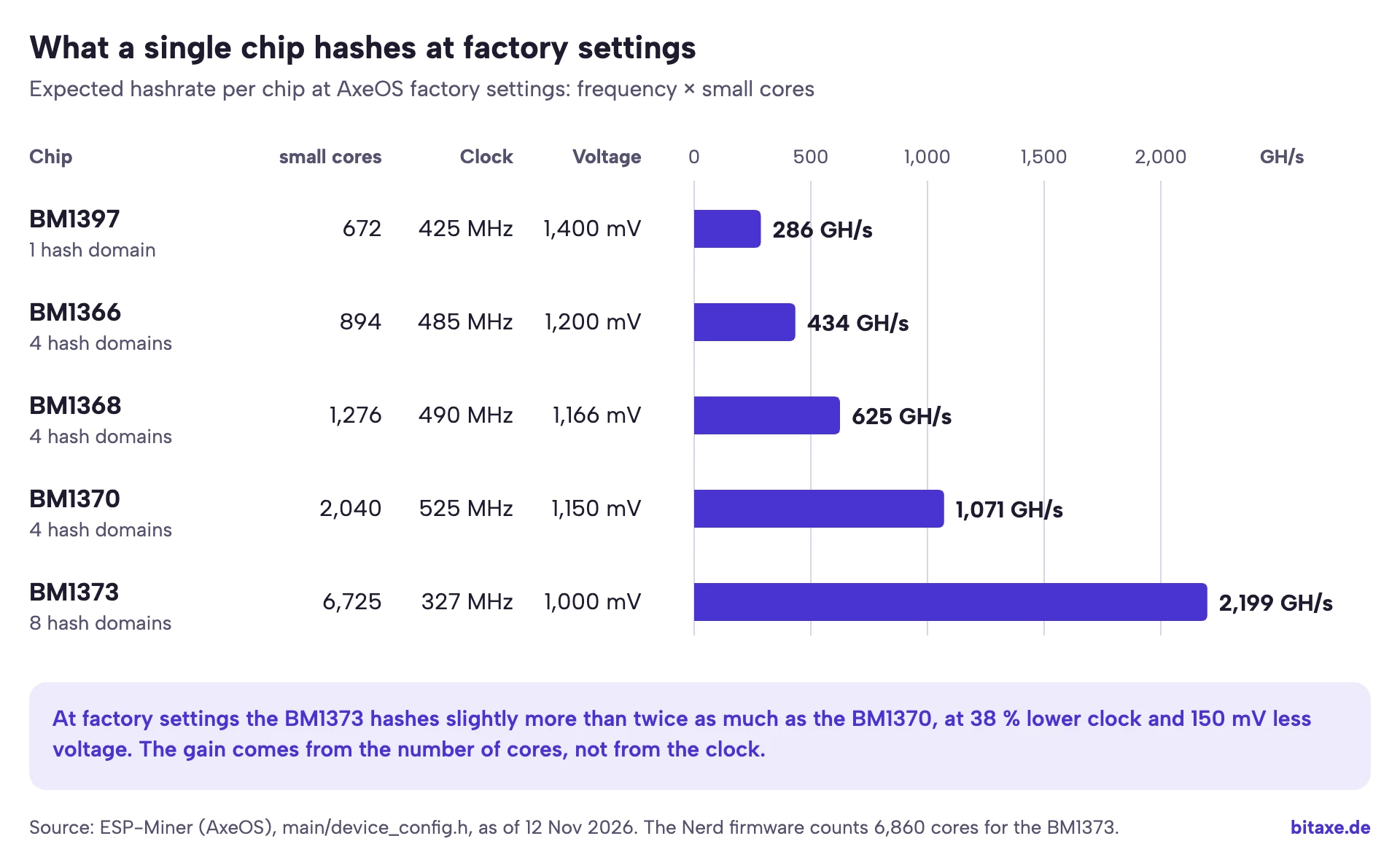
Two things stand out. First, hashrate per chip grows from generation to generation while the clock barely moves: from the BM1366 to the BM1370 the clock rises by 8 %, the number of small cores by 128 %. Second, the BM1373 breaks the pattern: it runs at a lower clock than any of its predecessors and still hashes twice as much as the BM1370.
What small cores means: the firmware keeps two numbers for each chip. The first counts the large cores, 128 each on the BM1370 and the BM1373. The second counts the small cores. The firmware only uses the second one for hashrate, and it treats each small core as delivering one hash per clock cycle: 2,040 small cores times 525 million cycles per second gives 1,071 billion hashes per second, or 1,071 GH/s. Hash domains are groups of cores for which the chip keeps its own counters. AxeOS shows them on the “Hashrate Registers” card; what they tell you is covered in Understanding the hashrate error.
Where the chips come from: from the Antminer to the desk
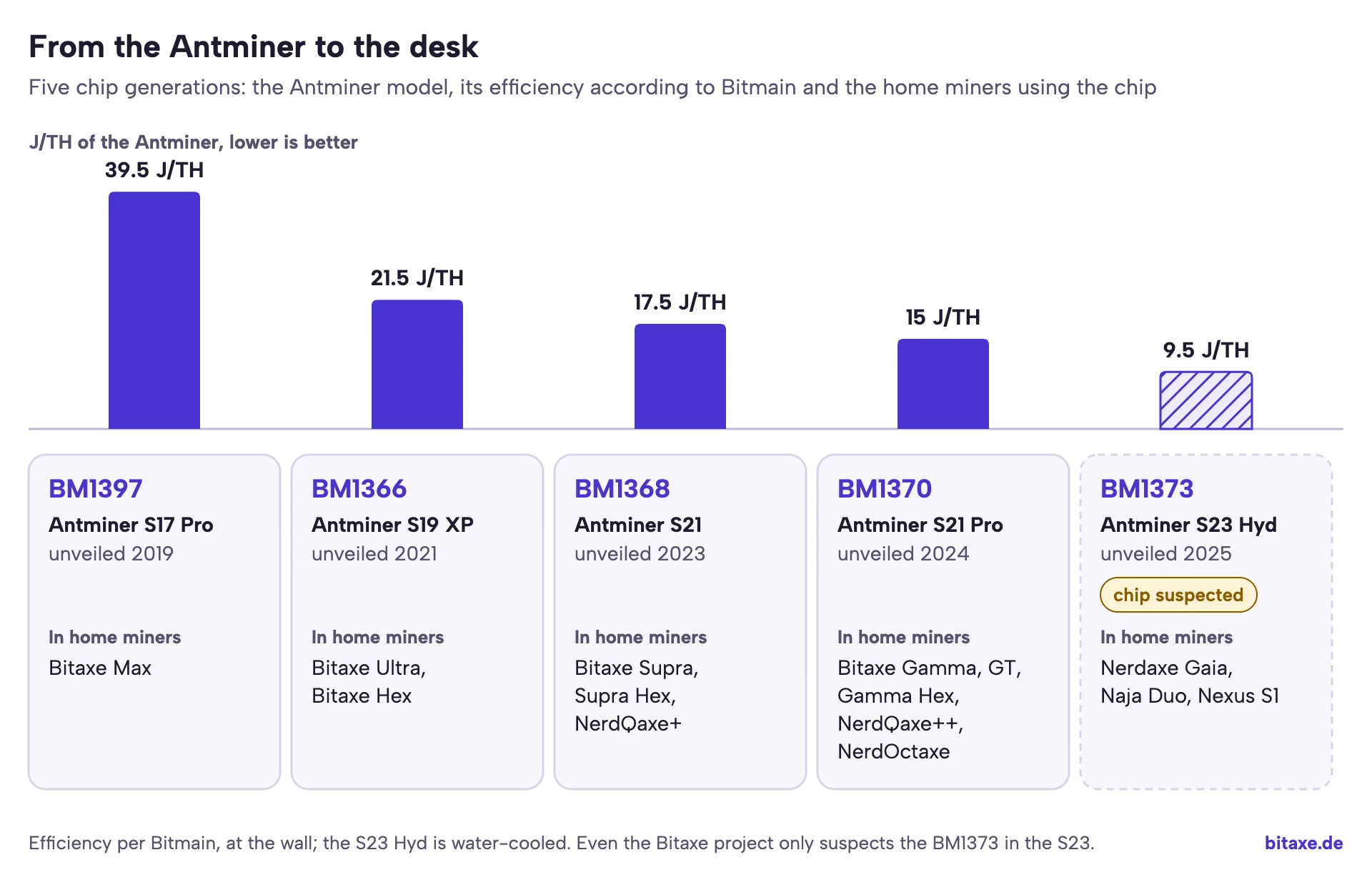
The Bitaxe project does not design its own chips. It takes the current chip from Bitmain's Antminers and builds a small board around it. Because Bitmain publishes no datasheets, the drivers are written by experimenting and reading out registers. The project descriptions are open about where the chips come from. According to the Bitaxe Ultra description, the BM1366 was available new for around 15 US dollars from a seller on AliExpress. For the BM1370, the description said at the launch of the Gamma that it was not yet sold on its own and the best source was an S21 Pro.
BM1397: the chip of the S17 series
Bitmain announced the BM1397 in February 2019 as a 7 nanometre chip and quoted as low as 30 J/TH for it at chip level. In the Antminer S17 Pro that became 39.5 J/TH in normal mode. In the home segment it powers the Bitaxe Max. Technically it is the odd one out: a single hash domain, 1,400 mV at factory settings and, according to the AxeOS source code, no version rolling in hardware. The firmware therefore precomputes four intermediate states of the block header (midstates) for it; every later chip varies the version bits on its own.
BM1366: the chip of the S19 XP
Bitmain unveiled the S19 XP in November 2021 and shipped it from 2022: 140 TH/s at 21.5 J/TH. Its BM1366 is used in the Bitaxe Ultra with one chip and the Bitaxe Hex with six. With 894 small cores at 485 MHz it delivers 0.43 TH/s out of the box, about 40 % of a BM1370.
BM1368: the chip of the S21
With the S21, Bitmain brought out an air-cooled machine with 200 TH/s at 17.5 J/TH in 2023. Its BM1368 powers the Bitaxe Supra, the Supra Hex, which we sell as the Bitaxe Supra Hex 702, and the NerdQaxe+. One quirk in AxeOS: in the self-test it only has to reach 80 % of the expected hashrate, every other chip 85 %.
BM1370: the chip of the S21 Pro
The BM1370 comes from the Antminer S21 Pro, which Bitmain rates at 15 J/TH. The Bitaxe Gamma project description does the maths: 234 TH/s nominal spread over 195 chips gives about 1.2 TH/s per chip. AxeOS expects 1.07 TH/s at its factory settings. Today the BM1370 is in most of the devices we carry: the Bitaxe Gamma, the Bitaxe GT with two chips, the NerdQaxe++ with four, the Bitaxe Gamma Hex with six and the NerdOctaxe with eight. The Gamma Duo runs it with its own profile, called “BM1370XP” in the firmware, at only 400 MHz out of the box.
BM1373: the new chip, probably from the S23 series
In May 2025 Bitmain unveiled the Antminer S23 Hyd: 580 TH/s at 5.51 kW, which is 9.5 J/TH, water-cooled, with deliveries from the first quarter of 2026. That the BM1373 comes from this series is likely but not proven; even the Naja Duo project description only calls it suspected. Its predecessor, the Bitaxe Naja, ran on a BM1340, which the project believes is a prototype of the same chip. During detection AxeOS accepts the IDs 0x1372 and 0x1373 and therefore calls the chip “BM1372/BM1373”. AxeOS has had a driver for it since version 2.15.2 of 18 September 2026. Today the chip powers the Nerdaxe Gaia and the Nerdaxe Gaia Copper Pro with one chip each, the Naja Duo with two and the Nexus models S1-01 and S1-02 with two and four respectively.
How the firmware calculates hashrate
All firmwares in this family calculate the expected hashrate the same way. In AxeOS the formula sits in the power management code and is used in two more places: by the share difficulty controller and by the self-test.
expected hashrate in GH/s
  = clock in MHz
  × small cores
  × number of chips
  ÷ 1000
You see the result on the dashboard as Expected Hashrate and through the API in the field expectedHashrate. At startup AxeOS writes the same calculation to the log, in a line with “ASIC Frequency” and “Expected hashrate”. The measured hashrate next to it comes from the chips' counters and fluctuates around that value. The self-test requires 85 % of the calculated value, 80 % on the BM1368; the limits for each model are in Bitaxe hardware faults. This is what the calculation looks like for the common boards:
| Device | Chips | Firmware | Calculation | Expected out of the box |
|---|---|---|---|---|
| Bitaxe Gamma 601 | 1 × BM1370 | AxeOS | 525 × 2,040 × 1 | 1.07 TH/s |
| Bitaxe GT 801 | 2 × BM1370 | AxeOS | 525 × 2,040 × 2 | 2.14 TH/s |
| Bitaxe Gamma Duo 650 | 2 × BM1370 | AxeOS | 400 × 2,040 × 2 | 1.63 TH/s |
| NerdQaxe++ | 4 × BM1370 | NerdOS | 600 × 2,040 × 4 | 4.90 TH/s |
| Bitaxe Gamma Hex 1300 | 6 × BM1370 | AxeOS | 690 × 2,040 × 6 | 8.45 TH/s |
| Bitaxe Supra Hex 702 | 6 × BM1368 | AxeOS | 490 × 1,276 × 6 | 3.75 TH/s |
| Nerdaxe Gaia | 1 × BM1373 | NerdOS | 350 × 6,860 × 1 | 2.40 TH/s |
| Bitaxe Naja Duo 1201 | 2 × BM1373 | AxeOS | 327 × 6,725 × 2 | 4.40 TH/s |
The formula also shows why the chip count alone says little. The Supra Hex reaches 3.75 TH/s with six BM1368, the NerdQaxe++ 4.90 TH/s with four BM1370, and a single BM1373 in the Gaia does more than the two BM1370 in the GT. Why the measured hashrate sits sometimes above and sometimes below, and when that becomes a problem, is explained in Understanding the hashrate error.
Working backwards: the clock behind a hashrate figure
The formula also works the other way round. Divide a hashrate figure by small cores times chips and you get the clock the miner needs on paper to reach it. It is the quickest sanity check for any product page, ours included. The chart compares that clock with the factory clock of each firmware.
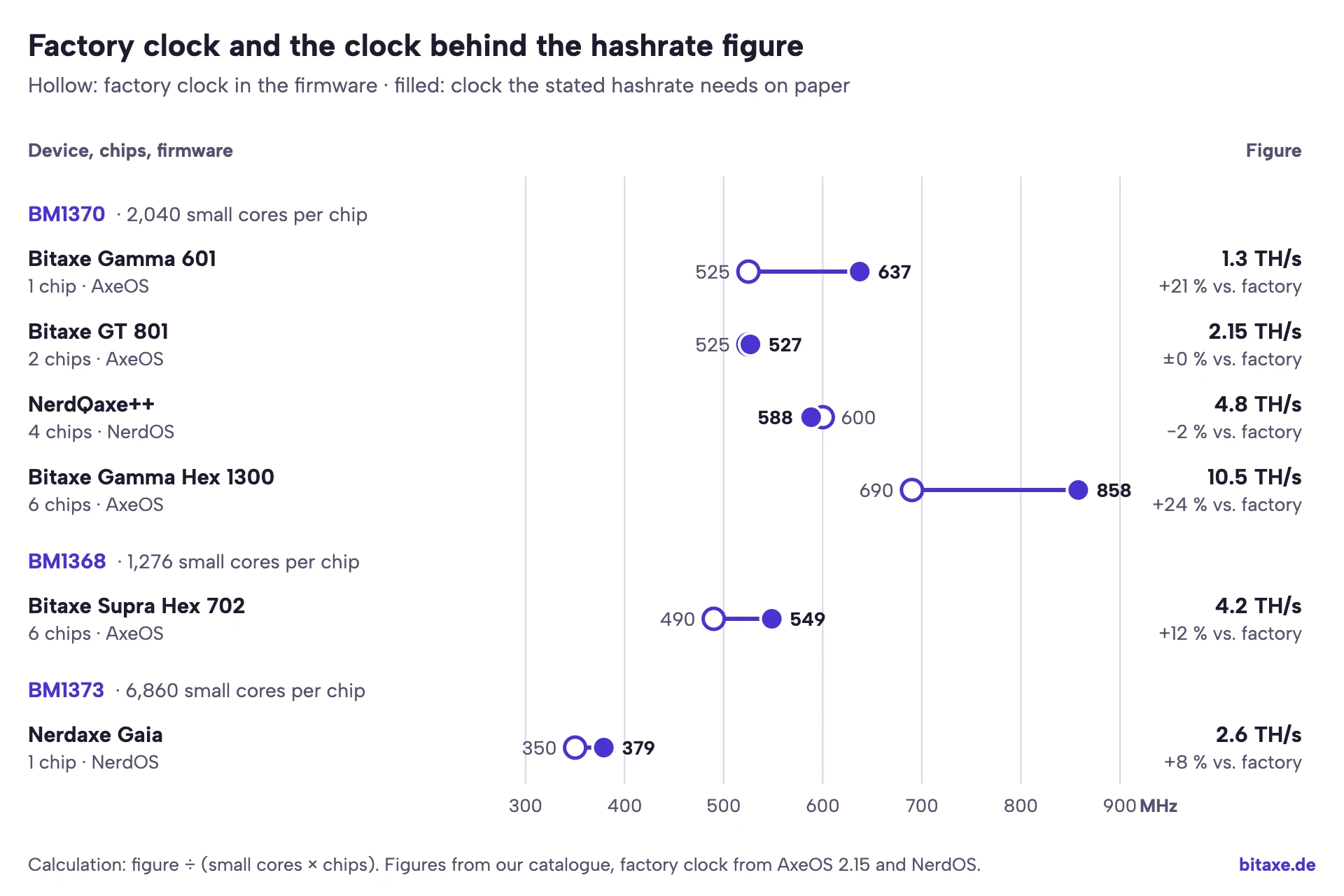
For the Bitaxe GT and the NerdQaxe++ the figure describes the factory state. The Gamma Hex product page carries two numbers: 8.4 TH/s out of the box and around 10.5 TH/s, which needs about 860 MHz on paper, a quarter above the factory setting. Our figure of around 1.3 TH/s for the Bitaxe Gamma corresponds to about 640 MHz. With stock AxeOS the firmware expects 1.07 TH/s; our Gammas reach 1.3 TH/s through hardware and software optimisation that you only get from us. For the Supra Hex, the 4.2 TH/s figure needs around 550 MHz, for the Gaia the 2.6 TH/s about 380 MHz.
These figures describe different operating points. For your comparison that means a hashrate without clock and power is only half the information. If the calculated clock is well above the factory clock, ask about voltage, power and cooling at that clock. How far a BM1370 can sensibly be overclocked and what it costs in power is shown in the overclocking guide. For the BM1373 the result also depends on which core count you use; more on that shortly.
Clock, voltage and efficiency: why more cores save power
Why does Bitmain build wider chips instead of clocking the old ones higher? The answer lies in a rule of thumb from chip design. The power a chip turns over while switching grows roughly with the clock and with the square of the voltage. Hashrate grows only with the clock. Energy per hash therefore depends mostly on voltage, and a low voltage only tolerates a low clock. If you want more hashrate at a lower voltage, you need more cores.
That is exactly the path the table above shows. From the BM1370 to the BM1373 the factory voltage drops from 1,150 to 1,000 mV and the clock from 525 to 327 MHz, while the number of small cores more than triples. By the rule of thumb alone, 1,000 instead of 1,150 mV means around 24 % less energy per hash. That is a model calculation, not a measurement: manufacturing, leakage, voltage regulators and fans all shape what you see at the wall.
For your miner this leads to the same rule as for overclocking: more clock at the same voltage costs little efficiency, more voltage costs a lot. AxeOS offers fixed steps for each chip:
| Chip | Clock steps in AxeOS | Voltage steps in AxeOS | Self-test requires |
|---|---|---|---|
| BM1397 | 400 to 600 MHz, 10 steps | 1,100 to 1,500 mV in steps of 50 mV | 85 % |
| BM1366 | 400 to 575 MHz, 9 steps | 1,100 to 1,300 mV in steps of 50 mV | 85 % |
| BM1368 | 400 to 575 MHz, 10 steps including 490 | 1,100 to 1,300 mV, plus 1,166 mV | 80 % |
| BM1370 | 400, 490, 525, 550, 600, 625, 690 MHz | 1,000, 1,060, 1,100, 1,150, 1,200, 1,250 mV | 85 % |
| BM1373 | 327, 350, 375, 380, 400, 410 MHz | 1,000, 1,060, 1,100, 1,150, 1,200, 1,250 mV | 85 % |
The steps are suggestions in the drop-down menu. In overclock mode, clock and voltage become free number fields. The BM1373 stands out: its steps already end at 410 MHz but start at the same voltage as the BM1370. The Nerd firmware even starts the Gaia at 940 mV.
Reading efficiency figures correctly
Bitmain measures its Antminers at the wall, with large power supplies and hundreds of chips. A home miner instead spreads fixed loads such as the ESP32, display and fan over one or a few chips, and manufacturers measure at different points. The table shows the values we have for our devices, with their origin:
| Device | Chips | Operating point | Power | Efficiency | Source |
|---|---|---|---|---|---|
| Bitaxe Gamma 601 | 1 × BM1370 | around 1.2 TH/s in everyday use | around 17 W | around 14 J/TH | our own measurement at the wall |
| Bitaxe GT 801 | 2 × BM1370 | 2.15 TH/s | 43 W | around 20 J/TH | reseller figure |
| NerdQaxe++ | 4 × BM1370 | 4.90 TH/s at 600 MHz | around 76 W | around 16 J/TH | developer |
| Bitaxe Gamma Hex 1300 | 6 × BM1370 | 8.4 TH/s out of the box | around 150 W | around 18 J/TH | our catalogue |
| Bitaxe Supra Hex 702 | 6 × BM1368 | around 4.2 TH/s | around 90 W | around 21 J/TH | our catalogue |
| Nerdaxe Gaia | 1 × BM1373 | 2.4 TH/s out of the box | 26 to 30 W | 11 to 12.5 J/TH | manufacturer Bitronics |
| Nexus S1-01 | 2 × BM1373 | around 5 TH/s | around 80 W | around 16 J/TH | our catalogue |
| Nexus S1-02 | 4 × BM1373 | around 10 TH/s | around 150 W | around 15 J/TH | our catalogue |
The values for the same chip are far apart. The BM1373 reaches 11 to 12.5 J/TH in the Gaia and 15 to 16 J/TH in the Nexus models; for the BM1370, six joules separate the Gamma at a measured 14 J/TH from the GT at 20 J/TH according to the reseller. That speaks against neither chip; it shows how much the operating point and the measuring point can matter. The Nerd firmware, for example, measures the Gaia's power at the output of the core regulator and adds a flat 5 W, so power supply losses are missing. Only compare J/TH if you know where and at which clock it was measured. What the watts cost per year is worked out for every model in Bitaxe power consumption.
BM1370 vs BM1373 head to head
Most questions are about these two chips, because today they sit side by side on the shelf. The differences at a glance:
| Feature | BM1370 | BM1373 |
|---|---|---|
| Comes from | Antminer S21 Pro (documented) | Antminer S23 (suspected) |
| ID that AxeOS expects | 0x1370 | 0x1372, also 0x1373 |
| Large cores | 128 | 128 |
| Small cores | 2,040 in every firmware | 6,725 (AxeOS), 6,860 (NerdOS), 6,912 (NMAxe) |
| Hash domains | 4 | 8 |
| Factory clock | 525 MHz (Gamma), 600 MHz (NerdQaxe++), 690 MHz (Gamma Hex) | 327 MHz (Naja Duo), 350 MHz (Gaia) |
| Factory voltage | 1,150 mV, 1,200 mV in the Gamma Hex | 1,000 mV (Naja Duo), 940 mV (Gaia) |
| Hashrate per chip out of the box | 1.07 TH/s (Gamma) | 2.20 TH/s (Naja Duo), 2.40 TH/s (Gaia) |
| Support in AxeOS | since the Bitaxe Gamma, mature | since 2.15.2 of September 2026, work in progress |
| Devices we carry | Gamma, GT, NerdQaxe++, Gamma Hex, NerdOctaxe and more | Gaia, Gaia Copper Pro, Nexus S1-01, Nexus S1-02 |
The open question: how many cores does the BM1373 have?
For the BM1370 every firmware agrees: 2,040 small cores. For the BM1373 each one counts differently. AxeOS uses 6,725, NerdOS 6,860 with a note that the value still needs checking, and NMAxe 6,912. The NMAxe comment cites measurements at 400, 600 and 740 MHz as its basis; the values it lists, however, are exactly 6,912 times the clock. On 13 November 2026 a user posted their own measurement to the AxeOS project (issue #2102, still open): from the hash counters of a Gaia and a Naja Duo they read about 6,900 small cores per chip. They point out the catch themselves: if the counter also includes hashes that end in a hardware error, the Gaia's value drops to about 6,700 with its error rate of around 3 %.
For day-to-day operation this is cosmetic. The core count only determines the expected hashrate and the self-test target, not what the chip does. Between 6,725 and 6,912 there is 2.8 %. If a BM1373 miner on AxeOS consistently shows a few percent more hashrate than expected, this may well be why.
How mature the firmware is for the BM1373
Every firmware has run the BM1370 since the Bitaxe Gamma, and its quirks and limits are well known. With the BM1373 much is new. One example: AxeOS 2.15.4, the current release, reads only four of the eight domain counters on the BM1373 and doubles the value. Since 9 October 2026 the main branch reads all eight (pull request #2011), but that has not reached a release yet. On the “Hashrate Registers” card two domains therefore appear as one, so a single weak domain is harder to spot. This affects boards running AxeOS such as the Naja Duo. The Gaia ships with NerdOS; which firmware we recommend for it is in our article on the Nerdaxe Gaia.
More hashrate per chip means more current per chip
A chip that hashes twice as much needs correspondingly more current at a low voltage. You can see it in the shutdown limits AxeOS gives the voltage regulator: 30 A for the Gamma with one BM1370, 55 A for the GT with two, 68 A for the Naja Duo with two BM1373 and 160 A for the Gamma Hex with six BM1370. For the Gaia, BitMaker raised the limits in the Nerd firmware to 28 A for the warning and 33 A for shutdown, because the usual 30 A already tripped at 440 MHz and 1 V. A BM1373 miner therefore needs a regulator designed for this chip and a power supply with headroom. Which power supplies suit which model is covered in Power supply for Bitaxe and NerdQaxe.
Several chips on one board: voltage domains
As soon as a board carries more than one chip, the question is how the chips get their power. The simple solution is to put them all in parallel on the same core voltage. That is what the Bitaxe GT does, with its two BM1370 on 1.15 V. The regulator then has to supply the current of both chips, and at such a low voltage that quickly adds up to several dozen amps.
The alternative is voltage domains. Groups of chips are stacked in series, much like batteries in a torch. AxeOS knows the number of domains for each board and sets the regulator's output voltage to core voltage times domains. The Naja Duo has two domains with one BM1373 each, so its regulator supplies 2 × 1,000 mV, or 2 V. According to the project description, the Gamma Hex has two domains with three BM1370 each, so its regulator supplies 2 × 1,200 mV, or 2.4 V. The Supra Hex and the Bitaxe Hex have three domains; on the Supra Hex the regulator is set to 3 × 1,166 mV, just under 3.5 V. The Nexus S1-01 also stacks its two BM1373 in series, according to the source code of the NMAxe firmware.
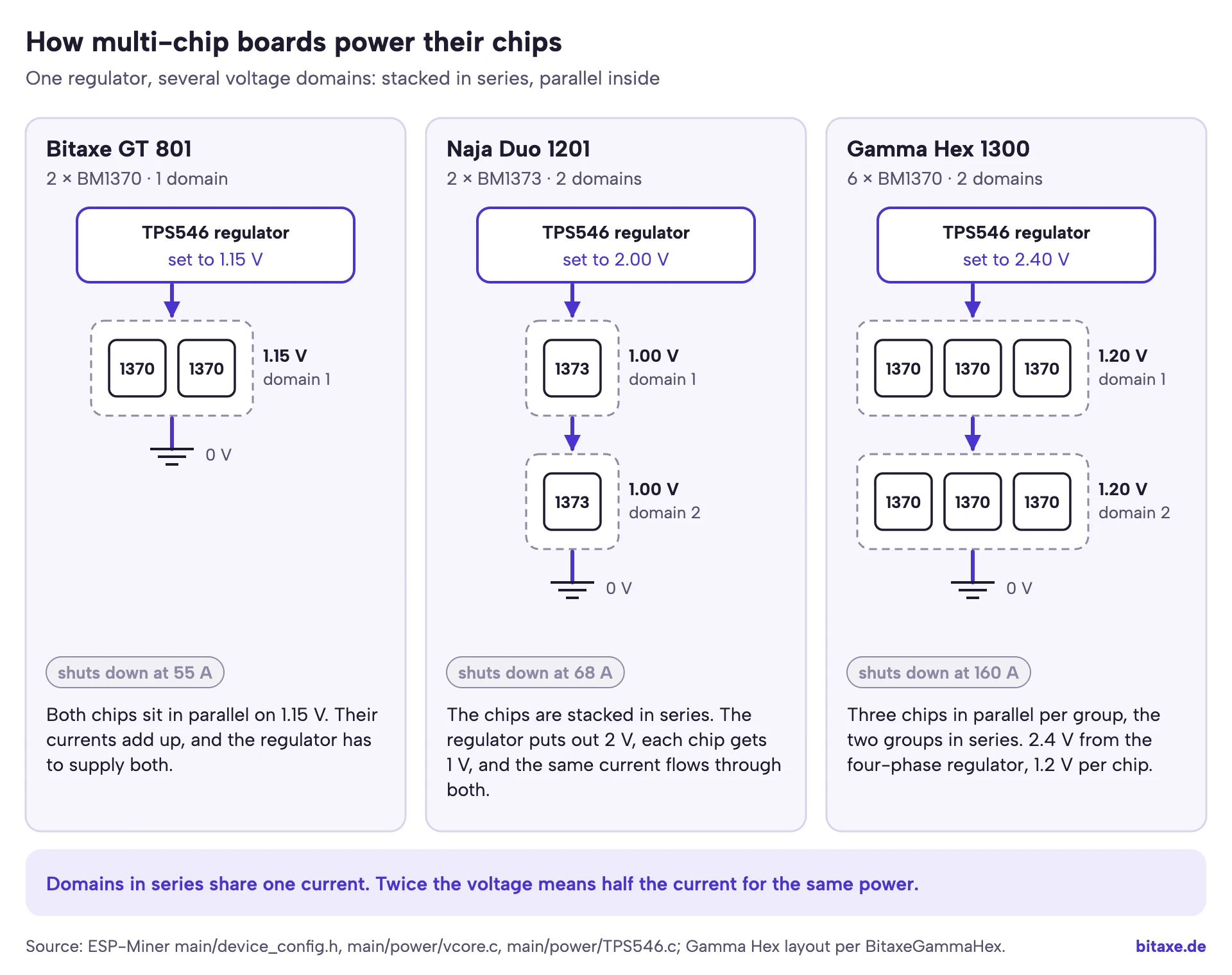
The advantage: the same current flows through domains stacked in series. At twice the voltage, the same power needs only half the current, which puts less load on traces and regulator. The price is more design effort. The domains must draw similar current so the voltage splits evenly, which is why every domain holds the same number of chips of the same type. And the data line runs across different voltage levels; the BM1373 driver in AxeOS sets a separate driver strength on the last chip of each domain for that. On the dashboard you notice little of this: AxeOS divides the measured regulator voltage by the number of domains and shows the voltage per chip.
Which chip is in your miner?
You do not need to open anything. You should even avoid removing the heatsink just to read the marking, because the thermal paste has to be replaced afterwards. These routes are quicker:
- AxeOS: the System page shows chip and count under “ASIC Type”, for example “2x BM1370” on the GT. Above it are “Device Model” and “Board Version”. Where to find the page is shown in AxeOS explained.
- Board version: the number gives away the chip. 102 and 2.2 are BM1397 (Max), 20x BM1366 (Ultra), 30x six BM1366 (Hex), 40x BM1368 (Supra), 60x BM1370 (Gamma), 650 two BM1370 (Gamma Duo), 70x six BM1368 (Supra Hex), 801 two BM1370 (GT), 1201 two BM1373 (Naja Duo) and 1300 six BM1370 (Gamma Hex).
- API:
/api/system/inforeturns chip, core count, clock, voltage and expected hashrate in one go. That lets you follow the calculation above directly. What else the API can do is covered in Bitaxe monitoring. - Nerdaxe and NerdQaxe: the display shows the chip type, for example “BM1373” on the Gaia.
curl -s http://192.168.1.50/api/system/info | jq '{ASICModel, smallCoreCount, frequency, coreVoltage, expectedHashrate}'Replace the IP address with your miner's. A Gamma at factory settings returns “BM1370”, 2040, 525, 1150 and around 1071. By the way, you cannot simply swap a chip. The board, voltage regulator and firmware profile belong to the chip; if AxeOS reports “CHIP_ID response mismatch”, the board setting and the chip do not match. What to do then is covered in Bitaxe hardware faults.
Which chip suits you?
The chip is an important part of the decision, but not the only one. For your chance of finding a block, only hashrate counts, no matter which chip it comes from; the maths is in Bitaxe block odds. The chip decides how much power, heat and noise you accept for that hashrate.
- A first miner, quiet and proven: a BM1370 in the Bitaxe Gamma. 5 volts, the largest community, and every guide fits.
- The most hashrate from one chip: the BM1373 in the Nerdaxe Gaia or the Gaia Copper Pro. 12 volts, little power per terahash, but firmware that is still maturing.
- More hashrate on the shelf: several BM1370 in the NerdQaxe++ or the Gamma Hex, or two to four BM1373 in the Nexus S1-01 and S1-02.
- BM1366 and BM1368: an existing Ultra or Supra keeps mining reliably. The Supra Hex 702 with six BM1368 is a solid multi-chip miner, but needs more power per terahash than the BM1370 boards.
How the device families differ beyond the chip is shown in Bitaxe or Nerdaxe. Our article on the Nerdaxe Gaia covers the BM1373 in the Gaia with all measured values and firmware questions, and the NerdQaxe++ review covers four BM1370 in everyday use.
FAQ
What is the difference between the BM1370 and the BM1373?
Which chip is in the Bitaxe Gamma?
Which Antminer uses the BM1373?
What are small cores?
How does AxeOS calculate the expected hashrate?
Why does my miner show a different hashrate than expected?
Is the BM1373 always more efficient than the BM1370?
Why does the BM1373 run at such a low clock?
What does “BM1372/BM1373” mean in AxeOS?
Can I upgrade the chip in my Bitaxe?
Are there datasheets for Bitmain's chips?
Does the chip affect the chance of finding a block?
Sources
- AxeOS (ESP-Miner): chip values in main/device_config.h, formula in power_management_task.c, voltage domains in vcore.c and shutdown limits in TPS546.c, release 2.15.4 and main branch as of 12 Nov 2026
- AxeOS: pull request #2011 (eight domain counters on the BM1373) and issue #2102 (BM1373 core count)
- Project descriptions: bitaxeMax, bitaxeUltra, bitaxeSupra, bitaxeGamma, BitaxeGammaHex, naja-duo and bitaxeNaja
- NerdOS: ESP-Miner-NerdQAxePlus (core count 6,860 in the BM1373 driver)
- NMAxe: ESP-Miner-NMAxe (core count 6,912, Nexus board definition)
- Bitmain on the BM1397: press release of 18 Feb 2019; on the S17: Bitcoin Magazine
- S19 XP: Hashrate Index; S21: Hashrate Index; S21 Pro: Bitmain; S23 Hyd: ForkLog
Matching products


Open-source Bitcoin mining · Hardware tests · Firmware · Technical support
We work with devices such as the Bitaxe, Nerdaxe and NerdQaxe every day, test different hardware and firmware configurations and document what we learn from running them. In March 2023 Bitaxe.de became the first retailer in Europe to build and sell the Bitaxe and has since supplied more than 5,000 home miners. We run the devices ourselves around the clock and operate the solo pool pool.bitaxe.de.
Disclosure: we sell many of the devices we write about here. How the team works
Read more
Bitaxe hardware faults: what Power Fault, the self-test and chip count 0 really mean
What “Power Fault Detected”, “ASIC 0 not found” and a failed self-test really mean: every AxeOS 2.15.4 hardware message explained from the source code, with the five reasons the voltage regulator shuts down, all twelve self-test checks and a flowchart that ends at support.
Guides & knowledgeBitaxe security: AxeOS login and password, home network, hotspot and remote access
AxeOS never asks for a password: anyone on the same network can change the pool and the payout address. Which gaps are open as of October 2026, how to separate the miner on your home network, reach it without port forwarding and notice a foreign address right away.
Guides & knowledgeMonitoring a Bitaxe: catch outages, heat and wrong payouts without false alarms
Which values the AxeOS API really delivers, when “no share for …” is a real outage, why a Bitaxe runs slower for good after overheating, and how a small script on your home network watches heat, power, fallback pool and coinbase.