
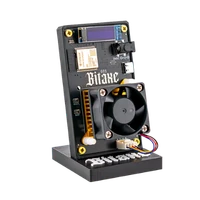
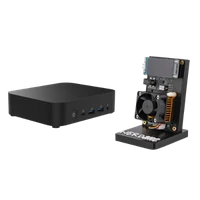
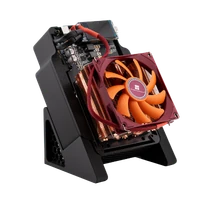
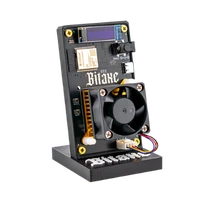
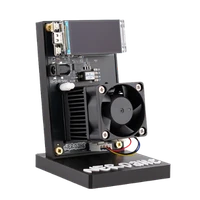

Bitaxe 702 | 4.2 TH/s
Six ASICs, around 4.2 TH/s: the Bitaxe for everyone who finds a Gamma too slow
Item no.: 94573 · Manufacturer: Bitaxe.de · Series: Bitaxe
- 6 × BM1368, around 4.2 TH/s as we ship it (stock AxeOS: 3.75 TH/s)
- Around 100 W in our tests, 12 V / 10 A power supply included
- Our OSM-OS firmware image, operated like any Bitaxe
- For home miners who want more hash rate from one device
- Hashrate
- ~4.2 TH/s
- Efficiency
- ~24 J/TH
- Power draw
- ~100 W
Hash rate per firmware as we ship it (OSM-OS, 550 MHz, 1250 mV). Power measured at the wall in our tests, efficiency calculated from it.
plus shipping
Sold out
Notify me when it is back
One email as soon as this miner is in stock again. No newsletter.
Product information
How the 702 runs as we ship it
The Bitaxe Supra Hex 702 carries six BM1368 ASICs on one board, controlled by an ESP32-S3. It is the Bitaxe for everyone who finds a single-chip device too slow, and like every Bitaxe it connects to a mining pool of your choice over Wi-Fi.
We ship it with our OSM-OS firmware image, which runs the chips at 550 MHz and 1250 mV. The firmware expects around 4.2 TH/s at that setting. With stock AxeOS they run at 490 MHz, and the firmware expects 3.75 TH/s.
In our tests we measured a power draw of around 100 W at the wall, roughly 73 kWh a month. The firmware estimates 105 W at this setting. That works out to around 24 J/TH. The mining calculator shows what it costs at your electricity price.
Placement and cooling
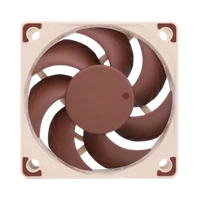
Six chips mean six heat sources. The 702 is air-cooled and belongs on an open surface with space behind and above it, not in a closed shelf. It is clearly audible while running: fine for a study or utility room, less so for a bedroom or living room.
The included power supply delivers 12 V and 10 A, i.e. 120 W, leaving headroom above the roughly 100 W it draws. If you replace it, make sure it really delivers 12 V and at least 10 A; a power supply that is too weak shows up as restarts under load, not as an error message. What fits is covered in Power supply for the Bitaxe.
Who it suits and who it does not
It suits you if you want much more hash rate from one device than a Gamma gives and have room for an audible device. In solo mining its roughly 4.2 TH/s give it a good three times as many tickets as a Gamma.
It does not suit you if efficiency or quiet matter. With the older BM1368 it needs more power per terahash than the BM1370 models. The Bitaxe GT with two BM1370 is more economical and quieter; the water-cooled Bitaxe Gamma Hex 1300 brings much more hash rate.
Setup
Like every Bitaxe it opens its own Wi-Fi on first start, where you enter your 2.4 GHz home network. Our solo pool is already set in the web interface; you enter your own Bitcoin address yourself. Step by step: Setting up a Bitaxe.
Bitaxe 702 compared to similar miners
| Model | Hashrate | Power | Efficiency | Price |
|---|---|---|---|---|
| Nerdaxe Gaia Copper Pro | ~3 TH/s | ~33 W | ~11 J/TH | €299.00 |
| Bitaxe 702 (this page) | ~4.2 TH/s | ~100 W | ~24 J/TH | €249.00 |
| NerdQaxe++ Rev7 | ~4.8 TH/s | ~80 W | ~16 J/TH | €349.00 |
All values are guide figures. Compare all miners, calculate power cost.
Frequently asked questions about the Bitaxe 702
How much hash rate does the Bitaxe 702 have?
How much power does the Bitaxe 702 need?
How loud is the Bitaxe Supra Hex 702?
Which power supply does the Bitaxe 702 need?
Why is the Bitaxe 702 less efficient than newer Bitaxe models?
Bitaxe 702 or Gamma Hex 1300?
Can I overclock the Bitaxe 702?
Why buy from Bitaxe.de?
Free shipping from 200 €
Free shipping to almost every EU country from 200 €, shipping to the EU and Switzerland with UPS and a tracking link. Items in stock leave within 24 hours, with no customs surprises inside the EU.
Truly open source
Bitaxe, Nerdaxe, NerdQaxe & co. are open hardware running open firmware (AxeOS or NerdOS): you set pool, clock and voltage yourself. No cloud account, no vendor lock-in, no black box.
CE, warranty & returns
Every product carries the CE marking. Plus statutory warranty and a 14-day right of withdrawal for a safe order. If something is not right, we find a solution with you, person to person.
Direct support
Questions about setup, pool, firmware or your order? By email or Telegram you get help from someone who runs these devices themselves, in English or German, beginners welcome.
Customer reviews
4.8 / 5 · 8 reviews from customers who bought this product from us.
Ich habe ihn jetzt seit ungefähr einem Monat. Bisher läuft alles wie es soll. Falls es zu einem Ausfall kommt, muss ich den WLAN-Router neu starten, aber sonst funktioniert alles einwandfrei.
Ordered in August but only running for two weeks, it took me that long to find a spot outside the bedroom. Setup in AxeOS was less scary than expected: join the miner's own wifi, pick the home network, enter pool and wallet address, done. The first evening it kept restarting, entirely my fault, I had it on the crowded power strip under the desk; own wall socket, not one restart since. The power brick is serious, and so is the number on the smart plug.
Familiar AxeOS, 6 chips, runs pretty warm though.
Inzwischen steht auf der Produktseite ausverkauft, was mir ein kleines, völlig unverdientes Gefühl von Weitsicht verschafft. Meiner läuft seit sechs Wochen durch, mit Standardtakt irgendwo zwischen 3,7 und 3,9 TH/s laut Dashboard, und das Geräusch dazu ist das eines Laptops, der gerade sehr ernsthaft etwas rendert. Ich habe mich daran gewöhnt, meine Frau hat sich an die geschlossene Bürotür gewöhnt, beide Lösungen funktionieren. Wer die Lüfterkurve in AxeOS leiser stellt, bekommt wärmere Chips, so einfach ist der Handel, mehr Magie gibt es nicht.
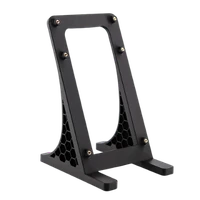
Seit einer Woche läuft der 702 bei mir neben dem alten Gamma, und der Unterschied ist vor allem akustisch. Der Gamma war im Arbeitszimmer praktisch nicht wahrnehmbar, den 702 hört man im Raum jederzeit als gleichmäßiges Rauschen. Nicht unangenehm, kein Pfeifen, kein Brummen, aber direkt neben der Tastatur wollte ich ihn nach zwei Tagen nicht mehr haben. Jetzt steht er auf dem mitgelieferten Ständer auf dem Sideboard mit Luft nach hinten und oben, und tagsüber ist das Lüftergeräusch kein Thema mehr. An der Lüfterkurve in AxeOS habe ich kaum gedreht, im Automatikmodus pendelt sich das nach ein paar Minuten ein. Hashrate liegt bei der Werkseinstellung von 490 MHz stabil um die 3,8 TH/s, an der Messsteckdose stehen rund 88 W, was nicht ganz mit dem Wert in AxeOS übereinstimmt, der ist ja eh nur gerechnet. Dafür, dass hier sechs Chips auf einem Board gekühlt werden, finde ich das Geräusch angemessen. Fürs Schlafzimmer wäre er nichts, im Arbeitszimmer mit Tür passt er für mich genau.
Got mine before they sold out. Six chips on one board and AxeOS is simple enough that even I had it mining within an evening and it just keeps going.
Hatte als Anfängerin Respekt vor der Einrichtung, aber AxeOS macht es leicht: Netzteil dran, WLAN wählen, Pool eintragen, fertig. Seit drei Wochen rechnet er und ich gucke ständig aufs Dashboard!
Lieferung zog sich, AxeOS wie gewhont, dickes Netzteil.
Related guides
Setup, pool, cooling, power supply and sensible upgrades for your setup.
You might also like

Bitaxe GT | 2.15 TH/s

Bitaxe Gamma | 1.3 TH/s

NerdQaxe++ Rev7 | 4.8 TH/s
