
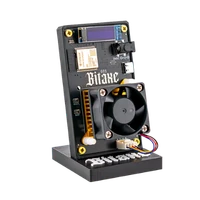
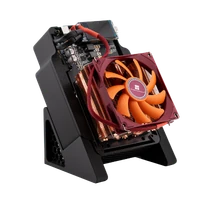
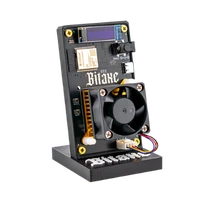
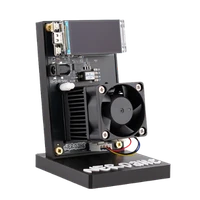

NerdOctaxe Hydro | 14 TH/s
Eight BM1370 under water – 14 TH/s where air cooling reaches its limit
Item no.: 79219 · Manufacturer: Bitaxe.de · Series: NerdOctAxe
- Eight BM1370 ASICs, 14 TH/s
- 220 W, cooled through a water loop
- NerdOS, your own pool, your own Bitcoin address
- 220 W power draw, water cooling
- Hashrate
- 14 TH/s
- Efficiency
- ~16 J/TH
- Power draw
- 220W
plus shipping
Sold out
Notify me when it is back
One email as soon as this miner is in stock again. No newsletter.
Product information
NerdOctaxe Hydro: 14 TH/s with water cooling
The NerdOctaxe Hydro uses the same base as the air-cooled version – eight BM1370 ASICs, NerdOS as firmware, 2.4 GHz Wi-Fi, configuration in the browser – and swaps the cooling. A water block sits on the chips with coolant running through it. Quoted figures are 14 TH/s at 220 W, supplied by a 12 V, 20 A power supply.
How loud the result gets is decided not by the board but by your loop: radiator area, pump, tubing and the fans on the radiator. A blanket dB figure would be misleading for this design. Power draw, on the other hand, is fixed: 220 W, roughly 158 kWh a month.
Solo mining is essentially buying tickets: 14 TH/s means fourteen trillion attempts per second at hitting the next valid block. If it lands on your worker, 3.125 BTC of block reward plus every fee from the transactions in that block go undivided to your address. The probability stays small; in the meantime your hash rate helps secure the network. How that works is covered in our solo mining guide.
Why water makes a difference at 220 W
- Heat gets transported: the water block picks it up at the ASICs and releases it at the radiator – over an area that would never fit on the board.
- Large area, slow fans: a properly sized radiator gets by with low fan speeds. That is the headroom a small fan above a heatsink does not have.
- Steady over long runs: feedback from continuous operation mostly describes one thing – temperatures stay where they were after start-up, even many hours later.
- As open as the small boards: pool, worker, address, frequency and voltage stay with you in NerdOS, with no manufacturer account and no service in between.
What belongs to the cooling loop
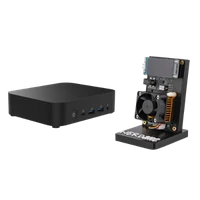
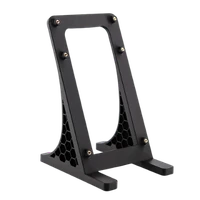
The box contains the miner with hydro cooling and water block, the matching power supply, a 3D-printed stand and a quick start guide. Temperature and noise, however, are decided by the build around it: radiator, pump, fans and how you route the tubing.
That is also where the work is. Several customers write that the first balancing of performance and cooling took time and that they would have liked a more detailed guide for the loop. So plan an afternoon, test the loop for leaks without load before the first long run, and pick a place where escaping water cannot damage anything.
Up and running in minutes
That applies to the software side: network and pool are set up quickly, and the procedure is in the NerdQaxe setup guide. The real time goes into filling and bleeding the loop beforehand.
- 1
Build and test the loop
Connect water block, radiator and pump, fill, bleed and first run the loop without load. Only when nothing drips and the pump runs quietly does the miner get power.
- 2
Connect power and join Wi-Fi
Connect the supplied power supply, start the miner and join it to your 2.4 GHz network through its own Wi-Fi access point. A 5 GHz-only network will not be detected.
- 3
Enter pool, worker and Bitcoin address
Open NerdOS in a browser, store the pool details and your own Bitcoin address, save and restart. Watch temperature and hash rate over the first few hours and adjust the radiator fans afterwards.
Who the NerdOctaxe Hydro is for
For miners with experience who are extending their setup deliberately: 14 TH/s in a build you understand yourself, on your own pool or solo pool. If you have built a water loop for a PC before, you will feel at home – customers usually name a technical shelf or a separate room as the location.
It is less suitable as a first device, when there is no room for radiator and tubing, when water next to electronics is a deal breaker, or when 220 W of continuous load is not part of the plan. In that case the NerdQaxe++ Hydro at 100 W is the smaller entry, and the air-cooled NerdOctaxe delivers almost the same hash rate without a loop.
What you need to run it
Besides the device and power supply you need a socket, 2.4 GHz Wi-Fi at the location, pool credentials and your own Bitcoin address. For the loop, add radiator, pump, fans, tubing and coolant.
A permanent location matters too. A loop that is sealed once and not constantly rebuilt is the biggest contribution to quiet continuous operation.
Accessories and sensible upgrades
There is little to change on the miner itself – the levers are in the cooling build and in the infrastructure around your mining.
- Cooling for fans and components that push temperature and noise down further.
- Bitcoin nodes if you want to build your block templates yourself instead of taking them from a pool.
Ready for your NerdOctaxe Hydro setup?
The NerdOctaxe Hydro is the choice when 14 TH/s should live in your home and the heat should go where it bothers nobody. The requirements are a leak-free loop, a permanent spot and the willingness to fine-tune at the start.
NerdOctaxe Hydro compared to similar miners
| Model | Hashrate | Power | Efficiency | Price |
|---|---|---|---|---|
| NerdOctaxe | ~12 TH/s | ~200 W | ~16 J/TH | €699.00 |
| NerdOctaxe Hydro (this page) | 14 TH/s | 220W | ~16 J/TH | €799.00 |
All values are guide figures. Compare all miners, calculate power cost.
Frequently asked questions about the NerdOctaxe Hydro
How loud is the NerdOctaxe Hydro?
How much electricity does the NerdOctaxe Hydro use?
What does the Hydro give me over the air-cooled NerdOctaxe?
What is the difference to the NerdQaxe++ Hydro?
Is everything for the water cooling included?
Do I need experience for the NerdOctaxe Hydro?
How much hash rate does the NerdOctaxe Hydro really have?
Which power supply does the NerdOctaxe Hydro need?
Can I let the NerdOctaxe Hydro solo mine?
Where should the NerdOctaxe Hydro stand?
Can I overclock the NerdOctaxe Hydro?
Does the NerdOctaxe Hydro have a LAN port?
Why buy from Bitaxe.de?
Free shipping from 200 €
Free shipping to almost every EU country from 200 €, shipping to the EU and Switzerland with UPS and a tracking link. Items in stock leave within 24 hours, with no customs surprises inside the EU.
Truly open source
Bitaxe, Nerdaxe, NerdQaxe & co. are open hardware running open firmware (AxeOS or NerdOS): you set pool, clock and voltage yourself. No cloud account, no vendor lock-in, no black box.
CE, warranty & returns
Every product carries the CE marking. Plus statutory warranty and a 14-day right of withdrawal for a safe order. If something is not right, we find a solution with you, person to person.
Direct support
Questions about setup, pool, firmware or your order? By email or Telegram you get help from someone who runs these devices themselves, in English or German, beginners welcome.
Customer reviews
4.9 / 5 · 12 reviews from customers who bought this product from us.
Building the loop was half the fun, and six weeks later I still grin at the dashboard: 14 TH/s with the chips parked just under 50 °C.
Took the better part of two weeks to get here, loop parts sitting ready on the desk the whole time. Stock preset reads around 11.5 TH/s at roughly 160 W, nudged it toward the advertised 14 and the wall meter says about 225 W now, chips holding at 56 °C on a 240 mm radiator with two slow fans. With the evenings getting chilly in October the radiator doubles as a foot warmer under the desk, so the 220 W aren't entirely wasted.
Wie leise so ein Ding sein kann, begeistert mich nach zwei Monaten immer noch. Mein Bruder hat die Luftversion und bei ihm hört man den Lüfter durch die Tür, bei uns gluckert höchstens die Pumpe nach dem Nachfüllen. Den Kreislauf hat mein Mann gebaut, ich kümmere mich um Pool und Adresse, das war die leichtere Hälfte. Anfangs liefen gut 11 TH/s, seit dem Übertakten zeigt das kleine Display knapp 14 und der Rest der Familie merkt davon nichts.
Erst fast drei Wochen Nachbestellung, dann liegen im Karton nur Gerät, klobiges Netzteil und Ständer, Radiator und Pumpe musste ich selber zusammensuchen. Läuft inzwischen, eine Einkaufsliste wäre aber nett gewesen.
Risultava disponibile solo su ordinazione, ho aspettato una decina di giorni, poi pacco veloce e imballato bene. Nella scatola trovi solo miner, alimentatore, supporto e foglietto, radiatore, pompa, tubi e liquido si comprano a parte, lo sapevo ma sul conto pesa. Con un amico esperto di raffreddamento a liquido il circuito era pronto in una serata, i chip stanno sui cinquanta gradi e dalla stanza accanto non si sente nulla. La parte software è stata quella facile, dieci minuti tra WiFi, pool e indirizzo.
Vorweg: Das Gerät war von Anfang an für ein Metallregal im Kellerflur gedacht, wo weder ein Tropfen Wasser noch die Abwärme jemanden stören. Der Block hängt dort an einem 420er-Radiator mit einer D5 aus der Restekiste, befüllt und entlüftet war der Kreislauf in anderthalb Stunden. Das Netzteil ist ein ordentlicher Brocken mit 12 Volt, 20 Ampere und XT60-Stecker, bei den rund 160 Watt, die der Miner ab Werk zieht, hat es sichtbar Luft nach oben und wird nur handwarm. Der 3D-gedruckte Ständer liegt ungenutzt in der Schublade, weil das Board neben dem Radiator auf dem Regal liegt. Zur Wasserkühlung selbst: Die Chiptemperatur liegt seit zwei Wochen praktisch unverändert bei Anfang fünfzig, egal ob der Miner gerade zwei Stunden oder zwei Tage durchläuft. Die Abwärme verschwindet natürlich nicht, sie landet nur woanders, und im August merkt man die 160 Watt in einem kleinen Raum deutlich, im Arbeitszimmer hätte ich ihn nicht haben wollen. Hashrate schwankt um 11,4 TH/s, für den Dauerbetrieb reicht mir das. Für mich war das der dritte Kreislauf, entsprechend entspannt lief der Aufbau, ohne diese Übung würde ich mir vorher ein paar Videos anschauen.
Chips sit at 45 °C stock. Same eight BM1370 as my air-cooled Octaxe, but on a 280 mm radiator at 600 rpm the room is finally quiet.
Love how cool the chips stay under water!
Den Kreislauf habe ich am ersten Abend nur mit der Pumpe laufen lassen und erst am nächsten Morgen, als alles trocken war, Strom aufs Board gegeben. Radiator ist ein 360er mit drei langsamen Lüftern, damit bleibt die Pumpe das Einzige, was man hört. Ab Werk liegen rund 700 MHz an und die Weboberfläche zeigt 11,6 TH/s, Richtung 14 geht es nur mit mehr Takt und Spannung, sprich deutlich mehr Watt. Drei Tage sind kein Urteil, aber die Temperaturen stehen seit dem Start wie festgenagelt.
War als Nachbestellung gelistet, nach zwei Wochen kam die Versandmail, schneller als gedacht. Jetzt steht er im Regal und ich schau öfter aufs kleine Display als auf den Fernseher.
Delivery was the slow part, twelve days from order to my doorbell here in Hungary and the tracking sat on the same status for most of it. The miner itself has behaved so far. On the default settings it shows a bit over 11 TH/s, the page says almost 14 is possible when you push it but I am not touching that yet. The power supply alone weighs more than my router and has a yellow XT60 plug I had to look up first.
Hab den Block an einen 240er-Radiator aus meinem alten Gaming-Rechner gehängt, einmal ordentlich entlüftet, seitdem läuft die Kiste, ohne dass ich noch was anfassen musste. Wasser war die richtige Entscheidung.
Related guides
Setup, pool, cooling, power supply and sensible upgrades for your setup.
You might also like

NerdOctaxe | 12 TH/s

NerdQaxe++ Hydro | 6 TH/s

NerdQaxe Copper Pro | Overclocking ready
