
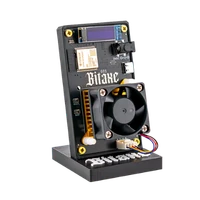
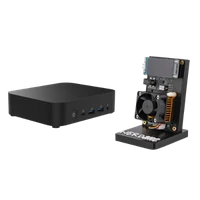
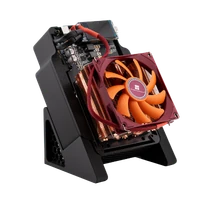
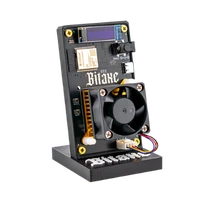
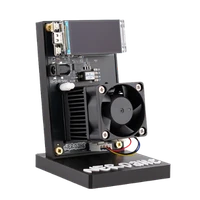

NerdQaxe++ Hydro | 6 TH/s
6 TH/s from a water loop – more hash rate and less noise in living spaces
Item no.: 49420 · Manufacturer: Bitaxe.de · Series: NerdQAxe
- 4× BM1370 ASIC, around 6 TH/s
- 1.2 TH/s more than the air-cooled NerdQaxe++
- 100 W power draw, water cooling
- For living rooms, offices and homelabs
- Hashrate
- ~6 TH/s
- Efficiency
- 16.7 J/TH
- Power draw
- 100W
plus shipping · −5% with Bitcoin: €379.05
In stock · ships within 24 h
Product information
NerdQaxe++ Hydro: 6 TH/s from a water loop
Home mining runs into two limits: heat and noise. The NerdQaxe++ Hydro tackles both the same way – with a closed water loop. The same four BM1370 ASICs as in the air-cooled model reach around 6 TH/s instead of 4.8, at a power draw of 100 W. That is also why the board carries no fan of its own: the heat leaves the miner through the loop.
It gets calmer not because there is less heat, but because the noise happens elsewhere – at the radiator instead of directly above the ASIC. The rest is fixed: 100 W of power draw, roughly 20 W more than the air-cooled NerdQaxe++, which in turn delivers 1.2 TH/s less. What that means at your tariff is shown by the mining calculator.
In solo mining every hash is a ticket in the same draw the large farms take part in – at 6 TH/s you draw a quarter more tickets than with the air-cooled model. If your Hydro finds a valid block, the full 3.125 BTC plus transaction fees go straight to your Bitcoin address, with no contract partner in between. In the meantime, your device helps secure the network. The process is explained in our solo mining guide.
What water cooling changes day to day
- More hash rate from the same chipset: around 6 TH/s instead of 4.8 TH/s. Water moves heat away faster, so the four ASICs may clock higher without thermal throttling.
- The noise moves to the radiator: no fan works against a small heatsink right above the ASIC. That is why many buyers put the Hydro where they actually spend time.
- Efficiency stays, performance rises: 16.7 J/TH – practically the same value as the air-cooled model. You are buying hash rate and calm, not lower consumption.
- One more system in the house: a loop is additional hardware. If you would rather avoid that, stay with the air-cooled standard model.
Hydro, standard or copper: what separates the three
All three build on four BM1370 ASICs and NerdOS. Cooling, hash rate, power draw and price differ. How the classes sort out overall is shown in the overview buy a Bitcoin miner.
- Hydro, 100 W, around 6 TH/s: water cooling. The only variant in the range above 4.8 TH/s – and the one most likely to be bearable in a lived-in room.
- NerdQaxe++, 80 W, 4.8 TH/s: air cooling with a 92 mm fan, and the cheaper option. Right when the miner lives in a basement, utility room or workshop.
- NerdQaxe Copper Pro, 80 W, 4.8 TH/s: solid copper and two PWM fans, roughly 17 J/TH. For tinkerers who overclock themselves – it does not make the device quiet.
Up and running in minutes
The Hydro arrives complete with a 12V/10A power supply, stand and quick start guide. Nothing to fill or assemble before starting – you need a socket, 2.4 GHz Wi-Fi and a browser. The steps in detail are in the NerdQaxe setup guide.
- 1
Position it and switch on
Find the miner a firm spot where the heat can escape and connect the power supply. On first boot the device opens its own setup Wi-Fi.
- 2
Connect Wi-Fi
Join the setup network, select your 2.4 GHz home network and enter the password. NerdOS is then reachable in the browser at the miner’s IP address.
- 3
Enter pool, worker and address
Store the pool details and your own Bitcoin address, save and restart. Plan for some fine-tuning afterwards: several buyers report spending a few hours balancing performance and cooling.
Who the NerdQaxe++ Hydro is for
For everyone who wants to mine in the lived-in part of the home: next to the desk, in the office, on the living room shelf. For homelab operators who care about the noise floor. And for anyone simply after the fastest variant of this range – 6 TH/s is only available here.
It is less suitable if the miner ends up in the basement anyway: there the price per TH/s counts, and the air-cooled NerdQaxe++ wins that comparison. As a first mining device it is also a size too big – buyers describe it as more demanding than a single-chip miner.
What you need to run it
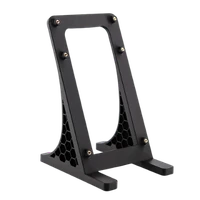
Included are the NerdQaxe++ Rev6.1 Hydro miner, the 12V/10A power supply (120 W), a 3D-printed stand and a quick start guide. From you come a socket, 2.4 GHz Wi-Fi, pool details and your Bitcoin address.
The location rules differ from an air-cooled miner: what matters is a stable, level spot for the loop. A closed cabinet is still off limits – 100 W have to be able to leave the room.
Accessories and sensible upgrades
The Hydro needs nothing else to run. The interesting part is the setup around it.
- Mining accessories for power supplies, spare parts and everything that keeps a permanent build tidy.
- Bitcoin nodes if you want your hash rate pointed at your own node and your own pool instead of someone else’s.
Ready for your NerdQaxe Hydro setup?
The Hydro is for everyone who wants both: the highest hash rate in this range and a miner that is allowed to stand where you live. Around 6 TH/s, open firmware, your own Bitcoin address.
NerdQaxe++ Hydro compared to similar miners
| Model | Hashrate | Power | Efficiency | Price |
|---|---|---|---|---|
| Nexus S1-01 | ~5 TH/s | ~80 W | ~16 J/TH | €399.00 |
| NerdQaxe++ Hydro (this page) | ~6 TH/s | 100W | 16,7 J/TH | €399.00 |
| NerdQX | ~8 TH/s | ~140 W | ~17 J/TH | €469.00 |
All values are guide figures. Compare all miners, calculate power cost.
Frequently asked questions about the NerdQaxe++ Hydro
How much hash rate does the NerdQaxe++ Hydro have?
How loud is the NerdQaxe++ Hydro?
How much electricity does the NerdQaxe++ Hydro use?
Does water cooling add hash rate?
What is the difference between the NerdQaxe++ Hydro and the NerdQaxe++?
Hydro or Copper Pro – which fits better?
Do I have to fill or assemble anything before starting?
Is the Hydro suitable for beginners?
Can I solo mine with the Hydro?
Where should the miner stand?
Does the Hydro work on 5 GHz Wi-Fi?
What is in the box?
Why buy from Bitaxe.de?
Free shipping from 200 €
Free shipping to almost every EU country from 200 €, shipping to the EU and Switzerland with UPS and a tracking link. Items in stock leave within 24 hours, with no customs surprises inside the EU.
Truly open source
Bitaxe, Nerdaxe, NerdQaxe & co. are open hardware running open firmware (AxeOS or NerdOS): you set pool, clock and voltage yourself. No cloud account, no vendor lock-in, no black box.
CE, warranty & returns
Every product carries the CE marking. Plus statutory warranty and a 14-day right of withdrawal for a safe order. If something is not right, we find a solution with you, person to person.
Direct support
Questions about setup, pool, firmware or your order? By email or Telegram you get help from someone who runs these devices themselves, in English or German, beginners welcome.
Customer reviews
4.9 / 5 · 23 reviews from customers who bought this product from us.
Nachbestellt, gewartet, Radiator schon dran, leiser als der Luftbruder.
Abgelöst hat er bei mir einen luftgekühlten NerdQaxe++, und vom Lüfterrauschen ist am Schreibtisch tatsächlich kaum etwas übrig. Mit angepasstem Takt liegt die Hashrate stabil um 6 TH/s, der Kreislauf hält die Chips dabei angenehm kühl, ohne dass ich mich darum kümmern musste. Was bleibt, ist die Pumpe. Sie summt gleichmäßig und leicht metallisch, und abends, wenn sonst alles aus ist, hört man das eben doch. Tagsüber am Arbeitsplatz stört mich das nicht, in einem ruhigen Lesezimmer würde ich ihn so nicht aufstellen.
Knapp drei Wochen von Bestellung bis Paket, länger als gedacht und bei dem Preis ärgerlich. Dafür bleiben die Chips laut Display unter 50 Grad, ablesbar sogar vom Sofa aus.
Ein Monat am Stück gelaufen, Kreislauf unauffällig, deutlich weniger Lüftergeräusch als beim Luftmodell. Einarbeiten muss man sich trotzdem, Wasser im Miner ist eben ein Thema mehr als bei einem Lüfter.
Depuis le canapé je l'entends a peine, et les puces restent au frais malgré les 100 W. Radiateur et pompe étaient déjà raccordés, j'ai juste branché et configuré le wifi !
Fertig verschlaucht, 100 Watt, einstecken, los!
Mich interessiert bei jedem Miner zuerst, was er aus der Steckdose zieht, also hing der Hydro die ersten Tage an meinem Zwischenstecker-Messgerät. Im Auslieferungszustand standen da knapp 80 W, mit meinem jetzigen Profil um 745 MHz pendelt die Anzeige zwischen 98 und 103 W, und das bei rund 6 TH/s. Auf der Leistungsseite im Display stehen ein paar Watt weniger, logisch, die Verluste im Netzteil sieht der Miner ja nicht. Das 12-V-Netzteil mit seinen 10 A hat damit noch Reserve und wird nur handwarm, so mag ich das! Rechnerisch sind das gut 72 kWh im Monat. Bei meinem Tarif ist das ein Betrag, den ich für ein Hobby gern zahle, zumal die Abwärme im Gästezimmer gerade richtig kommt, jetzt, wo die Abende kühler werden. Nach meinen Werten landet er knapp unter 17 J/TH, für vier Chips mit Wasserkühlung völlig in Ordnung. NerdOS habe ich auf 1.1.0 gebracht, das Update lief per Klick, und seitdem finde ich ihn im Netz auch über den Hostnamen statt über die IP. Macht richtig Spaß, dem Ding bei der Arbeit zuzusehen!
Beim Tunen ist das Dispaly mit Spannung, Strom und Chiptemperatur praktisch, so muss die Weboberfläche nicht ständig offen sein. Bei 750 MHz hängt er leicht über 6 TH/s.
Sonntags leuchte ich einmal mit der Taschenlampe die Schlauchanschlüsse ab, obwohl Pumpe und Radiator fertig montiert ankamen, bisher alles trocken. Hashrate und Temperatur lese ich direkt am Display ab, ganz ohne Browser.
Im Arbeitszimmer direkt neben dem Monitor, und ich vergesse ständig, dass er läuft! Genau deshalb die Wasserversion, bei den Videos von den Lüfter-Modellen war ich schon beim Zuschauen genervt. Der Kreislauf war beim Auspacken komplett fertig, man sieht die Schläuche und den Radiator, muss aber nichts anfassen. Einrichten über das eigene WLAN vom Miner, Adresse eintragen, das hab ich in einer halben Stunde hinbekommen. Nach einem Monat bin ich vor allem stolz, dass ich mir das als absoluter Neuling zugetraut habe.
Zum Wasserkreislauf gibt's keine zwei Sätze Anleitung, aber leiser als der Lüfter-Miner vom Kumpel ist er, die 100 Watt merkt man eher am Zähler als an den Ohren.
5,98 TH/s zeigt das Display gerade an, bei etwas über 100 W an der Steckdose. Dafür musste ich allerdings selbst ran, ab Werk kam er mit 600 MHz und rund 4,9 TH/s, die 6 holt man sich über die Frequenz. Mein Luft-NerdQaxe steht daneben und macht bei 80 W seine 4,8, der Unterschied ist also genau das, was versprochen wird. Und der Hydro ist dabei auch noch der leisere von beiden! Jetzt überlege ich schon, ob der Luftgekühlte in den Keller zieht.
Sechs Wochen Sideboard-Betrieb, und das Display ist inzwischen das, worauf Besuch als Erstes zeigt. Hashrate, beste Difficulty, Chiptemperatur, Stromaufnahme, mit den Knöpfen blättert man durch die Seiten, und die Schrift ist auch aus zwei Metern lesbar. Meine Frau fand den Miner vorher eher so mittel, seit sie sieht, dass der Kasten leise vor sich hin summt und was anzeigt, ist er geduldet. Läuft bei mir auf 700 MHz, pendelt um 5,7 TH/s, Chips knapp über 40 Grad. Das Rauschen vom Radiator geht im Wohnzimmer unter, die Pumpe hört man nur, wenn man das Ohr dranhält. Einziger Punkt: Ersatzschläuche oder Kleinteile für den Kreislauf gibt es nicht dazu, das muss man sich separat besorgen, falls man mal was umbauen will. Sonst läuft er einfach, und das ist beim Wohnzimmer-Miner ja das Wichtigste.
Schickes Display, Hashrate und Temp imer im Blick!
Beipackzettel: zum Kühlkreis kein Wort, weder zu Wartung noch zu den Schläuchen, hab ich mir im Netz zusammengesucht. Display zeigt alles Wichtige im Vorbeigehen, Hashrate, Chiptemp, Spannung, per Taste weiter.
Wasser im Wohnzimmer, bisher nur im Kreislauf.
Stand im Shop auf Nachbestellung, als ich zugeschlagen hab, also erst mal zehn Tage Däumchen drehen. Dafür kam dann alles komplett: Miner mit Kreislauf schon dran, Netzteil, Ständer, Zettel mit den ersten Schritten. Jetzt hängt er seit zwei Wochen neben dem Router, Werkseinstellung, knapp unter 5 TH/s, mehr hab ich noch nicht probiert. Der Radiator ist abends beim Fernsehen nicht rauszuhören. Die Kinder nennen ihn inzwischen das Aquarium.
Hatte vorher Angst das so ein Miner im Wohnzimmer nervt, aber das Ding ist leiser als mein alter Laptop. Nach zwei Wochen will ich ihn nicht mehr ausschalten!
Auf Nachbestellung bestellt, mit Bitcoin bezahlt wegen der fünf Prozent, und innerlich auf vier Wochen eingestellt. Nach gut zwei Wochen kam die Versandmail, einen Tag später das Paket. Drin: der Miner mit fertigem Kreislauf, das 12V/10A-Netzteil, der gedruckte Ständer. Auspacken, hinstellen, Netzteil dran, das war's an Aufbau. Die erste Nacht lief er auf Werkseinstellung, dann bin ich in Schritten auf 735 MHz bei 1,2 V hoch, jetzt zeigt er zwischen 5,9 und 6,1 TH/s und zieht etwa 100 W. Die Chiptemperatur bleibt dabei um die 45 Grad, das kriegt man mit Luft schlicht nicht hin. Als zweiten Pool hab ich meinen eigenen Node eingetragen, falls der öffentliche mal hängt. Radiatorlüfter läuft über PID auf Zieltemperatur und ist leiser als der Rechner daneben. Wer die 6 TH/s will, muss sie sich schon selbst holen, aber das ist ja der Spaß daran.
Deutlich leiser als die Lüfter-Variante die vorher hier stand und der Kreislauf läuft seit einem Monat ohne Zicken. Nur zum Kühlkreis selbst steht in der Anleitung so gut wie nichts.
Backordered this one in mid May and had it on the desk ten days later, quicker than the estimate at checkout. The loop comes pre-built, radiator and pump already hooked up, so it was literally power on, join the setup WiFi, enter the pool. Sitting at stock 600 MHz for now and the chips barely get warm, which is a strange feeling after a year of air-cooled miners. Loudest thing in the room is now the fridge!
Ich wollte bewusst keinen normalen kleinen Miner mehr, sondern etwas mit mehr Leistung und besserer Kühlung. Der NerdQaxe Hydro macht genau das.
Hatte vorbestellt. Schnell geliefert. Habe den NerdQaxe Hydro jetzt einige Tage laufen. Einrichtung war etwas technischer als bei einem kleinen Bitaxe, aber wenn man weiß, was man macht, läuft das Teil richtig sauber. Kühlung ist natürlich der große Punkt hier. Für Einsteiger vielleicht etwas viel, aber für Leute, die mehr aus ihrem Setup holen wollen, sehr stark.
Related guides
Setup, pool, cooling, power supply and sensible upgrades for your setup.
You might also like

NerdQaxe++ Rev7 | 4.8 TH/s

NerdQaxe Copper Pro | Overclocking ready

NerdOctaxe Hydro | 14 TH/s
