

NerdQaxe Copper Pro | Overclocking ready
Solid copper cooling and three fans on the NerdQaxe++ Rev7 board – 4.8 TH/s built to run around the clock
Item no.: 19026 · Manufacturer: Bitaxe.de · Series: NerdQAxe
- 4× BM1370 ASIC, around 4.8 TH/s
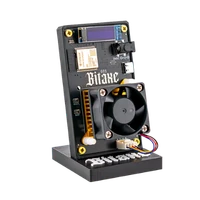
- Solid copper cooling, 60 and 92 mm PWM fans, 80 mm fan at the back (Rev7 board)
- Roughly 80 W, about 15 J/TH
- For continuous operation and controlled overclocking
- Hashrate
- ~4.8 TH/s
- Efficiency
- ~15 J/TH
- Power draw
- ~80W
plus shipping · −5% with Bitcoin: €569.05
In stock · ships within 24 h
Product information
NerdQaxe Copper Pro: 4.8 TH/s with copper instead of compromise
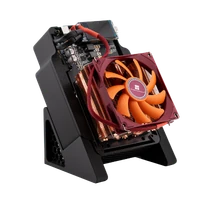
The NerdQaxe Copper Pro carries the same four BM1370 ASICs with around 4.8 TH/s as its sister models – the difference is everything built around them. The ASICs sit on solid copper cooling, served by two PWM fans of 60 mm and 92 mm; the board is the NerdQaxe++ in revision 7 and brings a third fan of 80 mm on the back. Copper conducts heat away faster than aluminium and spreads it across the whole block. Buyers describe exactly that: visibly better heat distribution and steady figures over long run times.
At roughly 80 W the power draw matches the air-cooled standard model. At around 4.8 TH/s that is roughly 17 J/TH, the same efficiency as the standard model. The copper cooler adds headroom for a higher clock, not less power per terahash. Copper does not make a device quiet, though: under full load the Copper Pro is audible, and you control the fan speed through the curve in NerdOS.
In solo mining every hash is a ticket in the draw for the next block. If your Copper Pro hits, 3.125 BTC of block reward plus transaction fees go to your own Bitcoin address. And because the device is built for continuous operation, your tickets are in the pot around the clock. How that works at home is covered in our solo mining guide.
Why copper makes the difference in continuous operation
- Thermal headroom: the copper mass absorbs load peaks before the temperature at the ASIC rises. The chip works in a narrower temperature window – so the hash rate stays the same over weeks.
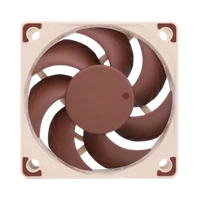
- Three fans instead of one: 60 mm and 92 mm on the copper cooler, both PWM controlled, plus the 80 mm fan on the back of the Rev7 board. You tune the curve for quiet or for cool instead of having to choose once.
- Overclocking as a design goal: you raise frequency and voltage in NerdOS, and the cooling is built for that case.
- Build quality you can feel: a cleanly seated cooling block and proper fasteners – the point buyers mention most often.
Copper Pro versus NerdQaxe++ and Hydro
Copper Pro and NerdQaxe++ deliver around 4.8 TH/s from four BM1370 ASICs, while the water-cooled Hydro reaches around 6 TH/s. What you pay extra for here is not hash rate but cooling surface, build quality and room to push. Where the range sits in the market is shown in the overview buy a Bitcoin miner.
- Copper Pro, roughly 80 W: solid copper, three fans, around 15 J/TH. For 24/7 operation and for everyone who adjusts frequency and voltage.
- NerdQaxe++ Rev7, roughly 80 W: a 92 mm fan in front and an 80 mm fan at the back, around 16 J/TH, and clearly cheaper. Right if you run the device at factory settings.
- NerdQaxe++ Hydro, 100 W, around 6 TH/s: a water loop instead of air cooling – more hash rate, less noise, a good €4 more electricity a month. The choice when noise is your main problem.
In short: the Copper Pro is the device for operators, the Hydro for residents, the NerdQaxe++ for everyone who wants 4.8 TH/s at the lowest price.
Up and running in minutes
The Copper Pro arrives ready to run with a 12V/10A power supply, stand and quick start guide. Setup needs only a socket, 2.4 GHz Wi-Fi and a browser; the NerdQaxe setup guide walks you through the first configuration.
- 1
Choose a spot and switch on
The copper build is heavier than a standard heatsink, so find the device a firm place. Connect the power supply and switch it on – on first boot the miner opens its own setup Wi-Fi.
- 2
Bring it onto your network
Connect to the setup Wi-Fi, choose your 2.4 GHz network and set the password. NerdOS is then reachable in the browser at the miner’s IP address.
- 3
Enter the pool, then set the fan curve
Store pool, worker and your Bitcoin address and save. Then comes the step experienced users recommend: test the fan curve until temperature and noise suit your room. Only after that go for frequency and voltage, in small steps.
Who the NerdQaxe Copper Pro is for
For tinkerers who tune frequency, voltage and fan curve themselves. For home miners who run 24 hours a day and would rather not think about temperatures. And for everyone who cares about build quality.
It is less suitable if you run at stock settings: then the premium over the NerdQaxe++ buys nothing that shows up on the dashboard. And copper does not make it quiet – the Hydro is built for that.
What you need to run it
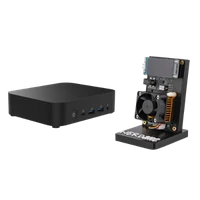
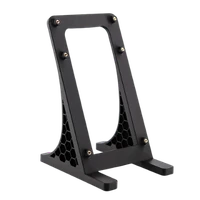
Included are the Copper Pro, a 12V/10A power supply (120 W), a 3D-printed stand and a quick start guide. Beyond that you need a socket, 2.4 GHz Wi-Fi, pool details and your Bitcoin address.
Two things are not in the box: a location with a free air path to all three fans, and stable power. If you overclock, check temperature and hash rate regularly during the first few days.
Accessories and sensible upgrades
You do not need to retrofit cooling. What makes sense is whatever keeps continuous operation tidy.
- NerdQaxe mount for a stable stand for the heavier copper build, with a free air path under the board.
- Mining accessories for power supplies, replacement fans and everything that eventually comes up in 24/7 operation.
Ready for your Copper Pro setup?
The Copper Pro is the right choice when your miner should not just run but keep running – and when you decide yourself how far to push it: four ASICs on solid copper, three fans on the Rev7 board.
NerdQaxe Copper Pro compared to similar miners
| Model | Hashrate | Power | Efficiency | Price |
|---|---|---|---|---|
| Bitaxe 702 | ~4.2 TH/s | ~100 W | ~24 J/TH | €249.00 |
| NerdQaxe Copper Pro (this page) | ~4,8 TH/s | ~80W | ~15 J/TH | €599.00 |
| Nexus S1-01 | ~5 TH/s | ~80 W | ~16 J/TH | €399.00 |
All values are guide figures. Compare all miners, calculate power cost.
Frequently asked questions about the NerdQaxe Copper Pro
What is the difference between the NerdQaxe Copper Pro and the NerdQaxe++?
Copper Pro or Hydro – which one suits me?
How much electricity does the Copper Pro use?
Is the Copper Pro a cooling upgrade for my Bitaxe?
How far can I overclock the Copper Pro?
How loud is the NerdQaxe Copper Pro?
Is the Copper Pro heavier than a normal NerdQaxe?
Is the Copper Pro suitable for 24/7 operation?
Can I solo mine with the Copper Pro?
Do I have to renew thermal paste or assemble anything?
Does the Copper Pro work on 5 GHz Wi-Fi?
Can I read the figures without a browser?
Why buy from Bitaxe.de?
Free shipping from 200 €
Free shipping to almost every EU country from 200 €, shipping to the EU and Switzerland with UPS and a tracking link. Items in stock leave within 24 hours, with no customs surprises inside the EU.
Truly open source
Bitaxe, Nerdaxe, NerdQaxe & co. are open hardware running open firmware (AxeOS or NerdOS): you set pool, clock and voltage yourself. No cloud account, no vendor lock-in, no black box.
CE, warranty & returns
Every product carries the CE marking. Plus statutory warranty and a 14-day right of withdrawal for a safe order. If something is not right, we find a solution with you, person to person.
Direct support
Questions about setup, pool, firmware or your order? By email or Telegram you get help from someone who runs these devices themselves, in English or German, beginners welcome.
Customer reviews
4.9 / 5 · 26 reviews from customers who bought this product from us.
Spent weeks circling the order button because of the price. The page had been open in a tab since spring and I kept telling myself a cheaper miner would do the same, which is probably true. Eventually I gave in, and four months later I am slightly annoyed to admit it was worth it. Setting it up as a total beginner took one evening, and since then it hums away in the spare room without needing me at all. Still not a cheap toy.
The temprature graph here is the flattest I have seen on any home miner. With PID at 60 the 92 mm fan hardly works at stock, so I tried 700 MHz with a bit more voltage: 5.7 TH/s but 94 W, too close to the brick's limit for my taste, and I settled at 650 for a steady 5.1. Chips stay well under 65 even on warm evenings. Since the last update its even reachable as nerdqaxe.local, no more hunting for the IP. Brilliant.
Schwerer als gedacht, dafür angenehm kühl.
Cooler is the same Thermalright AXP90-X47 you see in small PCs, only in full copper version with four heatpipes. Machining on the block is very clean and nothing was loose after the shipping. I run PID with 60 degree target and the 92 mm fan stays slow for that, chips are far from the 70 where firmware shuts down. For me this was point of buying it: same hashrate as the normal ++, but much more room when I play with frequency. Nice piece of metal.
Als der Paketbote den Karton abgestellt hat, dachte ich erst, da wäre noch etwas anderes mitbestellt worden, so schwer war er. Drin war aber nur der Miner samt Netzteil, Ständer und Kurzanleitung – das Gewicht kommt komplett vom Kupferblock, auf dem die Chips sitzen. Ich hatte vorher noch nie einen Miner in der Hand und war ziemlich beeindruckt, wie massiv und sauber das alles gebaut ist. Die Einrichtung hat trotzdem keine halbe Stunde gedauert: einschalten, mit dem WLAN verbinden, das der Miner selbst aufmacht, mein 2,4-GHz-Netz auswählen, Pool und Bitcoin-Adresse eintragen, fertig. Die Oberfläche lässt sich sogar auf Deutsch stellen, das hat mir als Anfängerin sehr geholfen. Am ersten Abend waren beide Lüfter ganz schön laut, bis ich die automatische Regelung mit Zieltemperatur gefunden hatte – seitdem ist es im Flur ein gleichmäßiges Rauschen, mit dem ich gut leben kann. Mein Mann fand das Ganze anfangs albern und schaut jetzt morgens als Erster auf das kleine Display, ob die Hashrate noch stimmt. Der Miner steht inzwischen auf einem stabilen Regalbrett, der Beistelltisch kam mir bei dem Gewicht zu wacklig vor. Und ja, ich bin begeistert von dem schweren Brocken!
Sieht edel aus und macht seine 4,8 TH/s.
Related guides
Setup, pool, cooling, power supply and sensible upgrades for your setup.


