
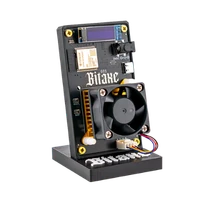
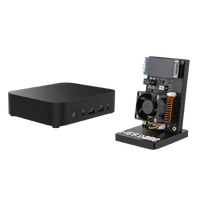

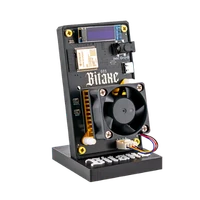


NerdQaxe Copper Pro | Overclocking ready
Solid copper cooling and two PWM fans – 4.8 TH/s built to run around the clock
Item no.: 19026 · Brand: NerdQAxe
- 4× BM1370 ASIC, around 4.8 TH/s
- Solid copper cooling, 60 and 92 mm PWM fans
- Roughly 80 W, about 15 J/TH
- For continuous operation and controlled overclocking
- Hashrate
- ~4.8 TH/s
- Efficiency
- ~15 J/TH
- Power draw
- ~80W
plus shipping
Sold out
Notify me when it is back
One email as soon as this miner is in stock again. No newsletter.
Product information
NerdQaxe Copper Pro: 4.8 TH/s with copper instead of compromise
The NerdQaxe Copper Pro carries the same four BM1370 ASICs with around 4.8 TH/s as its sister models – the difference is everything built around them. The ASICs sit on solid copper cooling, served by two PWM fans of 60 mm and 92 mm. Copper conducts heat away faster than aluminium and spreads it across the whole block. Buyers describe exactly that: visibly better heat distribution and steady figures over long run times.
At roughly 80 W the power draw matches the air-cooled standard model. Around 15 J/TH – the best efficiency figure in the range. Copper does not make a device quiet, though: under full load the Copper Pro is audible, and you control the fan speed through the curve in AxeOS.
In solo mining every hash is a ticket in the draw for the next block. If your Copper Pro hits, 3.125 BTC of block reward plus transaction fees go to your own Bitcoin address. And because the device is built for continuous operation, your tickets are in the pot around the clock. How that works at home is covered in our solo mining guide.
Why copper makes the difference in continuous operation
- Thermal headroom: the copper mass absorbs load peaks before the temperature at the ASIC rises. The chip works in a narrower temperature window – so the hash rate stays the same over weeks.
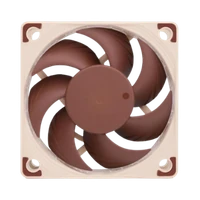
- Two fans instead of one: 60 mm and 92 mm, both PWM controlled. You tune the curve for quiet or for cool instead of having to choose once.
- Overclocking as a design goal: you raise frequency and voltage in AxeOS, and the cooling is built for that case.
- Build quality you can feel: a cleanly seated cooling block and proper fasteners – the point buyers mention most often.
Copper Pro versus NerdQaxe++ and Hydro
Copper Pro and NerdQaxe++ deliver around 4.8 TH/s from four BM1370 ASICs, while the water-cooled Hydro reaches around 6 TH/s. What you pay extra for here is not hash rate but cooling surface, build quality and room to push. Where the range sits in the market is shown in the overview buy a Bitcoin miner.
- Copper Pro, roughly 80 W: solid copper, two PWM fans, around 15 J/TH. For 24/7 operation and for everyone who adjusts frequency and voltage.
- NerdQaxe++, roughly 80 W: one 92 mm fan, around 16 J/TH, and clearly cheaper. Right if you run the device at factory settings.
- NerdQaxe++ Hydro, 100 W, around 6 TH/s: a water loop instead of air cooling – more hash rate, less noise, a good €4 more electricity a month. The choice when noise is your main problem.
In short: the Copper Pro is the device for operators, the Hydro for residents, the NerdQaxe++ for everyone who wants 4.8 TH/s at the lowest price.
Up and running in minutes
The Copper Pro arrives ready to run with a 12V/10A power supply, stand and quick start guide. Setup needs only a socket, 2.4 GHz Wi-Fi and a browser; the NerdQaxe setup guide walks you through the first configuration.
- 1
Choose a spot and switch on
The copper build is heavier than a standard heatsink, so find the device a firm place. Connect the power supply and switch it on – on first boot the miner opens its own setup Wi-Fi.
- 2
Bring it onto your network
Connect to the setup Wi-Fi, choose your 2.4 GHz network and set the password. AxeOS is then reachable in the browser at the miner’s IP address.
- 3
Enter the pool, then set the fan curve
Store pool, worker and your Bitcoin address and save. Then comes the step experienced users recommend: test the fan curve until temperature and noise suit your room. Only after that go for frequency and voltage, in small steps.
Who the NerdQaxe Copper Pro is for
For tinkerers who tune frequency, voltage and fan curve themselves. For home miners who run 24 hours a day and would rather not think about temperatures. And for everyone who cares about build quality.
It is less suitable if you run at stock settings: then the premium over the NerdQaxe++ buys nothing that shows up on the dashboard. And copper does not make it quiet – the Hydro is built for that.
What you need to run it
Included are the Copper Pro, a 12V/10A power supply (120 W), a 3D-printed stand and a quick start guide. Beyond that you need a socket, 2.4 GHz Wi-Fi, pool details and your Bitcoin address.
Two things are not in the box: a location with a free air path to both fans, and stable power. If you overclock, check temperature and hash rate regularly during the first few days.
Accessories and sensible upgrades
You do not need to retrofit cooling. What makes sense is whatever keeps continuous operation tidy.
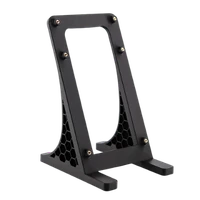
- NerdQaxe mount for a stable stand for the heavier copper build, with a free air path under the board.
- Mining accessories for power supplies, replacement fans and everything that eventually comes up in 24/7 operation.
Ready for your Copper Pro setup?
The Copper Pro is the right choice when your miner should not just run but keep running – and when you decide yourself how far to push it: four ASICs on solid copper, two adjustable fans.
NerdQaxe Copper Pro compared to similar miners
| Model | Hashrate | Power | Efficiency | Price |
|---|---|---|---|---|
| Bitaxe 702 | ~4,2 TH/s | ~90 W | ~21,43 J/TH | €239.00 |
| NerdQaxe Copper Pro (this page) | ~4,8 TH/s | ~80W | ~15 J/TH | €599.00 |
| Avalon Nano 3s | 6 TH/s | 140 W | 23,3 J/TH | €299.00 |
All values are guide figures. Compare all miners, calculate power cost.
Frequently asked questions about the NerdQaxe Copper Pro
What is the difference between the NerdQaxe Copper Pro and the NerdQaxe++?
Copper Pro or Hydro – which one suits me?
How much electricity does the Copper Pro use?
Is the Copper Pro a cooling upgrade for my Bitaxe?
How far can I overclock the Copper Pro?
How loud is the NerdQaxe Copper Pro?
Is the Copper Pro heavier than a normal NerdQaxe?
Is the Copper Pro suitable for 24/7 operation?
Can I solo mine with the Copper Pro?
Do I have to renew thermal paste or assemble anything?
Does the Copper Pro work on 5 GHz Wi-Fi?
Can I read the figures without a browser?
Why buy from Bitaxe.de?
Kostenloser Versand ab 300 €
Versand europaweit mit DHL und UPS aus unserem EU-Fulfillment – mit Tracking-Link. Lagerware geht innerhalb von 24 Stunden raus, ohne Zoll-Überraschung innerhalb der EU.
Echtes Open Source
Bitaxe, Nerdaxe, NerdQaxe & Co. sind offene Hardware mit offener AxeOS-Firmware: Pool, Takt und Spannung stellst du selbst ein – kein Cloud-Konto, kein Vendor-Lock, keine Blackbox.
Garantie & Rückgabe
Gesetzliche Gewährleistung und 14 Tage Widerrufsrecht für deine sichere Bestellung. Wenn etwas nicht passt, findest du hier eine Lösung – von Mensch zu Mensch.
Direkter Support
Fragen zu Einrichtung, Pool, Firmware oder Bestellung? Per E-Mail oder Telegram hilft dir jemand, der die Geräte selbst betreibt – auf Deutsch, auch für Einsteiger.
Customer reviews
4,8 / 5 · 40 Bewertungen von Kunden, die dieses Produkt bei uns gekauft haben.
Sehr gut mit kleinem Abzug
Bei mir läuft das Produkt täglich und bisher ohne Probleme. Auch bei längerer Laufzeit bleiben die Werte bei mir stabil. Für die optimale Lüfterkurve musste ich etwas testen. Für mich weiterhin eine klare Empfehlung.
Läuft zuverlässig
Ich habe lange verglichen und mich am Ende hierfür entschieden. Für Nutzer, die gern fein abstimmen, bietet das Setup viele Möglichkeiten. Ich nutze das Gerät rund um die Uhr. Macht im täglichen Betrieb einfach Freude.
Genau wie erwartet
Bestellung und Inbetriebnahme haben problemlos funktioniert. Für Nutzer, die gern fein abstimmen, bietet das Setup viele Möglichkeiten. Auch die Verarbeitung macht einen sauberen Eindruck. Würde ich jederzeit wieder bestellen.
Sauber verarbeitet
Auch bei längerer Laufzeit bleiben die Werte bei mir stabil. Die Wärme wird sichtbar besser verteilt. Für mein Setup genau richtig.
Schnell eingerichtet
Bei mir läuft das Produkt täglich und bisher ohne Probleme. Auch bei längerer Laufzeit bleiben die Werte bei mir stabil. Besonders gefällt mir, dass alles nachvollziehbar bleibt. Ich nutze das Gerät rund um die Uhr. Würde ich jederzeit wieder bestellen.
Gute Qualität
Das Gerät macht mechanisch und thermisch einen sehr durchdachten Eindruck. Kann ich anderen Bitcoin-Bastlern empfehlen.
Related guides
Setup, pool, cooling, power supply and sensible upgrades for your setup.
You might also like
 −30%
−30% NerdQaxe++ | 4,8 TH/s
 Ausverkauft
 NerdQaxe++ Hydro | 6 TH/s

NerdQaxe Halterung
 −37%
−37%