



Paying with Bitcoin at Bitaxe.de: how to get 5% off
27 April 2026 · 5 min read · Updated on 22 August 2026

Want to order your Bitaxe and see the option to pay with Bitcoin at checkout? Perfect. That is exactly what we introduced the Bitcoin discount for.
At Bitaxe.de you get 5% off when you pay for your order with Bitcoin. If you already hold Bitcoin, you can start right away. If you do not, you can buy some today without much fuss and pay for your order with it.
The best part: you are not using Bitcoin in theory but in practice. You pay directly with Bitcoin, save on your purchase, and thanks to the discount you may even have a few sats left over that you can simply keep.
Why we reward Bitcoin payments with 5% off
Bitcoin suits Bitaxe like hardly any other payment method. People who buy a Bitaxe are usually interested in more than hardware: they are interested in Bitcoin itself – in decentralisation, in hash rate of their own and in real everyday use.
So we want to make paying with Bitcoin as easy as possible here. For us a Bitcoin payment is more direct, fairer and closer to what Bitaxe stands for. No unnecessary intermediaries, no complicated chargeback systems, no expensive payment providers in the background.
We pass that advantage on to you: pay with Bitcoin and get 5% off your order.
If you already hold Bitcoin, this is the easiest way to make your order cheaper. And if you do not hold any yet, now is a good moment to use Bitcoin practically for the first time: buy, pay, save – and perhaps keep a few sats.
Step 1: buy Bitcoin
If you already hold Bitcoin, you can skip this step and go straight to the payment.
If you do not hold any Bitcoin yet, the easiest way is Kraken: create an account, verify, buy the amount you want in BTC and withdraw to your own wallet – or send straight from Kraken to the invoice address.
What matters: you do not have to start in a complicated way or buy large amounts straight away. To pay at Bitaxe.de it is enough to buy the Bitcoin you need for your order. Plan a small buffer for the exchange’s withdrawal fee and the network fee – together usually under €1; via Lightning there is practically none.
Our tip:
Buy roughly the amount you need for your order plus a little reserve. Thanks to the 5% Bitcoin discount you may still have a small remainder in sats afterwards.
Please note: only buy as much Bitcoin as you really want to use for your order or for yourself. The Bitcoin price fluctuates and this article is not investment advice.
Step 2: place your order at Bitaxe.de
Once you have put your products in the cart, go to the checkout as usual. There you simply select Bitcoin among the payment methods.
The advantage is immediately clear: paying with Bitcoin gets you 5% off your order. That turns Bitcoin from an investment into a real means of payment you can use straight away.
After you submit your order, the Bitcoin invoice opens (BTCPay Server on our own node). There you see:
- the BTC amount at the frozen rate, including the 5 % discount
- two tabs: Bitcoin (on-chain address) and Lightning (invoice) – you pick whatever your wallet supports
- a QR code for both routes
- a timer: the invoice is valid for 30 minutes. If it expires, open a new one via the payment link in your order confirmation – the amount is then recalculated at the current rate
Step 3: send the Bitcoin payment
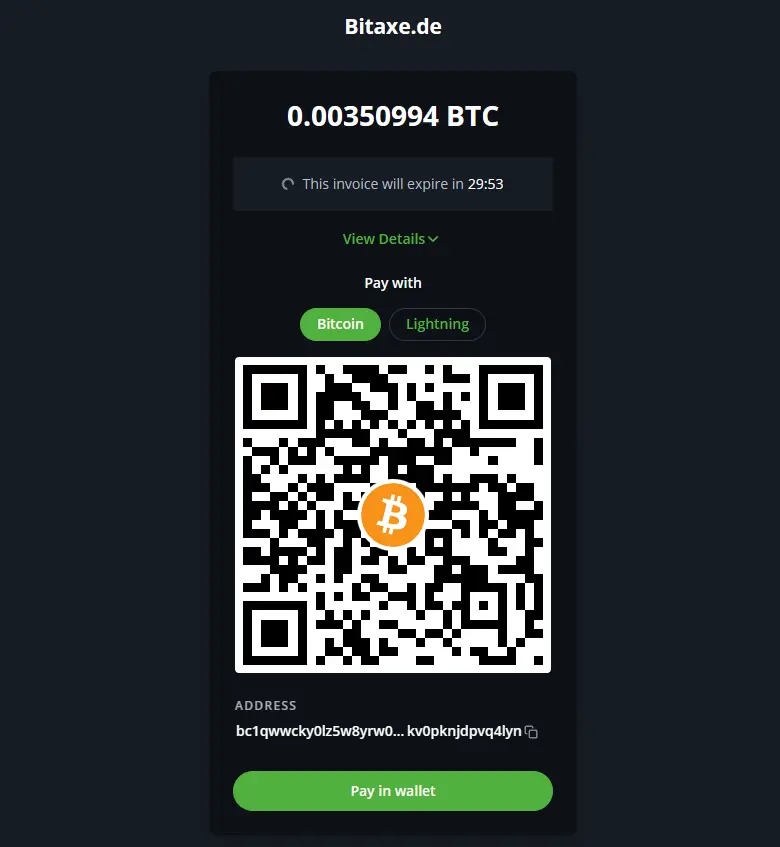
Now you send the BTC amount shown to the Bitcoin address displayed at checkout.
The easiest way is to scan the QR code with your wallet or exchange app. Alternatively you can copy the Bitcoin address and paste it manually.
Lightning is the fastest route: pick the “Lightning” tab, scan the invoice, confirm – the payment is done within seconds and the order is paid immediately.
Before sending, check once more:
- is the BTC amount correct?
- is the Bitcoin address or the Lightning invoice correct?
- is the network really Bitcoin / BTC, or Lightning if you chose Lightning?
- have possible network fees been taken into account?
If everything fits, confirm the payment in your wallet or app.
After that it is just a short wait. With Lightning the order is paid immediately. With an on-chain payment our node waits for the first confirmation on the network – around ten minutes on average, longer with a full mempool if your wallet chose too low a fee. As soon as the payment is confirmed you receive the invoice by email and we pack.
That is it: you have paid with Bitcoin, secured 5% off and used Bitcoin exactly as intended – directly, openly and without unnecessary intermediaries.
Frequently asked questions about paying with Bitcoin
Do I have to own Bitcoin already?
Do I really get 5% off?
What is Lightning?
Is the payment quick?
What happens if I send the wrong amount?
Can I pay straight from Kraken?
Read more
Setting up the Bitaxe Gamma 601: a step-by-step guide to the first start
Setting up the Bitaxe Gamma 601: a precise step-by-step guide to Wi-Fi, AxeOS, pool settings, your Bitcoin address, monitoring, common mistakes and sensible next steps.
Guides & knowledgeConnecting a Bitaxe to your own Bitcoin node: setting up Public Pool on Umbrel
Your own node, your own stratum server, a found block paid straight to your address: how to set up Public Pool on Umbrel and connect your Bitaxe – with all AxeOS values, storage and sync figures and the six mistakes we see most in support.
Guides & knowledgeWhich power supply for a Bitaxe? When the standard one is enough and when an upgrade pays off
Every miner from our shop ships with the matching power supply. Here are the values for every model, the connector, the one number in AxeOS that exposes a weak supply, and the maths for several miners on one unit.